
Your needs, this model
Does it fit your priorities?
Can one station handle duplex batches and also books or oversize sheets?
Yes. The built-in ADF is specified for 150 sheets at 80 g/m² and supports one-pass duplex; the 11-by-17-inch glass is the route for bound or irregular originals. The guide's add-pages workflow is sequential, not simultaneous capture.
Explore this need in the finder →What does the 150-sheet feeder figure mean in practice?
Epson's exact guide says 150 sheets at 80 g/m². That is a loading figure whose suitability depends on paper weight, size and condition; it is not a daily-workload rating.
Explore this need in the finder →Can people scan from a phone and send from the panel without a computer?
The exact model supports Smart Panel after network connection and ScanWay panel destinations. Treat mobile scanning and cloud sending as documented Wi-Fi/network routines, not as features carried by the USB computer plan.
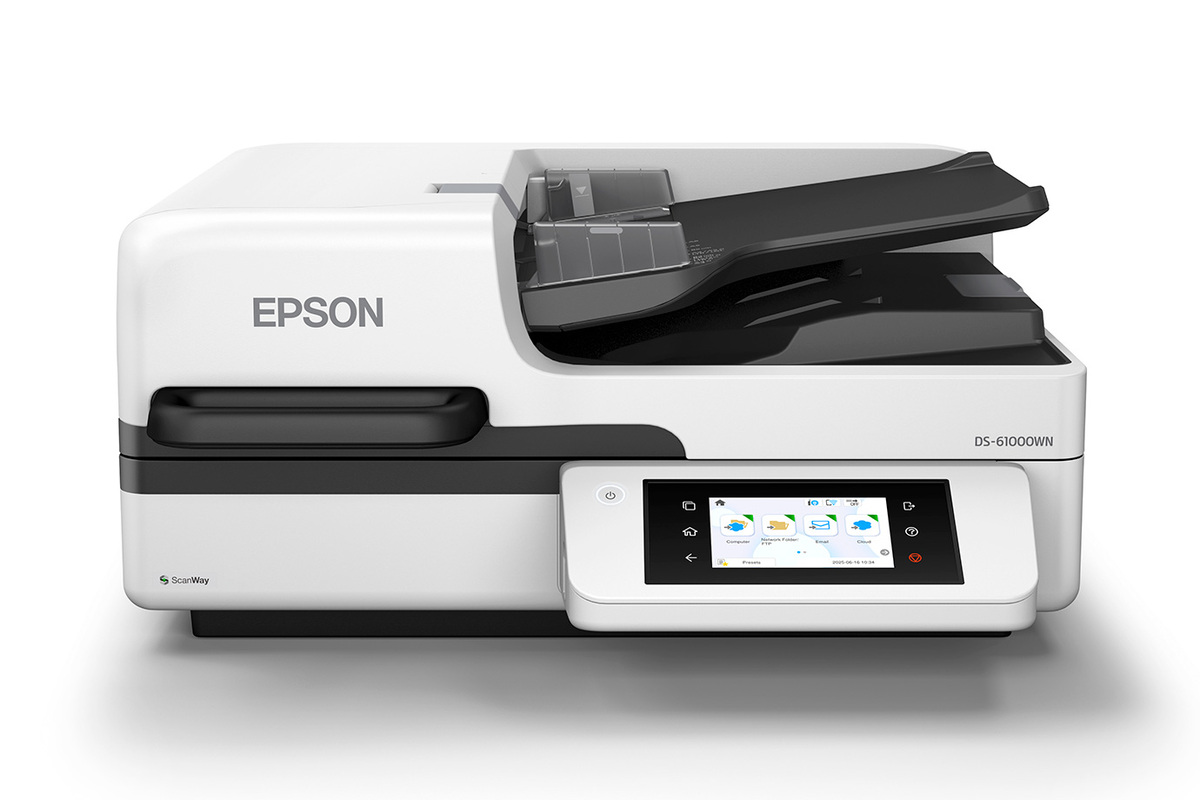
Explore this need in the finder →The DS-61000WN joins two useful capture surfaces in one workgroup unit: an 11-by-17-inch A3 flatbed for bound or irregular originals and a 150-sheet automatic document feeder for loose-paper batches. Epson's U.S. product page identifies base part B11B283201, lists USB, Wi-Fi and Ethernet, and describes one-pass duplex through the ADF. The exact guide rates that feeder at 150 sheets of 80 g/m² paper. This is a materially different machine from the DS-51000WN, whose product page says no ADF; it is not simply the same flatbed with a higher advertised speed.
A hybrid rather than a production-only feeder
For recurring mixed work, the practical advantage is that a staff member can use the feeder for ordinary multipage files and place a book, oversized sheet or delicate item on the glass. Epson describes using the ADF and glass together through a sequential add-pages workflow. The guide says the ADF takes priority when originals are left in both sources. That can keep a mixed job in one file, but it does not mean the two sources scan simultaneously or that every original belongs in the feeder. The ADF is specified for 150 sheets at 80 g/m². The stated number is a loading limit for the documented stock, not a daily volume and not a guarantee for heavy, curled, mixed or otherwise restricted originals. Check the manual's size and paper instructions against the actual batch. The feeder supports single-pass duplex according to Epson, with document-protection and ultrasonic double-feed detection listed on the U.S. page. ADF handling still needs operator review; the feature labels do not show that a fragile document is safe to feed.Read the speed claim with care
Epson describes up to 50 pages per minute, with a manufacturer condition of Letter-sized scanning at 300 dpi in black-and-white, grayscale or color using USB. It is a published specification, not an independently measured end-to-end workflow result, and OCR, file naming, network delivery and image review add steps outside a raw scanner rating. There is an unresolved conflict in Epson's own U.S. presentation of the DS-61000WN's image-per-minute figure: the short product highlight says 90 ipm, while its fuller description and the flatbed-category card say 100 ipm. I therefore use the stable 50-ppm wording and do not use either ipm number as a settled point of comparison. The discrepancy does not change the confirmed 150-sheet ADF or platen identity, but it is a reason to request the current exact-part specification if the ipm figure is procurement-critical.Network routes, panel jobs and host software
Epson lists USB, Wi-Fi and Ethernet alongside TWAIN and ISIS drivers. A USB-connected computer routine is distinct from ScanWay's panel destinations. With network and internet configuration, the touchscreen can send to listed destinations including a network folder, email and online storage without a computer at scan time. Epson also documents Smart Panel scanning for a connected iOS or Android device. Check current apps, operating-system versions, destination account setup and network policy; direct-cloud capability does not mean that a USB host connection itself sends to cloud storage. The 4.3-inch color touchscreen can present user-defined jobs, settings and maintenance. For a department using TWAIN, the driver listing is a starting point, not a universal compatibility certificate. Confirm the named application and current operating system with the IT owner. Epson's OCR and editable-document descriptions are software capabilities, not a recognition-accuracy test on your forms. If the team uses both panel destinations and a host capture queue, document which workflow owns each result and where staff check the saved file.Where it sits beside Epson's A3 choices
The DS-61000WN makes sense when the 150-sheet hybrid path and network/panel workflow matter more than a top-end feeder rate. The DS-51000WN is the glass-first option without an ADF; it cannot satisfy a feeder threshold. Epson specifies a higher 70-ppm/140-ipm rate and EdgeLink capability for the DS-71000WN, which may be a better fit when speed or a named enterprise integration is part of the project. Do not assume the DS-61000WN includes that capability merely because its model shares the network suffix. If EdgeLink is a requirement, confirm support with the workflow vendor and Epson for the exact configuration. Epson also gives the DS-61000WN an 8,000-sheet peak daily duty figure, calculated from maximum speed and assumed use time. Treat that as a manufacturer recommendation boundary, not a throughput guarantee or durability test. For a serious records rollout, test representative originals, OCR output, destinations and staffing assumptions during procurement rather than extrapolating a duty number into a promise.Buying checks
Match the exact U.S. base part B11B283201 and verify offer condition, return terms, included items and service separately. Confirm that 150 sheets at the intended stock weight is useful, that the platen covers the largest originals, that both Wi-Fi and Ethernet fit the network plan, and that cloud/account destinations are permitted. The assessment does not assume current stock, an included extended plan or software license, and it is not based on hands-on use. Epson's specifications are the source of the quoted features; no independent speed, feeding or OCR result is claimed.Key specifications
Key details at a glance
| Scanner class | Large format flatbed adf hybrid |
|---|---|
| Manufacturer-listed simplex rate | 50 ppm |
| Automatic document feeder capacity | 150 sheets |
| Connection options | USB / Wi-Fi / Ethernet |
| Automatic duplex capture | Yes |
| Separate manual-feed route | No |
| Touchscreen | Yes |
| TWAIN driver documented | Yes |
Use the exact model’s instructions for operating limits, supplied equipment and version differences.
Sources for this review
Sources for this assessment
Compare the workflow before you choose
Use the finder to test your connection, paper and software requirements against the documented scanner arrangements.