
Your needs, this model
Does it fit your priorities?
Can I use the ADF for a bound book or fragile original?
No. Epson separates its routes: the glass is the appropriate surface for bound or listed delicate/problem originals; the ADF is for loose stock within its size, weight and condition limits. The glass tops out at 8.5 × 11.7 inches, so measure the material before relying on it.
Explore this need in the finder →Does the base DS-6500 include Ethernet while keeping USB available?
No. Epson lists the Ethernet Network Scan Module B12B808411 as optional. The family manual says USB is disabled when that module is installed, so treat USB-computer and accessory-installed Ethernet as alternative operating plans, not a simultaneous connection promise.
Explore this need in the finder →Can it scan straight to cloud without a computer?
That route is not documented. Epson conditions Scan to Cloud on Document Capture Pro running on a connected Windows PC; an Ethernet module can send scans across a local network to a computer but does not turn the scanner into a computer-free cloud device.
Explore this need in the finder →What does “100-sheet ADF” mean here?
Epson specifies 100 sheets at 80 g/m², while the guide gives different paper-weight ranges for larger-than-A6 and A6-or-smaller originals and directs many unusual materials to the flatbed. It is a capacity per loading under specified conditions, not daily volume or proof that every paper stock will feed safely.
Explore this need in the finder →Does the glass provide a manual-feed slot for cards or envelopes?
No. The flatbed is a separate stationary scanning surface, not a card/envelope manual-feed inlet. Epson documents a normal ADF and the glass but no distinct manual-feed slot or mode for this model.
Explore this need in the finder →Earlier-model assessment · Epson U.S. part B11B205221
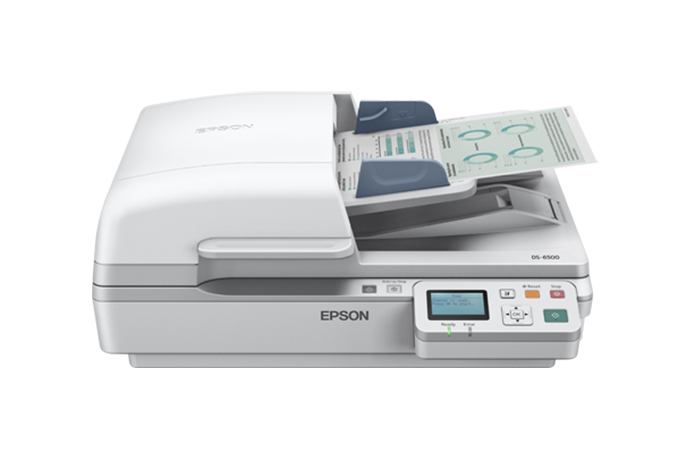
The WorkForce DS-6500 is a wide desktop hybrid: a conventional ADF for loose stacks sits above a flatbed for books and originals that should not travel through rollers. Its most relevant advantage is the combination, not a claim to be the fastest or newest scanner. Epson’s U.S. page still lists the exact B11B205221 configuration, but showed it out of stock when checked on October 31, 2026; the page did not explicitly call it discontinued. The specification sheet is dated 2012, so this assessment treats it as an earlier reference and makes no promise about seller supply or current driver support. This is a source-based review, not a hands-on test.
Two distinct paper routes
The ADF is rated for 100 sheets at 80 g/m², with one-pass duplex capture. Epson’s stated ceiling is up to 25 pages per minute and 50 images per minute for letter-size documents at 200 or 300 dpi; the sheet reports materially lower rates at 600 dpi—up to 6 ppm/12 ipm in black and white and 4 ppm/8 ipm in color. These are manufacturer specifications under stated conditions, not a prediction of the time to sort, load, inspect, name and file a real batch.
The second route is the glass, sized to 8.5 by 11.7 inches. That is useful for a bound book page or an original that should not enter a feeder, but it is not an oversized flatbed: measure the material, especially a thick book or a legal-length page, before assuming it fits. Epson lists book-spine correction software, but image processing cannot make the glass itself larger. The ADF reaches documents up to 8.5 by 40 inches; its guide separately limits paper weight and condition. Epson directs photos, booklets, glossy or non-paper material, staples, wet ink, sticky notes, loose labels, and ripped, curled, folded or wrinkled originals to the glass rather than through the ADF. The 100-sheet number therefore describes a loading capacity for specified stock, not every special original.
Connectivity depends on the configuration
The base part is USB-connected to a computer. Epson also lists the Network Scan Module, part B12B808411, as an optional accessory for wired Ethernet and network-to-computer scanning. Do not assume that module comes in a used listing or package: it is separate. More importantly, Epson’s family guide says the USB port is disabled while the network module is installed. Treat USB capture and module-installed Ethernet as alternative operating arrangements, not simultaneous ports on one setup.
The module does not add Wi-Fi or a phone/tablet scanning route in the reviewed documentation. The manufacturer’s cloud language has a further dependency: its exact product page and specification footnote tie scan-to-cloud to Document Capture Pro installed on a connected Windows PC. That is a computer-mediated job, not a scanner-to-cloud function that works without a computer. Buyers who need a wireless destination or panel-driven cloud workflow should compare a newer model with those capabilities explicitly documented.
Driver and control checks are part of the purchase
Epson advertises TWAIN and ISIS support, which may matter when a business application expects a standard scanner interface. The software and operating-system tables in the old specification/manual are not a current compatibility guarantee. Before choosing a used or old-stock unit, look up the exact B11B205221 download page for the target computer, then confirm the named TWAIN/ISIS application with its software owner. A scanner that can save a PDF is not automatically a drop-in device for every capture system.
The body’s documented controls are physical power, wake/sleep, start and stop buttons with status lights; the main scanner is not a touchscreen profile station. Its stated footprint is 19.4 by 14.1 by 8.5 inches and its listed weight is 22.5 pounds, so it suits a settled desk better than a compact or mobile setup. Epson’s daily-duty figure is 3,000 pages, a manufacturer rating rather than an endurance result; it should not be treated as evidence of the condition or remaining life of an older unit.
Who should shortlist it—and who should not
It is worth investigating if your routine genuinely alternates between ordinary two-sided stacks and occasional bound or delicate originals, you have room for a substantial machine, and a computer-based USB workflow remains acceptable. The duplex feeder and flatbed solve different jobs; neither replaces the other. The standard package sheet lists a USB cable and power equipment, but that original list says nothing about what a present seller includes, the state of feed rollers, or whether software media is useful for a current operating system.
It is a weaker fit when you need built-in Wi-Fi, mobile scanning, computer-free cloud upload, a touchscreen, a separate manual-feed inlet, a larger flatbed, or assured modern driver support. If comparing against Epson’s newer DS-1760WN, the trade changes: that reviewed U.S. model has a smaller stated 60-sheet feeder but documented built-in USB, Ethernet and Wi-Fi with a touchscreen; the older DS-6500 instead lists a 100-sheet ADF and separates wired network behind an optional module. Compare the exact part and operating arrangement rather than reading one model’s bundle or features across to the other.
Evidence and buying checks
The assessment uses Epson’s U.S. B11B205221 product page, the DS-6500 specification sheet, the DS-6500/DS-7500 user guide, and the exact support page, checked October 31, 2026. Before buying, match B11B205221, confirm whether the optional B12B808411 network module is actually present, inspect condition and roller/service history, check the intended OS and application support, and verify seller-listed cables, software and return terms. Epson’s dated out-of-stock display is not a statement about every seller or a current availability check.
Key specifications
Key details at a glance
| Scanner class | Flatbed color document scanner with adf |
|---|---|
| Manufacturer-listed simplex rate | 25 ppm |
| Manufacturer-listed duplex image rate | 50 ipm |
| Automatic document feeder capacity | 100 sheets |
| Optical resolution | 1200 dpi |
| Connection options | USB |
| Automatic duplex capture | Yes |
| Separate manual-feed route | No |
| Touchscreen | No |
| TWAIN driver documented | Yes |
Use the exact model’s instructions for operating limits, supplied equipment and version differences.
Sources for this review
Sources for this assessment
Compare the workflow before you choose
Use the finder to test your connection, paper and software requirements against the documented scanner arrangements.