
Your needs, this model
Does it fit your priorities?
Is the standard model the same thing as the TAA DS-730N?
No. Epson lists standard B11B259201 and TAA-compliant B11B259202 as separate U.S. entries. This review covers B11B259201; do not use the other part's designation, origin statement or offer terms to settle this model's procurement status.
Explore this need in the finder →Can it scan to a cloud service without a computer?
The documented panel Quick Send workflow is for preconfigured email or network-folder destinations over wired Ethernet. Epson describes cloud/SharePoint upload through Document Capture software on a connected computer, so this profile does not classify cloud as computer-free.
Explore this need in the finder →What does the 100-sheet feeder claim mean?
Epson's standard specification sheet states a 100-sheet ADF. Treat it as a per-load specification, not daily volume or capacity for every special item; the family manual gives separate handling rules for cards, folded and irregular originals.
Explore this need in the finder →How much should I rely on the advertised duty figure?
The standard product page's detailed copy and specification sheet say 4,500 sheets per day, while one product-page highlight says 6,500. The cited 4,500 figure is a manufacturer calculation based on rated speed and assumed use, not an endurance result; ask Epson to reconcile the page before planning sustained workloads.
Explore this need in the finder →Evidence-led assessment of Epson's standard U.S. part B11B259201. This is not a hands-on test; no current reseller inventory, seller package or price is implied.
Read the part number before treating the name as enough
Epson lists standard B11B259201 and TAA-compliant B11B259202 as separate DS-730N entries. This assessment covers the standard part; verify the exact number and procurement documents rather than transferring the TAA designation, origin statement or offer terms.
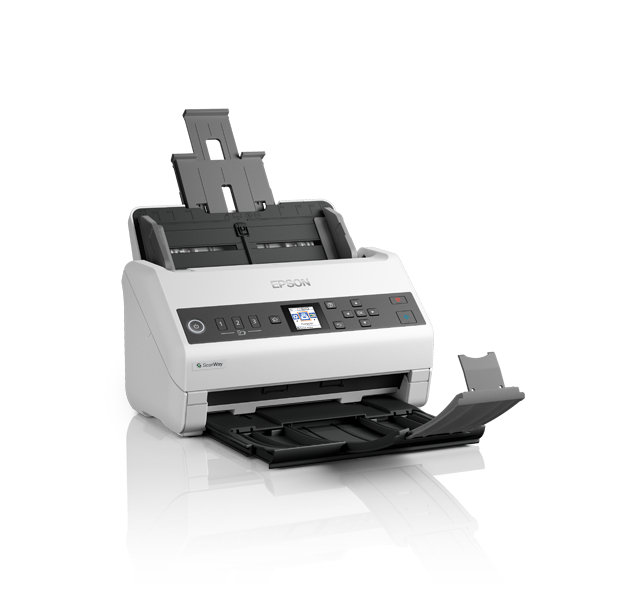
For ordinary document work, the product sheet describes a sheet-fed color scanner with one-pass duplex capture, a 100-sheet automatic feeder, USB 2.0 and Ethernet. It lists TWAIN and ISIS drivers, which can be useful when an existing capture or records application expects one of those interfaces. That is a driver claim, not proof that every current version of a chosen application, operating system or security configuration will work. Epson's model-specific support page should be checked for the host OS and current download before an order is approved.
A substantial feeder, with a real-world paper caveat
The 100-sheet ADF is the clearest fit advantage for an office that batches paperwork rather than placing each original on a platen. Epson rates it up to 40 pages per minute and 80 images per minute for Letter-size, 300 dpi scans through USB in black-and-white, grayscale or color. Those are manufacturer conditions, not independent measurements or a guarantee for the full OCR-and-filing workflow.
There is an unusually important source inconsistency on the daily-duty claim. One highlight on Epson's product page says up to 6,500 sheets. The detailed copy lower on that same page and the standard-model specification sheet say 4,500 sheets; the sheet says its figure is calculated from rated speed and assumed daily use. This profile records 4,500 from the detailed sheet and page text but does not pretend the discrepancy is resolved. A buyer whose work plan depends on daily volume should get an answer from Epson rather than selecting the more convenient number.
For one load, the 100-sheet figure is not a universal instruction for every stock. Epson's family manual distinguishes media and loading procedures, while the product sheet lists 27–413 g/m² paper weight as a broad supported range. Check the exact size, thickness and special-original procedure for the papers you will feed; capacity claims do not mean one mixed stack can safely contain every supported material.
Wired sharing is different from a phone or cloud workflow
USB suits a nearby host computer that owns capture and filing. Ethernet adds workgroup sharing: Epson describes configured Quick Send buttons, and the family guide covers panel jobs to preconfigured email or network folders. Network setup needs Epson configuration software, so include destination permissions, firewall rules and network security in deployment planning.
This is not a wireless personal scanner. The standard specification lists USB and wired Ethernet, not Wi-Fi, and the reviewed sources do not establish a phone-scanning route. The support page's generic installer description contains a wireless phrase, but that boilerplate is not evidence of a Wi-Fi radio in B11B259201. Likewise, the product page's cloud-storage footnote requires Epson software on a connected Windows PC or Mac; the family guide's SharePoint/cloud instructions use computer software. For a computer-free routine, rely only on the documented panel/network destinations after setup—not a claim that the scanner uploads to any cloud account on its own.
Long pages and folded originals need the correct accessory
The standard sheet sets three different long-page limits: 8.5 by 240 inches at 200 dpi, 215 inches at 300 dpi, and 53 inches at 600 dpi. Epson also lists folded pages up to 11 by 17 inches, with a carrier sheet required and sold separately. The manual's size-specific handling steps still apply. A single sheet loaded into the ADF, or a folded original using a carrier sheet, should not be mistaken for a separate manual-feed mechanism. The standard sheet identifies carrier sheets as an accessory, so verify whether the precise seller package includes any before planning that workflow.
The unit is listed at 11.7 by 8.3 by 8.5 inches and 7.9 pounds. Leave clearance beyond the body for the raised feeder, cable access and output pages. Epson's standard box list includes a USB cable, AC adapter/power cable and setup guide; confirm actual seller contents and service terms in writing.
Who should consider it—and what to verify
The standard DS-730N suits a wired office routine where duplex batches, a stated 100-sheet load and TWAIN/ISIS integration matter more than Wi-Fi or touchscreen controls. Its Quick Send buttons support repeat destinations after setup. Phone-led workflows should look for documented Wi-Fi/mobile support; the software-dependent cloud route here is not scanner-only cloud.
Before purchase, match B11B259201; verify host OS, current driver and named application; confirm network destinations and paper-specific loading; and ask Epson to reconcile the daily-duty discrepancy if volume depends on it. Check accessories, three-year limited warranty terms, service, returns and exact package in writing. A manufacturer listing does not prove reseller availability or terms.
Primary references: Epson standard DS-730N product page, standard-model specification sheet, DS-730N family user guide, and model-specific support downloads (checked October 31, 2026). The family guide is used for operating procedures, not to transfer identity or seller-package details.
Key specifications
Key details at a glance
| Scanner class | Desktop sheet fed document scanner |
|---|---|
| Manufacturer-listed simplex rate | 40 ppm |
| Manufacturer-listed duplex image rate | 80 ipm |
| Automatic document feeder capacity | 100 sheets |
| Optical resolution | 600 dpi |
| Connection options | USB / Ethernet |
| Automatic duplex capture | Yes |
| Separate manual-feed route | No |
| Touchscreen | No |
| TWAIN driver documented | Yes |
Use the exact model’s instructions for operating limits, supplied equipment and version differences.
Sources for this review
Sources for this assessment
Compare the workflow before you choose
Use the finder to test your connection, paper and software requirements against the documented scanner arrangements.