
Your needs, this model
Does it fit your priorities?
Does the DS-785W support a USB host workflow and a separate Wi-Fi setup?
Yes. Epson identifies both USB and Wi-Fi for B11B288201. Treat them as alternative supported connections for different arrangements, not as simultaneous capture paths. Its wireless touchscreen and Smart Panel routes are separate from a conventional USB-to-computer session.
Explore this need in the finder →Can the DS-785W scan from a phone or tablet without first using a computer?
Epson's exact support page lists Smart Panel compatibility with iOS and Android, and the model guide describes scanning after the mobile device connects to the scanner. Confirm the current app, operating-system support and original-type restrictions for the job; this is a wireless mobile route, not a USB-host scan.
Explore this need in the finder →Can a user send a scan to cloud from the touchscreen without a computer at scan time?
Yes, after setup. Epson documents PC-free ScanWay cloud destinations from the panel, but the manual requires a network connection, Epson Connect registration and a configured destination list; Internet access and service availability matter. This is not an account-free or setup-free cloud promise.
Explore this need in the finder →Does Automatic Feeding Mode count as a separate manual-feed path?
No separate path is established. The model guide starts Automatic Feeding Mode from host software and feeds the next original through the same ADF. A carrier sheet is a separate accessory, but it too travels through the feeder; it does not change the base scanner into a manually selected second feed route.
Explore this need in the finder →Does the 100-sheet ADF figure apply to a stack of Letter paper at any weight?
No. Epson's model-specific table gives 100 Letter sheets at 80 g/m² and 80 Legal sheets at that weight, then lists smaller Letter loads as paper gets heavier. The figure is one loading, not a daily scan target or a mixed-stock guarantee.
Explore this need in the finder →Current Epson U.S. model reference · DS-785W · B11B288201
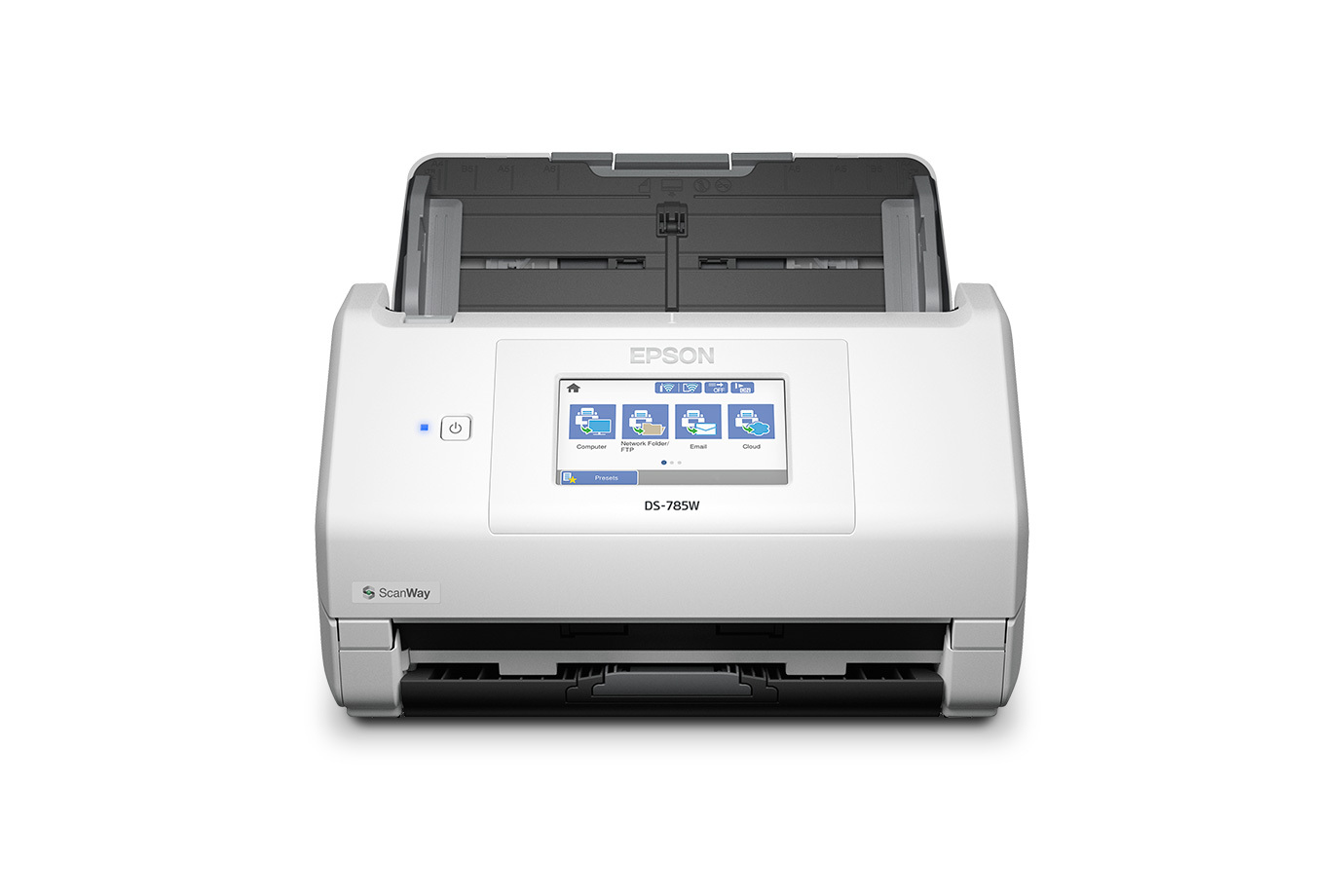
The Epson DS-785W is a desktop duplex ADF scanner whose most distinctive difference from the USB-only DS-530X is a second, wireless way to work: its touchscreen can launch configured ScanWay destinations, and Epson also documents Smart Panel phone scanning. This assessment is for the U.S. base scanner B11B288201, not a seller bundle, optional carrier sheet, storage device, renewed unit or particular warranty entitlement. The scanner was not operated or independently tested.
Resolve the model identity before using a spec card
Epson's exact U.S. product and support routes identify part B11B288201, and its May 2026 announcement separates the wireless DS-785W from the USB DS-530X. There is an important catalog discrepancy: the broad U.S. document-scanner category card retrieved for this research displayed 35 ppm, 70 ipm and a 50-page feeder. In contrast, the exact DS-785W product page, Epson's desktop-scanner reference, the May announcement and the model-specific guide describe the B11B288201 as a 45 ppm/90 ipm unit with a 100-sheet feeder. This review uses the exact-part page and model guide for this configuration; the inconsistent category-card text remains a reason to verify the offered part and current specification.
One-load capacity depends on size and paper
The manual's standard-original table is more useful than a standalone “100-sheet” headline. It lists 100 U.S. Letter sheets at 80 g/m² with a stack under 12 mm, but 80 Legal sheets at that weight. For Letter paper, its counts decrease to 86 at 90 g/m², 74 at 104, 62 at 127, 50 at 157, 30 at 256 and 18 at 413. Epson warns that the limit varies by paper type. That is a per-loading figure, not a mixed-stock promise, pages-per-day number or endurance result. A requirement for more than 100 sheets in one loading is not met on the documented Letter basis.
Speed and duty are manufacturer figures
Epson specifies one-pass duplex scanning and rates the scanner up to 45 pages per minute and 90 images per minute. The stated speed condition is Letter originals at 300 dpi in black-and-white, grayscale or color over USB. The rate is not an independent test, and it should not be read as a guaranteed time for mixed originals, blank-page handling, OCR, file naming, routing or saving. Epson's 7,000-sheets-per-day peak duty recommendation is likewise a calculated manufacturer recommendation based on its stated speed and assumed daily usage. It is neither a feeder capacity nor a tested workload guarantee.
USB, Wi-Fi, mobile and direct destinations are distinct routes
The exact model supports both USB and wireless network setup. A USB-connected computer route suits ordinary host capture, and Epson lists TWAIN and ISIS drivers. A separate Wi-Fi arrangement supports touchscreen ScanWay and Epson Smart Panel mobile workflows; Epson identifies iOS and Android support, while the model guide describes connecting the phone or tablet to the scanner before scanning. These are alternative supported arrangements, not evidence that USB and Wi-Fi carry the same scan simultaneously. Check Epson's current OS-specific download matrix and the named capture application's version before relying on TWAIN or ISIS.
ScanWay can send from the panel to a compatible USB memory device, a configured network folder or FTP destination, email, or a configured cloud service without a computer at scan time. That convenience has prerequisites: the manual calls for network setup, Epson Connect registration and a saved destination list for cloud delivery; internet access and service availability also matter. A wired USB session is not itself a computer-free cloud path. Epson describes direct USB media support up to 2 TB for FAT, FAT32 or exFAT devices, but excludes encrypted or security-configured storage and devices needing their own driver.
Special originals do not create a second feed path
The guide's Automatic Feeding Mode lets host software start a job and then feed different originals one at a time through the same ADF. That is not a separately selected manual-feed inlet. The model guide documents loading procedures for supported cards and other special originals, with type-specific size, thickness and orientation restrictions. For eligible photos, irregular or easily scratched sheets, or folded oversized originals, Epson lists carrier sheet B12B819051 separately. It still passes through the ADF; the manual gives a 3,000-scan replacement guide and says not to continue with a scratched carrier sheet. It is not included by this base-model assessment and does not authorize feeding fragile items directly.
Who should keep it on the shortlist?
The DS-785W is worth considering when one desktop device needs duplex capture, a Letter/80 g/m² load of up to 100 sheets, listed host drivers, and both USB and wireless operating choices. Its touchscreen and mobile route matter when users will actually configure network destinations or scan from supported phones. Compared with the DS-530X B11B286201, the DS-785W adds wireless, display and PC-free routing; the DS-530X is USB-only. Epson's DS-790WN is a separate wired-Ethernet comparison, not evidence that this DS-785W has Ethernet. Choose neither by feature names alone: confirm the exact part, paper stock, service endpoint, host environment and needed workflow.
What remains to verify before a purchase
Epson's current-reference product page describes a three-year limited warranty and an Advance Exchange program, but a specific offer's date, condition, region and eligibility need confirmation with the seller and current warranty terms. Confirm that a quote is for B11B288201 and whether it includes any optional carrier sheet or other accessory you need. Then check the current driver for the exact OS, your TWAIN/ISIS application, cloud service availability, Wi-Fi policy, network/account setup and the intended stock's loading table. Research for this review used Epson's exact product page, exact-part support page, May 2026 U.S. announcement, and selected sections of the DS-785W user's guide. No independent speed, reliability, OCR-accuracy, customer-experience, price or stock claim is made.
Key specifications
Key details at a glance
| Scanner class | Desktop sheet fed document scanner |
|---|---|
| Manufacturer-listed simplex rate | 45 ppm |
| Manufacturer-listed duplex image rate | 90 ipm |
| Automatic document feeder capacity | 100 sheets |
| Connection options | USB / Wi-Fi |
| Automatic duplex capture | Yes |
| Separate manual-feed route | No |
| Touchscreen | Yes |
| TWAIN driver documented | Yes |
Use the exact model’s instructions for operating limits, supplied equipment and version differences.
Sources for this review
Sources for this assessment
- Epson U.S. document-scanner category listing for DS-785W
- Epson U.S.: DS-785W High-Speed Wireless Desktop Document Scanner, B11B288201
- Epson U.S. Support: DS-785W, SPT_B11B288201
- Epson U.S. newsroom: DS-530X and DS-785W commercial desktop scanner announcement, May 12, 2026
- Epson DS-785W U.S. User's Guide: model-specific manual, selected sections
- Epson DS-785W User's Guide: standard-size original loading-capacity table
- Epson DS-785W User's Guide: touchscreen ScanWay and cloud destinations
- Epson DS-785W User's Guide: Smart Panel mobile scanning
- Epson DS-785W User's Guide: Automatic Feeding Mode and special originals
- Epson DS-785W User's Guide: network and Wi-Fi setup
- Epson U.S. DS-785W product-gallery image for B11B288201
Compare the workflow before you choose
Use the finder to test your connection, paper and software requirements against the documented scanner arrangements.