
Your needs, this model
Does it fit your priorities?
Can the DS-80W scan wirelessly to my phone or tablet?
Epson documents DS-80W mobile scanning over Wi-Fi or direct Wi-Fi with its app, subject to current phone/app support and narrower mobile limits such as no carrier sheets or long originals.
Explore this need in the finder →Can it get a scan to cloud storage when no computer is part of the job?
Epson's DS-80W DocumentScan app can share a phone-captured scan to named cloud services. This is mobile-mediated, not a scanner-side direct-cloud destination; check phone, app, Internet and account support. The separate Document Capture cloud route uses a connected computer.
Explore this need in the finder →Can I use USB and Wi-Fi at once, or load a stack for duplex capture?
No. The guide says USB and network cannot be used simultaneously, and specifies one-sheet simplex capacity; use the connections as alternatives and feed originals one at a time.
Explore this need in the finder →Evidence-led assessment of Epson U.S. part B11B253202. This is not a hands-on test, and no seller offer, price or current availability is implied.
A wireless sibling, not a different class of feeder
Epson's U.S. general document-scanner page lists the DS-80W Wireless Portable Document Scanner as B11B253202. The separate Certified ReNew page identifies a renewed-condition suffix B11B253202-N. This review is for the exact base part; the renewed suffix is a separate offer identity whose condition, contents, return terms and current availability require their own checks. Do not use an identical family name to infer that a particular seller's package or warranty is the same.
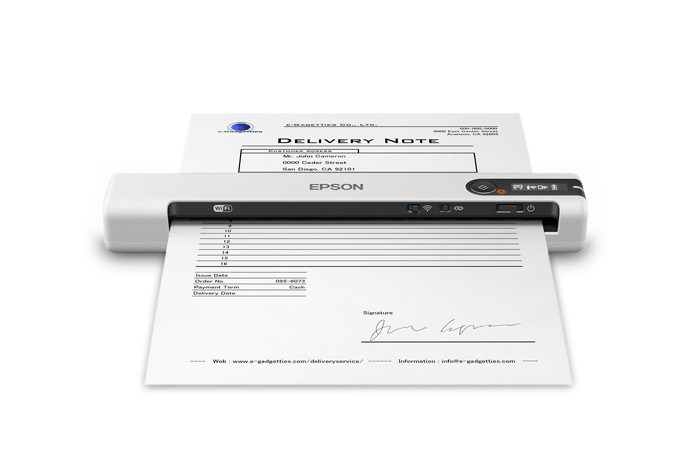
The DS-80W's meaningful difference from the USB-only DS-70 is its wireless interface, built-in rechargeable battery and mobile scanning route. Epson lists USB 2.0 and 802.11 b/g/n Wi-Fi, but the manual says the scanner cannot use USB and a network connection at the same time. Think of these as alternative arrangements: USB to a computer, or a wireless setup for compatible computers or phones. The small LCD reports status and battery level; it is not a touchscreen for choosing scan profiles.
Mobile capture has a clear but limited role
The DS-80W is the portable option when the scanner needs to send an original wirelessly to a phone or tablet. Epson documents both its DocumentScan app and Smart Panel instructions for compatible iOS and Android devices. The exact support page describes DocumentScan as scanning to the mobile device and then allowing the resulting data to be sent to email, other apps or named cloud services. That is a phone-mediated route: it is not the same as a scanner panel sending directly to a cloud destination. Epson separately describes its Document Capture cloud workflow as software on a connected Windows PC or Mac. Confirm the current app, phone OS, cloud provider, account and network requirements before treating either route as a dependable filing process.
App convenience comes with original limits. The shared manual excludes carrier-sheet scans, long paper and long receipts from its Smart Panel workflow. The regular host instructions and the phone workflow should not be collapsed into one list of supported media. If a long receipt or delicate original is central to the routine, verify that the intended host-side setup can handle it before choosing the phone route.
Battery operation and speed figures
The user guide specifies a 1,140 mAh lithium-ion battery, approximately 3.5 hours to charge over USB with the scanner off, and about 300 scans when fully charged under its stated continuous-feed, 300-dpi color Wi-Fi conditions. These are Epson's specifications, not an independent battery test or an all-day mobile guarantee. Charging takes longer if the scanner remains on. At a fully charged battery and a one-sheet Letter original at 300 dpi, Epson rates the DS-80W at up to 15 pages per minute or about four seconds per page. That does not include phone setup, OCR, file naming, wireless transfer or cloud upload time. The device weighs 0.66 pound, a little more than the non-wireless DS-70's listed 0.59 pound.
One original in the slot; no automatic duplex
Despite the “Automatic Feeding Mode” language in Epson's marketing, the technical guide identifies paper capacity as one sheet and the scanner type as simplex (single-sided). Automatic feeding here describes accepting each next sheet as it is inserted, with software able to combine successive pages into a file; it does not mean a stack ADF. Two-sided pages need separate passes, and a user has to present each page. A nominal 300-sheet peak daily duty figure is a maximum manufacturer recommendation, not an ADF capacity or an endurance result. This small machine is best understood as an occasional, one-original-at-a-time mobile tool, not a workgroup batch scanner.
Paper size also depends on resolution. The family guide permits documents up to 8.5 by 72 inches at 300 dpi, but limits originals scanned at 301 dpi or higher to 8.5 by 14 inches. A single receipt can be 72 inches long in the ordinary paper instructions, while the mobile app does not support long receipts. The manual describes one card at a time, notes limits on embossed and laminated ID cards, and recommends an optional carrier sheet for delicate or easily wrinkled originals. A carrier sheet is not an extra feeder route, and it cannot be used in the Smart Panel workflow.
When to choose it—and when not to
The DS-80W is worth considering when a computer is not always beside the original and a compatible phone or tablet is part of the capture routine. USB keeps a computer-owned option available when needed; the Wi-Fi/battery setup is a distinct portable alternative. The included TWAIN driver and Epson desktop software can support host-based workflows, but exact driver support must be checked against the target OS and application. Its small body (10.7 by 1.9 by 1.4 inches) is easy to position, yet it still needs an operator to feed each sheet.
Choose a different kind of scanner if your everyday job is a stack of two-sided pages, a high-volume shared queue, a touchscreen destination panel, or a computer-free direct-to-cloud service. The phone app can share to cloud after scanning, but that extra phone-and-account step should be made explicit to the people who will use it. Before purchase, check the exact B11B253202 or B11B253202-N suffix, battery/charging condition for renewed units, included cable and package, host and mobile support, paper restrictions and current seller terms. No stock, price, independent test result or personal use is established here.
Key specifications
Key details at a glance
| Scanner class | Portable one-sheet sheet-fed scanner |
|---|---|
| Manufacturer-listed simplex rate | 15 ppm |
| Automatic document feeder capacity | 1 sheets |
| Optical resolution | 600 dpi |
| Connection options | USB / Wi-Fi |
| Automatic duplex capture | No |
| Separate manual-feed route | No |
| Touchscreen | No |
| TWAIN driver documented | Yes |
Use the exact model’s instructions for operating limits, supplied equipment and version differences.
Sources for this review
Sources for this assessment
Compare the workflow before you choose
Use the finder to test your connection, paper and software requirements against the documented scanner arrangements.