
Your needs, this model
Does it fit your priorities?
Is a TWAIN driver documented for the standard DS-870?
Epson's exact B11B250201 specification lists TWAIN and ISIS. Confirm the current driver, host operating system and named capture application's accepted version before relying on that interface.
Explore this need in the finder →Does the 100-sheet figure apply to every paper job?
No. Epson's shared DS-870/DS-970 guide lists 100 Letter sheets at 21 lb (80 g/m²), but only 80 Legal sheets at that weight, and it specifies smaller loads for heavier stock and special originals.
Explore this need in the finder →Can its LCD satisfy a touchscreen-profile requirement?
No touchscreen is documented for B11B250201. Epson describes a front-panel color LCD operated by push buttons; do not treat a screen or physical job-selection keys as touch input.
Explore this need in the finder →Research-based assessment of the standard U.S. Epson DS-870, part B11B250201. This is not a hands-on test, a seller-offer check or a promise of current stock.
A 100-sheet workgroup feeder, not a network scanner by default
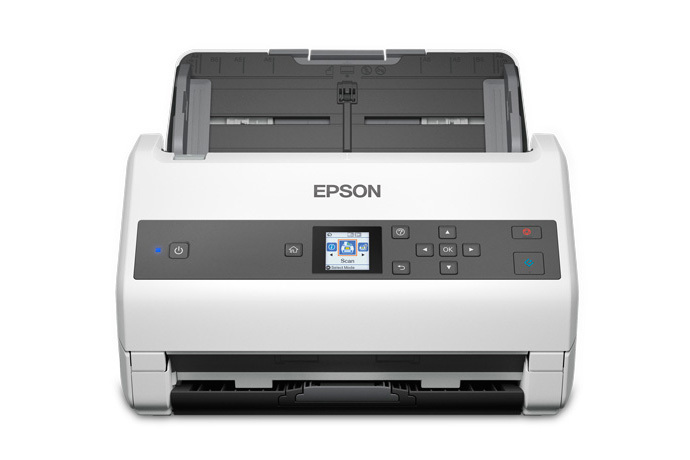
Epson's U.S. page identifies the standard DS-870 as B11B250201: a sheet-fed desktop model with single-pass duplex capture, USB 3.0, TWAIN and ISIS drivers, and a color LCD controlled by buttons. The product page and current U.S. document-scanner category list it as a workgroup model. That establishes a manufacturer reference, not that a particular seller has a new unit or a complete package. Keep this base part separate from the TAA-labelled B11B250203; the suffix and procurement designation are meaningful, and the TAA page's warranty language should not be carried over to this standard part.
The headline performance is 65 pages or 130 image sides per minute on Letter originals at 200 or 300 dpi, according to Epson. The DS-870 specification sheet lists 16 ppm/32 ipm at 400 or 600 dpi, a large drop when more detail is requested. Treat both as stated manufacturer settings, not our measurements and not an end-to-end expectation for a job that also includes deskewing, OCR, review, naming and filing. If your documents need high resolution, compare the 400/600-dpi line rather than selecting from the 65-ppm headline alone.
The feeder number depends on the stock
The DS-870's ADF is rated for 100 sheets, but Epson's shared DS-870/DS-970 guide ties that maximum to Letter paper at 21 lb (80 g/m²). It gives 80 Legal sheets at the same paper weight and 86 A4 sheets at 24 lb (90 g/m²); heavier stock and smaller formats have their own lower counts. Mixed-size pages can be loaded together only within the guide's stated limits. Therefore, “100-sheet ADF” is a useful one-load comparison, not permission to put 100 sheets of any size or thickness into every job.
The same guide allows a broad range of originals through the feeder, including supported ID cards and business cards, but it also lists pages that should not be fed directly. Photos and valuable documents need a compatible carrier sheet; folded or oversized originals have specified carrier-sheet and folding procedures, and envelope/card scans require different handling and settings. The base scanner does not have a second manual-feed inlet: Epson's “Automatic Feeding Mode” means the host scan can wait for individual originals to be placed in the ADF. A protective carrier sheet or a one-at-a-time software workflow is not a separate feed path. If bound material or photos are central to the job, the optional flatbed dock is a different accessory, not an included platen.
USB and the host application are part of the workflow
For B11B250201, the ordinary documented path is USB to a Windows computer or Mac. Epson lists TWAIN and ISIS, which is relevant when a capture or records application names one of those driver standards as a requirement. It is not proof that every scanner driver works with every software version. The exact specification's operating-system table is a dated snapshot, and Epson's support page provides a system selector; check the current driver and the target application's supported interface before procurement.
Epson Document Capture, Document Capture Pro and Epson Scan 2 support host-based scanning and output tasks, including searchable PDFs. Epson's specification ties the listed online-storage destinations to Document Capture installed on the connected Windows PC or Mac. That is not computer-free cloud scanning. The standard base configuration does not include built-in Wi-Fi or an established phone-scanning route. An optional Epson Network Interface Unit, part B12B808441, can add network scanning, but it is additional hardware, not a capability to assume from the base part number. A network add-on also does not by itself establish a direct mobile or computer-free cloud workflow.
Physical controls, upkeep and optional extensions
The front panel combines a color LCD with push buttons; Epson does not describe it as a touchscreen. Users can navigate scan settings or job profiles at the panel, but touch-based profile selection should not be assumed. The specification lists ultrasonic double-feed detection, paper-protection features, and a roller-assembly replacement reference of 200,000 pages. Those features may help describe the intended workgroup routine, while regular cleaning and consumable replacement still belong in the operating plan.
Epson also publishes a peak daily duty figure of 10,000 sheets, calculated from rated speed and an assumed daily-use period. The manufacturer calls it a highest recommended daily limit; it is not an independent endurance test or a guarantee that a particular job will reach that output. If the expected demand is near that ceiling, ask the vendor about the intended workload, support terms and consumables rather than treating the planning number as a service-life promise.
Two optional extensions solve different problems. The Flatbed Scanner Dock, part B12B819011, connects a compatible Epson Perfection V19 or V39 photo scanner for glass-bed work; the separate photo scanner is also required. The model guide says the dock cannot be used at the same time as the optional Network Interface Unit. Neither accessory should be assumed present in a seller's offer just because an image or page describes expanded versatility. Confirm the precise part number and package contents, and determine which optional route matters before ordering.
Where it fits beside related Epson choices
The DS-870 suits a wired workgroup that wants one-pass duplex, a substantial Letter-paper load, and a standard host driver path. Its current U.S. page states a three-year limited warranty, subject to the applicable terms. A different question may point elsewhere: choose a built-in network model if Wi-Fi/mobile use is essential, a touchscreen model if touch input is required, or a flatbed-first device if bound originals dominate. The DS-970 is a related USB workgroup model rated faster by Epson, while the DS-870 TAA B11B250203 is a separately identified configuration. Those distinctions are useful only when they match the actual deployment; part labels are not interchangeable purchase assurances.
Checks before shortlisting
Match the standard B11B250201 part, confirm whether the unit is new or another condition, and verify the exact seller's included cable, power supply, return terms and warranty eligibility. Check the current Epson driver for your operating system and test the named TWAIN/ISIS application path with its vendor. For capacity, use the paper size and weight you actually scan; for unusual pages, follow the DS-870 guide and price any required carrier sheet or flatbed/network accessory separately. Do not infer Wi-Fi, mobile scanning, a touchscreen, or computer-free cloud delivery from the scanner's ability to make searchable files.
Evidence checked October 31, 2026: Epson's B11B250201 product page, CPD-56836R4 specification sheet, the shared DS-870/DS-970 user guide, and the exact U.S. support page. Published speeds and duty ratings are manufacturer figures; no price, ASIN, seller inventory, customer experience or hands-on performance is asserted.
Key specifications
Key details at a glance
| Scanner class | Desktop sheet fed workgroup document scanner |
|---|---|
| Manufacturer-listed simplex rate | 65 ppm |
| Manufacturer-listed duplex image rate | 130 ipm |
| Automatic document feeder capacity | 100 sheets |
| Optical resolution | 600 dpi |
| Connection options | USB |
| Automatic duplex capture | Yes |
| Separate manual-feed route | No |
| Touchscreen | No |
| TWAIN driver documented | Yes |
Use the exact model’s instructions for operating limits, supplied equipment and version differences.
Sources for this review
Sources for this assessment
- Epson U.S.: unfiltered WorkForce document-scanner category
- Epson U.S.: DS-870 Color Duplex Workgroup Document Scanner, B11B250201
- Epson U.S. Support: DS-870, SPT_B11B250201
- Epson DS-870 Specification Sheet CPD-56836R4
- Epson DS-870/DS-970 User Guide CPD-56597
- Epson U.S. DS-870 product gallery image for B11B250201
Compare the workflow before you choose
Use the finder to test your connection, paper and software requirements against the documented scanner arrangements.