
Your needs, this model
Does it fit your priorities?
Can the DS-970 use a TWAIN capture application over USB?
Epson lists USB 3.0 and TWAIN/ISIS drivers for B11B251201; check current OS, application, and driver support.
Explore this need in the finder →Will the ADF meet a 100-sheet duplex requirement?
The guide specifies 100 Letter sheets at 21 lb (80 g/m²), and Epson describes one-pass duplex; heavier paper and Legal loads are lower.
Explore this need in the finder →Is its color LCD a touchscreen?
No. Epson describes an LCD with physical buttons; the product page does not identify a touchscreen.
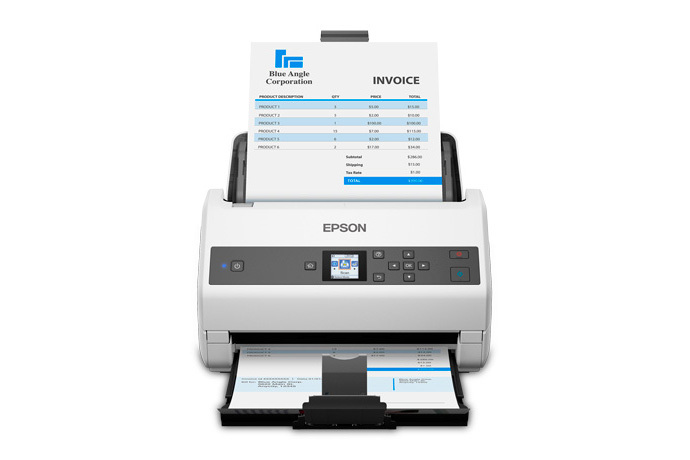
Explore this need in the finder →The Epson DS-970 is a fast, USB-connected workgroup ADF scanner with a 100-sheet feeder and one-pass duplex capture. Epson's U.S. part number is B11B251201. The manufacturer's headline is up to 85 pages per minute / 170 images per minute at 200 or 300 dpi; it is a specification, not an independent throughput result. This profile suits a computer-owned capture station where fast two-sided batches matter more than Wi-Fi or scanner-only cloud functions.
What the speed and capacity figures describe
The product specification gives 85/170 ppm/ipm at 200 and 300 dpi, while the stated rate falls to 16/32 at 400 and 600 dpi. Job processing, paper condition, color mode, OCR and file handling remain outside those headline figures. The 100-sheet ADF is specified for ordinary Letter paper at 21 lb (80 g/m²); Epson lists lower loads for heavier sheets and Legal-size originals. The guide also limits original lengths by resolution: long pages can extend to 240 inches at 200 dpi or 215 inches at 300 dpi. These conditions matter more than a single capacity or speed number when a batch mixes sizes, thin stock, cards, or long forms.
Epson separately gives the exact DS-970 a peak daily duty cycle of up to 14,000 sheets. Its B11B251201 product-page footnote defines that as the highest recommended daily limit, calculated from the rated 85 ppm speed and assumed use; it is not a test of sustained output or a service-life guarantee. The current desktop-scanner category page repeats the 14,000 figure, but its superscript-7 footnote describes a 35 ppm calculation. That category footnote conflicts with the model-specific footnote, so treat 14,000 as Epson's qualified ceiling and confirm workload and service terms in current written documentation if your volume is near it.
Host software and control panel
The exact page lists USB 3.0 and included TWAIN/ISIS drivers with Epson Scan 2 and Document Capture Pro/Document Capture. A color LCD and buttons provide local controls, but the DS-970 is not a touchscreen model. The base connection is USB-to-computer; an optional Network Interface Unit can share it across a network, and an optional flatbed dock can extend the setup for bound or irregular originals. Both accessories are separate. Check the exact accessory model, supported scanner pairing, driver, operating system, and destination software before treating them as part of a purchase.
Cards, folded originals, and trade-offs
Epson documents supported cards and folded originals, including an optional carrier sheet for oversized folded pages. Those are carefully qualified ADF procedures, not evidence of an independent manual-feed path. If a workflow depends on passports, delicate originals, or thick embossed cards, read the model instructions for the exact paper type and carrier setup before feeding valued records. High-speed ADF capture also does not remove the need to review skew, double feeds, OCR output, and naming or retention rules after a job.
Before choosing the DS-970
Epson states a three-year limited warranty for the listed part. Verify that B11B251201 appears on the offer, confirm the included standard accessories, and separately price any network unit or flatbed dock. Check the current host OS and named TWAIN/ISIS application; a driver label is not a compatibility guarantee for every capture stack. Ask for written service and return terms from the seller instead of treating the model profile as proof of current inventory.
It is useful to separate three questions that marketing can blur: the base unit's connection, the speed rating, and optional ways to expand the workflow. The standard USB path still expects a computer; adding the Network Interface Unit changes access, while the flatbed dock changes which originals can be scanned. Neither option is part of the 100-sheet ADF itself. A buyer comparing it with the DS-870 TAA should also weigh the different exact configuration and warranty, not treat the faster DS-970 as a drop-in TAA substitute.
Assessment: the DS-970's distinguishing case is throughput-oriented duplex work from a 100-sheet USB feeder, with optional network or flatbed expansion. It is not the wireless choice, and its front panel is buttons plus an LCD rather than touch. Epson's rated speeds and maximum loads need to be read with their paper, resolution, and setup conditions. This is an evidence-based product assessment, not a hands-on test or ownership report.
Key specifications
Key details at a glance
| Scanner class | Desktop sheet fed document scanner |
|---|---|
| Manufacturer-listed simplex rate | 85 ppm |
| Manufacturer-listed duplex image rate | 170 ipm |
| Automatic document feeder capacity | 100 sheets |
| Optical resolution | 600 dpi |
| Connection options | USB |
| Automatic duplex capture | Yes |
| Separate manual-feed route | No |
| Touchscreen | No |
| TWAIN driver documented | Yes |
Use the exact model’s instructions for operating limits, supplied equipment and version differences.
Sources for this review
Sources for this assessment
- Epson U.S.: unfiltered WorkForce document-scanner category
- Epson DS-970 Color Duplex Workgroup Document Scanner — exact U.S. product page
- Epson DS-970 Color Duplex Workgroup Document Scanner — Epson support page
- Epson DS-870/DS-970 User Guide, CPD-56597
- Epson U.S. Desktop Document Scanners page, High Speed Scanners section
Compare the workflow before you choose
Use the finder to test your connection, paper and software requirements against the documented scanner arrangements.