
Your needs, this model
Does it fit your priorities?
Can the DS-C330 connect to a phone or send cloud files without a computer?
The reviewed B11B272201 configuration is documented with USB, not Wi-Fi or Smart Panel. Epson describes the computer's document-capture software as the cloud workflow, so this assessment does not establish phone capture or scanner-only cloud delivery.
Explore this need in the finder →Will a 20-sheet batch fit in the automatic feeder?
Epson specifies 20 sheets at 21 lb (80 g/m²) in vertical-path loading; the same manual lists 18 at 24 lb, 15 at 28 lb and 12 at 34 lb. Use the exact paper size, weight and path rather than treating 20 as a mixed-stock or daily-volume guarantee.
Explore this need in the finder →Does duplex mean scanning both sides in a single pass?
Yes. Epson identifies a sheet-fed, one-pass duplex scanner and publishes a 30 ppm/60 ipm maximum under its stated Letter/300-dpi USB conditions. The rate excludes job setup, OCR, review and filing time.
Explore this need in the finder →Can I feed a passport directly through the C330?
No. Epson's exact family guide says the DS-C330 requires its compatible optional passport carrier sheet for all passports. It is not presumed included, and the straight path handles one original at a time; check accessory part B12B819651 and the current guide before a valuable original.
Explore this need in the finder →A small USB feeder for a computer-owned workflow
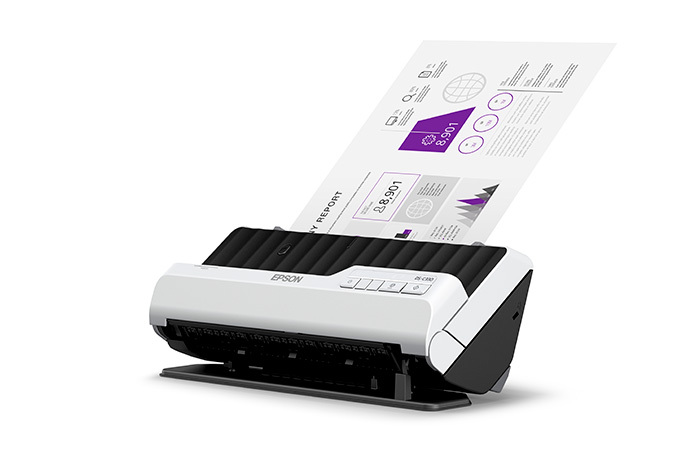
The Epson DS-C330 is a compact desktop document scanner centered on a 20-sheet automatic document feeder and one-pass duplex capture. The U.S. model is B11B272201. Epson lists USB, TWAIN and ISIS drivers, but no display or wireless phone/cloud workflow for this configuration. Its case is straightforward: a nearby computer handles the files, while the scanner takes small two-sided batches and occasional supported special originals. This review concerns the base scanner, not a particular seller bundle or the separately available passport carrier.
Its narrow upright position can help when desk depth matters, but the machine has a second straight-path position for selected originals. It needs clearance at the front for output and more space when opened into that position. The manual gives a body width of about 11.7 inches and different height/depth measurements for vertical and straight positions. Treat those as device dimensions, not a complete desk footprint that includes paper handling.
The 20-sheet limit depends on the paper
Epson's guide specifies a 20-sheet load at 21 lb (80 g/m²). Its table drops to 18 sheets at 24 lb, 15 at 28 lb and 12 at 34 lb. That matters more than the headline if the routine uses heavier stock. Receipts, cards, folded sheets and other media have their own loading rules. The straight path handles one item at a time; it does not add another batch feeder or make every fragile original safe to feed directly.
Epson rates the C330 up to 30 pages per minute and 60 images per minute for Letter-size scans at 300 dpi over USB in its stated color and grayscale modes. That is a manufacturer condition, not an independent test and not the time for an entire filing job. Loading, reloading, checking page order, OCR, naming and saving remain outside the published capture rate. A 20-sheet load may suit routine packets, but it means repeated handling if an ordinary job starts with a larger stack.
Duplex is useful; special handling has a narrow role
The sheet-fed mechanism captures both sides in one pass, which is the practical advantage over turning pages manually. The shared C330/C490 guide sets out vertical and straight paper paths and several original-specific restrictions. The straight path is for supported thick, long, irregular or specialty items one at a time, with front ejection. It is an alternate path through the scanner, not a flatbed and not general permission to feed valuable originals without a carrier or procedure.
Passports are a particularly important distinction: Epson says every passport on the C330 requires its compatible optional carrier sheet. The accessory is not assumed to be in a given retail package. The manual identifies accessory part B12B819651. If passports or other stiff originals are a regular task, check the current loading instructions and the actual package before treating this as ready to use. The C490 has a different passport/booklet procedure; that capability should not be attributed to the C330 just because the two appear in one family guide.
The manual also limits long originals by resolution: the C330 reaches 120 inches at 50–300 dpi but only 30 inches at 301–600 dpi. Long sheets use the one-at-a-time straight path, so a maximum-length figure should not be read as a promise that every material can be run at every resolution. The file destination is a computer connected by USB, and a single awkward original may require more care than an ordinary stack.
TWAIN and USB do not settle software compatibility
The exact U.S. product page lists TWAIN and ISIS drivers, which is relevant when a required capture program expects one of those interfaces. It does not certify every version of Windows or macOS, every driver release or every third-party document application. Epson's support page exposes downloads after choosing a host. Before relying on a particular workflow, check both the current Epson package for that operating system and the capture application's own supported-scanner list.
There is no model-specific Wi-Fi, Smart Panel, scanner-side cloud route or touchscreen menu established for this C330. If people need to initiate scans by phone or send files directly from the scanner to a registered service without a computer, this model's USB computer path does not answer that need. The DS-C480W is a distinct Epson option with those documented routes, while also having limits of its own.
Where the C330 differs from the compact siblings
The DS-C330 and DS-C490 are both USB-only compact duplex models with 20-sheet feeders and TWAIN/ISIS interfaces. The C490 has a higher published 40 ppm/80 ipm rating and its guide includes booklet scanning and a passport procedure that the C330 does not share; the C330's long-sheet maximum is also shorter, particularly at higher resolution. The wireless DS-C480W instead adds USB/Wi-Fi alternatives, a touchscreen, Smart Panel and configured panel-cloud tasks, but its ADF remains 20 sheets and each route has its own original-length limits.
The C330 is most defensible when USB-to-computer capture, small standard-paper batches, one-pass duplex and a compact upright form match the work. It is less suitable when an ADF must hold much more paper, an operator needs a scanner-side display, mobile/cloud routing is essential, or routine passports must be scanned without the optional carrier. Before choosing one, verify the exact B11B272201 model, current host driver, the application's TWAIN/ISIS support, the paper weights in your routine, front clearance and the need for the passport accessory. Epson's official references are the DS-C330 product page, model support page and CPD-63189 guide.
Key specifications
Key details at a glance
| Scanner class | Compact desktop document scanner |
|---|---|
| Manufacturer-listed simplex rate | 30 ppm |
| Manufacturer-listed duplex image rate | 60 ipm |
| Automatic document feeder capacity | 20 sheets |
| Optical resolution | 600 dpi |
| Connection options | USB |
| Automatic duplex capture | Yes |
| Separate manual-feed route | Yes |
| Touchscreen | No |
| TWAIN driver documented | Yes |
Use the exact model’s instructions for operating limits, supplied equipment and version differences.
Sources for this review
Sources for this assessment
Compare the workflow before you choose
Use the finder to test your connection, paper and software requirements against the documented scanner arrangements.