
Your needs, this model
Does it fit your priorities?
Can I use a capture program that requires TWAIN?
Epson lists an included TWAIN driver for this exact model. Check current driver support for the intended Windows or Mac version and confirm that the target application supports that driver version; a file export route is not the same thing as TWAIN.
Explore this need in the finder →What does its 50-sheet duplex feeder capacity mean?
Epson documents a 50-sheet load at 21 lb (80 g/m²) and one-pass two-sided capture. Treat the published capacity as a per-loading figure for its stated paper basis, not a promise that every heavier or mixed stack holds 50 sheets or that each job runs at the rated maximum.
Explore this need in the finder →Can it send a scan to cloud storage without a computer?
No scanner-side computer-free cloud route is documented for the ES-400 II. Epson's described ScanSmart cloud workflow runs on a connected Windows PC or Mac and requires Internet access and an account sign-in.
Explore this need in the finder →Does it have a separate manual-feed path for occasional originals?
Epson documents loading originals through the input tray, with optional carrier sheets and special settings for some folded, large, photo, or irregular originals. That is not a separate manual-feed path; the optional flatbed combination is a separate accessory setup, not a hand-feed mode.
Explore this need in the finder →A USB feeder, not a small network appliance
The U.S. WorkForce ES-400 II (model B11B261201) is a desktop sheet-fed scanner for a computer-centered routine. Epson lists USB connectivity, a 50-sheet automatic document feeder, one-pass two-sided capture and an included TWAIN driver. That combination can make sense when a nearby Windows or Mac computer already owns the scanning job and the priority is batching ordinary pages into a desktop application. It is not the wireless member of the family: the ES-400 II's current comparison lists no Wi-Fi or mobile route, unlike the separate ES-500W II. The family guide's network and Epson Smart Panel phone instructions explicitly name the ES-500W II, so those capabilities should not be borrowed for this model.
Read “50 sheets” as a paper-loading condition
Epson rates the ES-400 II at up to 35 pages per minute and 70 images per minute, with the speed footnote based on letter originals at 300 dpi in black-and-white, grayscale or color. That is a manufacturer rating, not an independent speed test or a promise for every original, resolution or host. Its English user guide describes a 50-sheet load at 21 lb (80 g/m²); if your routine mixes heavier stock, envelopes and ordinary pages, the headline figure is not a universal stack count. The feeder captures both sides in one pass, which is more useful for a two-sided intake workflow than doubling paper-handling steps, but the exact loading instructions still govern the batch.
Long originals need a resolution check too. Epson lists a maximum length of 240 inches, but the guide limits that longest mode to 200 dpi or less; its stated ceiling is higher for shorter pages. The manufacturer's maximum should not be read as an all-resolutions 20-foot document mode. Special originals also have narrower conditions: envelopes and plastic cards use specific input-tray procedures, while folded, large, photo or irregular items may require separately purchased carrier sheets. For those jobs the guide instructs users to turn off double-feed detection. That is a documented special-loading procedure through the ordinary feeder, not a separate manual-feed slot.
TWAIN is a real advantage, with a host caveat
Epson explicitly lists an included TWAIN driver for model B11B261201. That matters when a records system, capture application or older scan workflow calls the driver interface directly. It does not guarantee that a particular application, operating-system release or driver build will work together: check Epson's current download for the target computer and ask the software owner to confirm the required TWAIN version before treating compatibility as settled. Epson's ScanSmart and Epson Scan 2 are separate software paths; convenience features such as OCR or searchable PDF creation do not replace a driver standard when the receiving application requires one.
The scanner's physical start button also does not turn it into a standalone machine. Epson's guide says a button scan opens ScanSmart on the computer and begins the job there. Cloud upload follows the same host-centered logic: Epson describes selecting a cloud action in ScanSmart, signing in, and sending the file with an Internet connection. That is useful desktop software, but it is not a scanner-to-cloud route without a computer, nor evidence of a phone app on this USB-only configuration.
The optional flatbed is a separate package decision
For books, thicker originals or photos where a flatbed capture is preferable, Epson documents an optional ES-400 II flatbed dock, part B12B819011, combined with a separate Perfection V19 or V39 scanner. The product page says those items are sold separately. The flatbed arrangement can expand what the workstation handles, but it adds equipment, footprint and a different glass-based process; the ES-400 II alone remains a feeder, not an all-in-one sheet-fed/flatbed box. Do not assume a seller's scanner-only listing contains the dock, Perfection unit or carrier sheets.
Who should shortlist it—and who should pause
This model is a reasonable candidate when USB-to-computer capture, automatic duplexing, a 50-sheet stated paper load and TWAIN are the requirements. It is less suitable when a team needs wireless placement, direct mobile scanning, a touchscreen profile picker, or a computer-free cloud destination. Its compact 11.7-by-6.9-by-6.7-inch body and 8.2-pound listed weight are convenient for a desktop, but those dimensions do not replace the extra clearance needed for input and output trays. Before choosing one, check the host's current driver, the actual TWAIN application, your recurring paper mix, and whether an optional dock or carrier sheet belongs in the intended purchase. This assessment is based on Epson's U.S. product information and English user guide; it does not report hands-on testing, measured speeds, ownership or current seller stock.
Certified ReNew ES-400 II: separate offer terms
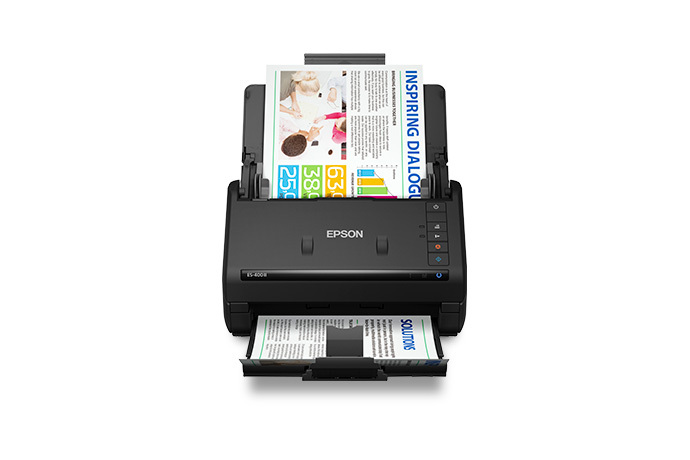
Epson also lists the ES-400 II as Certified ReNew, part B11B261201-N. The exact U.S. offer page retains the ES-400 II name and 50-sheet duplex/TWAIN description, and displays a one-year limited warranty and 30-day return-policy badges. Those are offer-level statements, not a new hardware assessment; check the current policy and exclusions for the exact suffix before ordering. The page does not provide an itemized renewed-box checklist or establish that an optional ES-400 II flatbed dock, separate Perfection scanner or carrier sheet is included. The image above represents the ES-400 II scanner body, not a renewed unit or its carton. See Epson's exact Certified ReNew listing and verify the package, condition and current terms for the chosen offer.
Key specifications
Key details at a glance
| Scanner class | Desktop sheet fed document scanner |
|---|---|
| Manufacturer-listed simplex rate | 35 ppm |
| Manufacturer-listed duplex image rate | 70 ipm |
| Automatic document feeder capacity | 50 sheets |
| Optical resolution | 600 dpi |
| Connection options | USB |
| Automatic duplex capture | Yes |
| Separate manual-feed route | No |
| Touchscreen | No |
| TWAIN driver documented | Yes |
Use the exact model’s instructions for operating limits, supplied equipment and version differences.
Sources for this review
Sources for this assessment
Compare the workflow before you choose
Use the finder to test your connection, paper and software requirements against the documented scanner arrangements.