
Your needs, this model
Does it fit your priorities?
Does the ES-65WR have USB and Wi-Fi?
Yes, Epson lists both setups, but its guide says USB and network use are not simultaneous. USB is a computer-host route; Wi-Fi supports compatible computer or Smart Panel phone capture. The LCD shows status, not scan profiles.
Explore this need in the finder →Can I scan a receipt from a phone and send it straight to cloud storage without a computer?
Epson documents Smart Panel mobile scanning, but the product's cloud-upload note specifies ScanSmart on an Internet-connected Windows PC or Mac. The phone route does not establish computer-free cloud; check Epson's current app and service support before relying on it.
Explore this need in the finder →Will it duplex or take a stack of 20 papers?
No. Epson's guide describes simplex sheet-feed operation and one-sheet paper capacity. Automatic Feeding Mode only accepts the next single sheet through the same slot; it is not a 20-sheet ADF or a separate manual-feed path.
Explore this need in the finder →Does the included TWAIN driver guarantee my accounting application works?
No. Epson lists a TWAIN driver and ScanSmart Accounting Edition tools, but the current operating system, application version and host support need checking. Accounting extraction is not a guarantee of field-level OCR accuracy.
Explore this need in the finder →Epson U.S. portable scanner reference · WorkForce ES-65WR Accounting Edition · B11B253203
The WorkForce ES-65WR is a small, one-page-at-a-time scanner with USB and wireless setups, a rechargeable battery and Epson's accounting-oriented software bundle. The "Accounting Edition" changes the workflow and software story, not the basic paper path: this is still a simplex mobile sheet-feed machine rather than a stack-feeding office ADF. This review covers the exact U.S. part B11B253203. It does not describe a seller's condition, a current offer, a separate carrier-sheet package or any purchase-specific warranty. I have not operated or independently tested the scanner.
Think portable sheet feed, not a miniature ADF
Epson calls the ES-65WR a mobile, sheet-fed scanner. Its shared ES-60W/ES-65WR guide describes one sheet of paper capacity and simplex capture. The Automatic Feeding Mode can keep a multi-page job together as one file, but it does so by accepting each next original after the prior one; it does not take a stack from a tray. Duplex is also absent, so the back of a two-sided form needs another pass. That distinction matters more than the word "automatic" if the goal is to load a pile and step away.
For individual receipts, signed pages, cards and occasional documents, the narrow workflow may be exactly the point: the scanner is about 10.7 by 1.9 by 1.4 inches and Epson lists a 0.66-pound weight. The guide allows receipts one at a time and lists a maximum long page, but the practical limits depend on the chosen route. Smart Panel does not scan long paper or long receipts and excludes originals that use a carrier sheet. If long, delicate or awkward records are routine, consider whether a desktop feeder or flatbed would reduce handling.
USB, Wi-Fi and the LCD are different things
The exact product page lists USB and wireless capture. Epson's family guide explains that USB and network connections cannot be used simultaneously. In a USB arrangement, a computer runs the scanner software; in a Wi-Fi arrangement, a compatible computer can scan over the network or a compatible phone can use Epson Smart Panel. The guide also describes a direct Wi-Fi setup. So the useful interpretation of "both" is that the owner can choose between setups, not that one scan travels through USB and Wi-Fi together.
The small LCD is not a touchscreen interface for selecting profiles. Epson describes it as a display for wireless and battery status, and the controls in the manual are physical buttons and switches. Someone seeking a panel that starts scans to destinations without a computer should look at a different model class, such as a screen-equipped desktop scanner, and verify its setup requirements.
Separate mobile capture from cloud delivery
Epson lists Smart Panel for compatible iOS and Android devices, which makes the ES-65WR more flexible than a USB-only travel scanner. The manual narrows that phone workflow: carrier-sheet originals and long paper or receipts are not supported in Smart Panel. Epson's product notes describe cloud upload through ScanSmart installed on an Internet-connected Windows PC or Mac. The presence of a phone app therefore does not establish that this exact scanner sends files directly from the phone to cloud storage without a computer.
The Accounting Edition proposition is similarly computer-centered. Epson says its receipt tools extract data and export to accounting destinations, but the product note states that the Accounting Edition software runs on the connected Windows PC or Mac and is not available for Android or iOS. That can suit a desk-based process in which receipts are scanned in the field and reviewed later on a computer. It is not a promise that every receipt field will be recognized correctly, that every named accounting service is supported by a given software release, or that corrections disappear. Review extracted dates, vendors, taxes and totals before using them as records.
Speed claims have specific conditions
Epson lists 15 pages per minute and describes a Letter page in as fast as four seconds. The specification footnote ties the rate to one-sheet capture at 300 dpi in black-and-white, color or grayscale. These are manufacturer conditions, not an independent measure of a full receipt-to-accounting workflow. Setup, feeding each sheet, software review, OCR correction, file naming and network or host performance all affect the task that a buyer actually cares about.
The family guide also gives an approximate 300 scans per charge under a particular continuous-feed, 300-dpi color Wi-Fi condition and about 3.5 hours for USB charging with the scanner off. Those figures should not be treated as a universal battery guarantee; an individual trip may involve different scan settings, pauses, host connections and battery age. The guide's long-document allowance also changes above 300 dpi, where it restricts the page length to 14 inches.
Where this model fits
The ES-65WR is a plausible fit for someone who values a light portable body, a phone-capable wireless alternative, a USB/TWAIN computer route and a receipt-oriented computer software bundle, and who accepts feeding every original separately. It is a weaker fit for duplex stacks, an ADF minimum of 20 sheets, computer-free touchscreen destinations, a separate manual feed inlet, or phone capture of long/carrier-sheet originals. Against a USB-only one-sheet scanner such as Epson's ES-50, the notable difference is wireless/mobile and battery capability—not duplex or a larger feeder.
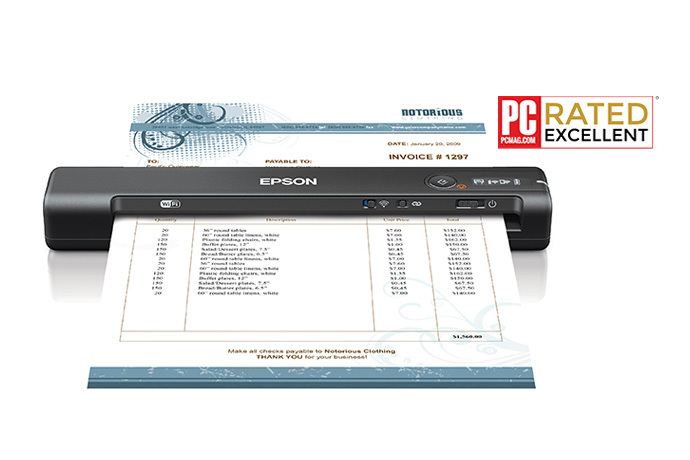
Before choosing an offer, confirm the B11B253203 model, current driver and operating-system support, compatibility of the target TWAIN application, the intended Smart Panel device, and whether the software workflow supports the accounting service in use. Check if an optional carrier sheet is needed and supplied; it is not assumed here. The official image shown with this review represents the scanner body and a staged page, not a test result or a box-content list. Sources: Epson's exact U.S. product page, support page and ES-60W/ES-65WR guide. No independent speed, endurance, OCR accuracy, feed reliability, price, rating or seller availability claim is made.
Key specifications
Key details at a glance
| Scanner class | Portable one-sheet sheet-fed scanner |
|---|---|
| Manufacturer-listed simplex rate | 15 ppm |
| Automatic document feeder capacity | 1 sheets |
| Optical resolution | 600 dpi |
| Connection options | USB / Wi-Fi |
| Automatic duplex capture | No |
| Separate manual-feed route | No |
| Touchscreen | No |
| TWAIN driver documented | Yes |
Use the exact model’s instructions for operating limits, supplied equipment and version differences.
Sources for this review
Sources for this assessment
Compare the workflow before you choose
Use the finder to test your connection, paper and software requirements against the documented scanner arrangements.