
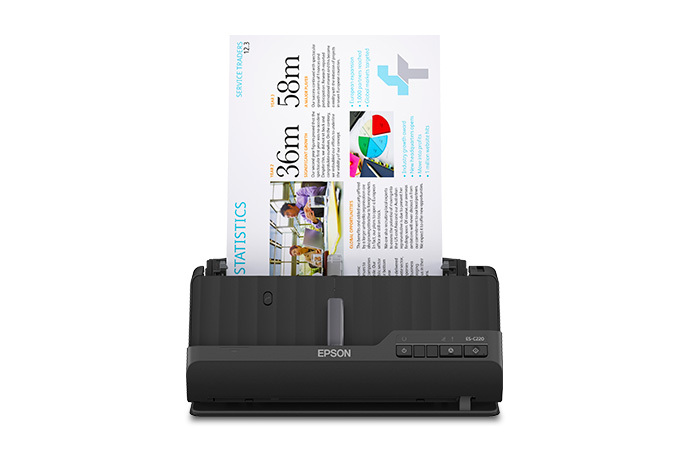
Your needs, this model
Does it fit your priorities?
Can the ES-C220 scan wirelessly to a phone or cloud without a computer?
The reviewed C220 configuration is USB-only. Epson's shared guide reserves Smart Panel mobile scanning and Wi-Fi/network procedures for the ES-C320W and RR-400W; the C220's ScanSmart cloud workflow is described for a connected computer. For phone-first or computer-free cloud use, compare a separately reviewed wireless model rather than borrowing a sibling's route.
Explore this need in the finder →Can the C220 scan both sides in a single pass?
Yes. Epson describes one-pass duplex capture and a 20-page feeder; the guide gives 20 sheets at 21 lb (80 g/m²), with lower counts for heavier stock. Its up-to-30-ppm/60-ipm rating is based on specified Letter-size 300-dpi modes and is not an end-to-end OCR or records-workflow result.
Explore this need in the finder →Does the stated 20-sheet capacity cover every paper stack?
No. The guide rates 20 sheets at 21 lb (80 g/m²), then lists 18 at 24 lb, 15 at 28 lb and 12 at 34 lb in the vertical path; special media and the one-at-a-time straight path are separate. The number is a paper-specific per-load limit, not a promise for every mixture or daily output.
Explore this need in the finder →Can it handle a passport or another thick original?
The guide describes a straight-path route for supported thick and irregular originals and specifically requires a compatible optional passport carrier sheet for passports. It is one original at a time, not a second feeder tray, and the carrier is not assumed to be in a retailer's box.
Explore this need in the finder →A compact sheet-fed duplex scanner for a computer-owned workflow, with a real limit worth reading closely: the ES-C220's 20-sheet feeder figure is tied to specified paper weight, and Epson lists this base model as USB rather than wireless.
What the ES-C220 is for
The U.S. model B11B272202 is a small desktop document scanner built around an automatic feeder and one-pass capture of both sides. That combination makes it relevant when a modest paper stack can be gathered near one computer and the scan software, filenames, review and storage will remain on that computer. Epson's current compact-scanner listing also identifies a TWAIN Driver, so the model has a documented route for compatible capture applications in addition to Epson's ScanSmart software. Neither fact proves that a particular computer, driver build or line-of-business program will work; check the current download for the exact operating system and the application owner's support matrix.
The product page rates throughput up to 30 pages per minute and 60 images per minute for letter-size scans at 300 dpi in black-and-white, grayscale or color. Treat that as Epson's stated scanner rating, not a test result or a promise of completed, correctly named, searchable files at that pace. Feeding, blank-page review, OCR, checking, saving and organizing all take place around the scan itself. The page promotes ScanSmart for preview, email, upload and OCR assistance, but its software download and installation require an Internet-connected Windows PC or Mac.
USB only is a substantive workflow choice
Epson identifies USB connectivity for the ES-C220 and labels its display type “No Display.” Its shared user guide distinguishes the C220's physical power, stop and start controls from the additional Wi-Fi controls on the ES-C320W/RR-400W pages. The wireless-network, Wi-Fi Direct and Smart Panel mobile sections are scoped to those latter models. That distinction matters: the C220 is not a phone-first scanner, does not offer the documented phone-led cloud path of the C320W, and does not provide the ES-C380W's touchscreen profile controls. A phone or computer application is not a scanner touchscreen.
For a desk with a nearby supported computer, USB may be exactly the uncomplicated connection required; it also gives the host software an obvious place to manage capture and saved files. If more than one person needs to send scans from different locations, if a scanner must live on Wi-Fi, or if scans must reach cloud storage without a computer at scan time, choose an individually reviewed wireless model instead. Do not infer those functions from the fact that the manuals share some pages or from generic language on a driver-download screen.
Read the feeder number as a paper limit
The headline is a 20-page automatic document feeder, but the English guide sets its standard-paper loading basis at 20 sheets of 21 lb (80 g/m²). It lists 18 sheets at 24 lb, 15 at 28 lb and 12 at 34 lb for the stated vertical-path setup. Paper size and type have their own table entries, while the straight path takes one original at a time. A capacity figure is therefore a number for one supported loading condition—not a general guarantee for any pile, a mixed stack or a day's output.
The one-pass duplex design can avoid manually turning ordinary two-sided pages, which is the practical reason to consider this over a simplex feed. For the small, predictable stack described above, 20 sheets may be enough to make batch loading useful. If every batch must clear 30 sheets, this model's documented feeder ceiling cannot satisfy that minimum. If heavier stock is common, use the lower weight-specific values rather than planning around the boldest 20-sheet number.
Special originals require a different path
The scanner can be repositioned between vertical and straight paper paths. Epson describes the straight path for supported thick or long originals, cards, envelopes and irregular papers; the sheet exits from the front, so that route needs clear space there and is not a second feeder tray. For passports, Epson requires a compatible optional carrier sheet. The carrier is not established as included with any particular seller's unit, and the guide gives other originals separate size, thickness, count and software restrictions. Confirm the exact item against the instructions before loading it; “handles passports” does not mean feed every valuable original bare or assume a larger automatic batch.
The model's rated maximum length is also conditional: the guide allows up to 120 inches at 50–300 dpi and up to 30 inches at 301–600 dpi. If long-paper work is routine, the selected resolution and scan method need to fit that limit. The scanner's approximate 11.7-inch width and 4-pound weight suit a small desktop footprint, but the output tray and straight-path position still need working room.
How it compares with its compact siblings
The ES-C220 and ES-C320W share a compact, 20-sheet, one-pass duplex premise, but their routes are not interchangeable. Epson's U.S. compact page identifies the C220 as USB and the C320W as USB plus Wi-Fi; the latter manual sections document Smart Panel mobile scanning and cloud upload. The separate ES-C380W also has wireless capability and adds a 2.4-inch color touchscreen. The C220's no-display, physical-button arrangement is not a missing version of those controls—it is a different operating profile. Someone who will always use a host computer may not need the extras. Someone who needs on-device setup, mobile capture or wireless placement should compare those exact sibling configurations instead.
A higher-capacity desktop model such as the ES-400 II is another comparison if the limiting factor is how often the tray must be reloaded, rather than wireless access. Epson lists that model with a larger feeder. Compare the stated stock basis and exact software route for both units, not just the headline speed or product-family name.
Who should shortlist it
The C220 is worth considering when USB-to-computer scanning is essential, one-pass duplex and a modest 20-sheet standard-paper batch cover the expected job, and the available TWAIN/ScanSmart path fits the named host and software. Its limitations are equally concrete: no documented Wi-Fi, mobile or computer-free cloud arrangement for this configuration; no on-device display; reduced feeder loads for heavier stock; and an optional-carrier check for passport use. If any of those are hard requirements, the finder should eliminate this model rather than treating a shared family manual as proof.
Before buying, verify the nameplate or listing SKU B11B272202, the seller's actual unit condition and package, the computer's current driver support, the application-specific TWAIN requirement, the paper-weight table and any carrier sheet you need. Epson's separate Certified ReNew entry uses the suffix B11B272202-N and showed out of stock when inspected; that is a different offer condition and not the base SKU reviewed here. No current seller price, package contents or offer availability is asserted. This is a source-based assessment; no hands-on scan, speed, OCR accuracy or durability test was conducted.
Primary references
- Epson U.S. ES-C220 product page
- Epson U.S. ES-C220 support and downloads
- Epson ES-C220/ES-C320W/RR-400W English User's Guide
- Epson U.S. compact-scanner listing
Key specifications
Key details at a glance
| Scanner class | Compact desktop document scanner |
|---|---|
| Manufacturer-listed simplex rate | 30 ppm |
| Manufacturer-listed duplex image rate | 60 ipm |
| Automatic document feeder capacity | 20 sheets |
| Optical resolution | 600 dpi |
| Connection options | USB |
| Automatic duplex capture | Yes |
| Separate manual-feed route | Yes |
| Touchscreen | No |
| TWAIN driver documented | Yes |
Use the exact model’s instructions for operating limits, supplied equipment and version differences.
Sources for this review
Sources for this assessment
- Epson U.S.: WorkForce ES-C220 Compact Desktop Document Scanner with Auto Document Feeder
- Epson U.S. Support: ES-C220
- Epson ES-C220/ES-C320W/RR-400W User's Guide, English, CPD-63180
- Epson U.S.: Compact Document Scanners
- Epson U.S.: ES-C220 Certified ReNew product entry
- Epson U.S.: exact ES-C220 product-gallery image
Compare the workflow before you choose
Use the finder to test your connection, paper and software requirements against the documented scanner arrangements.