
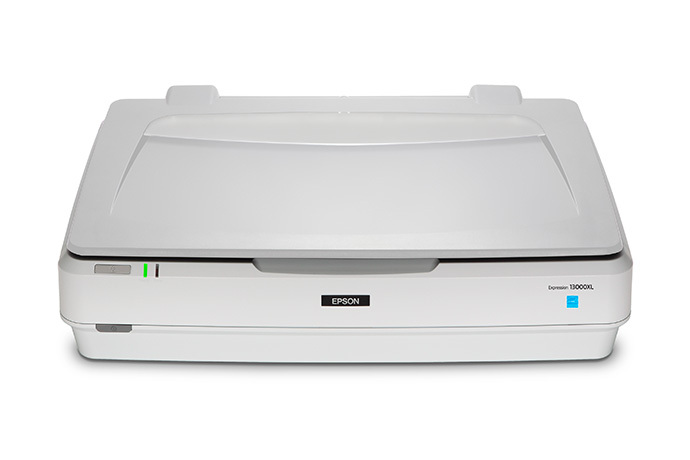
Your needs, this model
Does it fit your priorities?
Can the Expression 13000XL capture an oversized reflective document?
Yes, if the original fits the 12.2 × 17.2-inch glass. Epson Scan 2 Document Mode is intended for text originals, and its source is fixed to Scanner Glass.
Explore this need in the finder →Does the 12.2 × 17.2-inch figure mean it can load a stack of that size?
No. That is the flatbed document area; no ADF or numeric feeder capacity is documented. Each original is placed on the glass by hand.
Explore this need in the finder →Will it automatically scan both sides of a page?
No automatic duplex route is specified in the exact guide; a second side would need manual handling.
Explore this need in the finder →Is the scanner’s glass a separate manual-feed inlet?
No. It is the only described Document Mode source, not a separate manual-feed route alongside an ADF.
Explore this need in the finder →Does the exact model support a TWAIN workflow?
Epson product information identifies an included TWAIN driver and the guide discusses TWAIN-compliant applications. Verify the current driver, host operating system and named application rather than assuming universal compatibility.
Explore this need in the finder →Can a phone scan through built-in Wi-Fi or send directly to cloud storage without a computer?
No such route is documented in the reviewed exact-model sources; the described plan uses USB and computer software.
Explore this need in the finder →Is the optional A3 Transparency Unit part of every base scanner offer?
No. Epson identifies the unit as optional; verify the exact seller package and part if film scanning is required.
Explore this need in the finder →Research-based assessment of the exact Epson U.S. Expression 13000XL Archival Scanner, part B11B257201. I have not tested or owned this model. The assessment uses Epson's exact product and support pages and its user guide; it makes no claim about a particular seller's stock, package or condition.
A large-format flatbed with a real document mode
The Expression 13000XL sits in Epson's Photo and Graphics line, and its retail description emphasizes archival photography and graphic arts. That positioning matters: this is not a conventional office ADF scanner. I include it in a document-scanner comparison for a narrower reason than its name alone: the exact model guide gives Epson Scan 2 a dedicated Document Mode for text originals, with document-specific adjustments and searchable-PDF output. For an organization that sometimes needs to capture oversize paper originals as well as photographs or artwork, that is a meaningful document workflow rather than an inference from generic image scanning.
Its useful difference is the size of the glass. Epson specifies a reflective document area up to 12.2 by 17.2 inches, compared with the letter/A4 beds common on small personal flatbeds. The guide identifies it as a flatbed A3 color image scanner and explains that Document Mode fixes the source to Scanner Glass. A sheet, map, chart or other flat original within that area can be scanned from the platen; the size figure describes that glass, not a feeder load or the scanner's outer dimensions.
Document Mode is host software, not automatic paper handling
In the guide, the operator places the original, launches Epson Scan 2 on Windows or Mac and chooses Document Mode. Text Enhancement can sharpen blurred letters; other settings address mixed text-and-image pages and printed-paper moiré. Epson also documents saving a searchable PDF, which embeds recognized text, with the required OCR component installed. These are useful capture and retrieval tools, but searchable output depends on settings, software and legibility; it is not a guarantee that every original will be recognized correctly.
The glass-only source is the central trade-off. Epson does not document an ADF or a numeric feeder capacity for this configuration, so it cannot be treated as a stack scanner or matched to a minimum ADF load. Each original has to be placed and removed from the platen by hand. The manual does not document automatic duplex, and the questionnaire's separate manual-feed feature means an occasional-special-original inlet alongside a regular feeder, not a flatbed's one glass source. No touchscreen or on-device profile selection is specified; its physical start control begins a software-driven scan.
That distinction also limits what Epson's product-page “batch scanning” claim means here. The page describes scanning several images at once on the flatbed, a photo workflow; it does not make the scanner an automatic document feeder. A stack of two-sided invoices still requires individual platen handling and manual page turning. If that would dominate the work, a duplex ADF model is the more relevant class to compare.
USB, TWAIN and the host boundary
The model guide specifies one Hi-Speed USB interface; Epson's product information identifies the included connection as USB 2.0, Type-B. The documented plan is therefore a scanner connected to a computer running Epson scanning software. The reviewed sources do not establish built-in Wi-Fi, phone/tablet scanning or a scanner-only cloud destination, so do not infer those routes from the fact that the resulting file can be shared later.
TWAIN is a positive distinction here. Epson's product information says the TWAIN driver is included, and the manual discusses selecting the scanner in TWAIN-compliant applications and troubleshooting that path. That supports a TWAIN-capable workflow, not universal compatibility: check Epson's current driver for the exact host operating system and confirm that the named capture application supports it. A successful Epson Scan 2 export alone would not answer that question.
Space, optional film hardware and a sensible use case
The manual lists the base scanner at about 31.5 pounds and approximately 25.8 by 18.4 by 6.2 inches. Leave room for the lid to open and for originals wider than a desk scanner's normal paper path. Epson presents the optional A3 Transparency Unit as an additional way to scan film and slides; it is not a reason to assume that a seller's scanner listing includes that accessory. Confirm the exact part and package contents if transparent originals are part of the job.
This is most plausible when a computer-based workflow needs a large platen for occasional oversized reflective originals, with careful one-at-a-time handling and document-specific software settings acceptable. It is a poor fit for unattended stacks, routine double-sided batches, a compact desk, or a phone-first process. Its high-resolution imaging and photo-oriented software may be attractive in archives or graphics work, but those strengths do not substitute for feed capacity.
Before choosing a B11B257201 offer, check the part label, the intended host's current Epson Scan 2 and TWAIN support, available desk space, and whether the required source is a flat original that fits the 12.2 by 17.2 inch bed. Verify whether the optional Transparency Unit is actually part of the seller's package and assess the seller's condition, returns and warranty independently. Compare the USB and software guide and the feeder and duplex guide; keep the same USB condition in the finder.
Key specifications
Key details at a glance
| Scanner class | USB-connected flatbed document scanner (manual platen) |
|---|---|
| Optical resolution | 2400 dpi |
| Connection options | USB |
| Automatic duplex capture | No |
| Separate manual-feed route | No |
| Touchscreen | No |
| TWAIN driver documented | Yes |
Use the exact model’s instructions for operating limits, supplied equipment and version differences.
Sources for this review
Sources for this assessment
- Epson U.S. All Scanners catalogue, exact current two-page response
- Epson U.S. All Scanners catalogue, page 2 of the exact current response
- Epson U.S. Expression 13000XL Archival Scanner product page
- Epson U.S. support page: Expression 13000XL
- Epson Expression 13000XL User’s Guide
- Epson official Expression 13000XL product-gallery image
Compare the workflow before you choose
Use the finder to test your connection, paper and software requirements against the documented scanner arrangements.