
Your needs, this model
Does it fit your priorities?
Does the RR-600W have both USB and Wi-Fi, and can it use them in the same scan?
Epson identifies USB and Wi-Fi for B11B258202, but these describe distinct arrangements: USB-connected host capture and a wireless touchscreen/Smart Panel route. They are not proof that one scan uses both links simultaneously.
Explore this need in the finder →Can the RR-600W send a scan to cloud storage without a computer at the scanner?
Yes, after setup. Epson documents computer-free touchscreen destinations, but the guide requires network configuration, Epson Connect registration and a saved destination. Internet access and the current cloud service matter; USB host capture is a different plan.
Explore this need in the finder →Does a 100-sheet feeder mean 100 sheets for every stock and size?
No. Epson rates 100 Letter sheets at 80 g/m² and 80 Legal sheets at that weight; heavier Letter stock has lower listed loads. Use the model guide for the actual paper and treat this as a one-loading limit, not a daily-output figure.
Explore this need in the finder →Is Automatic Feeding Mode a separate manual-feed route?
No separate route is established. Epson's Automatic Feeding Mode starts in host software and asks the operator to place each next original into the same ADF. A separately sold carrier sheet protects selected originals but still travels through that feeder.
Explore this need in the finder →Epson U.S. desktop scanner reference · RapidReceipt RR-600W · B11B258202
The Epson RapidReceipt RR-600W is a desktop duplex document scanner whose receipt-management framing is only part of its use: the manufacturer also describes general document capture, a 100-sheet ADF, mobile scanning and touchscreen destinations. This assessment is for the exact U.S. base part B11B258202. A renewed suffix, seller bundle, used unit, optional carrier sheet or specific warranty entitlement is not included. The scanner was not operated or independently tested.
Distinguish the exact part and the similar RR-620W
Epson identifies the RR-600W separately from the newer RR-620W. Their base U.S. parts are B11B258202 and B11B288203, respectively; they should not be collapsed into one listing just because both are wireless, touch-controlled desktop receipt scanners. Epson currently gives the RR-600W an up-to 35 pages/70 images per minute claim, while the RR-620W page states 45/90 under its own stated USB test conditions. Those are manufacturer ratings, not independent results. Confirm the part number on any offered device before comparing specifications, software or an accessory package.
Read the ADF number as a loading rule, not a workload promise
The RR-600W's guide is more useful than a standalone “100-page feeder” phrase. For Letter paper, Epson specifies 100 sheets at 80 g/m² in a stack under 12 mm; at 90 g/m² it lists 86, then 74 at 104, 62 at 127, 50 at 157, 38 at 209, 30 at 256 and 18 at 413 g/m². The Legal limit is 80 sheets at 80 g/m². The guide explicitly says capacity varies with paper type. These are per-load values; they do not imply 100 of every form, an all-day rate, or successful feeding of mixed, curled, sticky or fragile originals. If a task needs more than 100 Letter sheets in one loading, the published basis does not meet it.
Keep the computer, mobile and touchscreen routes separate
The RR-600W offers USB and Wi-Fi. A USB-connected computer plan supports conventional Epson software and the TWAIN workflow Epson names for this model; verify today's driver against the exact operating system and capture application. A separate wireless route supports Epson Smart Panel on iOS and Android. Epson says the 4.3-inch touchscreen can start scans without a computer at the device, including to configured email, cloud or USB-memory destinations. That is not a claim that the unit needs no network or account setup.
The manual treats cloud transfer as a configured service workflow. Connect the scanner to the network, register it with Epson Connect, and add a destination before relying on a touchscreen send. Epson notes that internet access is needed for some applications and that service availability can change. The direct USB-storage route also has filesystem, capacity and security-device restrictions in the guide. A locally attached computer, an app-based phone scan and a panel-originated cloud delivery solve different jobs; one should not be inferred from another.
Receipt automation does not remove file-checking work
Epson's ScanSmart Accounting Edition is presented as a way to extract receipt and invoice information and export it to financial software. The product page's notes make clear that accounting export uses ScanSmart Accounting Edition on a connected Windows PC or Mac, not the Android/iOS app; some applications require internet. OCR can speed organization, but it does not certify that a vendor, date, tax field or total was read correctly. Review extracted records before they become accounting entries. Searchable PDFs and image adjustments likewise depend on included software, settings and the source document; they are not guarantees of transcription accuracy.
Special documents still need a route decision
The RR-600W has an ADF, not a flatbed. Epson's guide lists supported receipts, business cards and certain plastic or laminated cards but imposes type-specific limits. It also excludes fragile or awkward originals such as photos, booklets and passports from direct feeding; a separately sold carrier sheet is listed for selected photos, folded oversized or irregular originals. That accessory remains an ADF path, not a second manual-feed inlet. The host-started Automatic Feeding Mode lets the operator place originals one at a time through the same feeder, so it does not satisfy a requirement for a separate manual-feed route.
Where the RR-600W fits—and what to verify
It is a plausible fit for a home office or small business that wants a relatively large 100-sheet Letter load, duplex capture, digitized receipts plus ordinary documents, and optional phone or computer-free destinations. It is less compelling if the routine is USB-only and does not use the touchscreen, or if the primary need is a separate platen, a genuinely manual document path, or direct fragile-original handling. The RR-620W is a distinct comparison with a higher published speed rating, not proof of a universal performance difference in the buyer's own files.
Before choosing an offer, check the exact B11B258202 part, the condition and return terms, the current operating-system driver, the named TWAIN application, Smart Panel support for the intended phone, actual paper sizes/weights, network policy, cloud-service setup and whether the needed carrier sheet is included. Current-reference status does not establish seller stock or a unit's purchase-specific coverage. Research for this review used Epson's exact RR-600W page, support route, the RR-600W User's Guide and Epson's RapidReceipt announcement. No independent speed, OCR-accuracy, reliability, customer-experience, price or availability claim is made.
Certified ReNew RR-600W: same scanner identity, separate offer terms
Epson separately identifies a RapidReceipt RR-600W Certified ReNew offer as part B11B258202-N. The offer page names the same RR-600W and repeats its scanner capability description; the suffix distinguishes the renewed offer from the base B11B258202 assessed above, not a documented change to the scan engine. This is a condition/offer cross-reference to the existing RR-600W review, not a second hardware assessment.
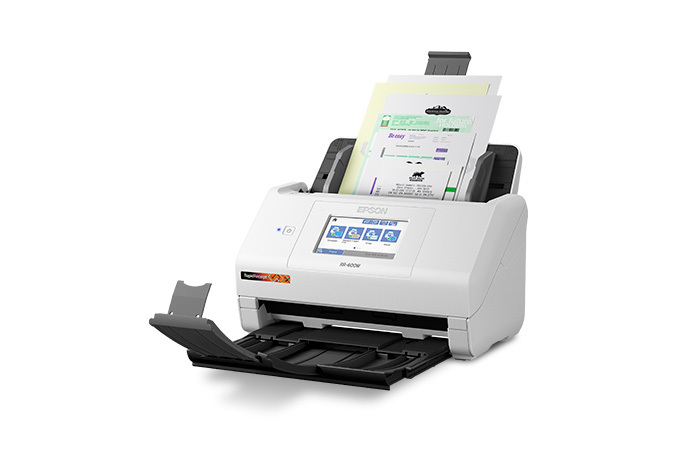
When checked on November 1, 2026, Epson's exact U.S. offer page displayed a one-year limited-warranty badge and a 30-day return-policy badge. The return-policy text is for purchases made directly from Epson.com and refers buyers to the applicable terms; confirm the current checkout terms and exclusions rather than transferring them to another seller. The listing does not provide a complete renewed carton checklist or a cosmetic-condition grade. Verify the exact suffix, supplied accessories/software and unit condition before purchase. The official RR-600W image above depicts the scanner body, not a renewed unit or package contents. See Epson's exact RR-600W Certified ReNew offer page. No current stock, price, third-party seller terms or customer experience is asserted.
Key specifications
Key details at a glance
| Scanner class | Desktop sheet fed document scanner |
|---|---|
| Manufacturer-listed simplex rate | 35 ppm |
| Manufacturer-listed duplex image rate | 70 ipm |
| Automatic document feeder capacity | 100 sheets |
| Optical resolution | 600 dpi |
| Connection options | USB / Wi-Fi |
| Automatic duplex capture | Yes |
| Separate manual-feed route | No |
| Touchscreen | Yes |
| TWAIN driver documented | Yes |
Use the exact model’s instructions for operating limits, supplied equipment and version differences.
Sources for this review
Sources for this assessment
- Epson U.S. Receipt Scanners catalogue, RR-600W card
- Epson U.S. RapidReceipt RR-600W exact product page, B11B258202
- Epson U.S. RR-600W support and Smart Panel route
- Epson RR-600W User's Guide, selected model-specific sections
- Epson newsroom: RapidReceipt scanner and software announcement
- Epson RR-600W exact product-gallery image
- Epson U.S. Certified ReNew RR-600W offer page, B11B258202-N
- Epson U.S. Certified ReNew parent listing, current in-stock state
Compare the workflow before you choose
Use the finder to test your connection, paper and software requirements against the documented scanner arrangements.