
Your needs, this model
Does it fit your priorities?
Does the fi-4340C have an automatic feeder and a flatbed?
Yes. The exact archived model page and operator guide describe a duplex ADF plus a separate document bed. The page lists ADF originals up to A4 or Legal and flatbed originals up to A4 or Letter; it does not make the platen a sheet-stack feeder.
Explore this need in the finder →How many sheets can its ADF load?
PFU's exact-model page and guide both state a maximum of 100 A4 sheets per loading, but their printed weight bases conflict: 80 g/m² (20 lb) on the page versus 64 g/m² (20 lb) in the guide. Do not apply that limit to every paper stock or to daily throughput.
Explore this need in the finder →Can I assume its TWAIN driver works with a current computer?
No. PFU documents old TWAIN/ISIS releases and dated Windows support tables for this exact model, not current OS, application, processor-architecture or license compatibility. Verify the precise host and software route before relying on a used unit.
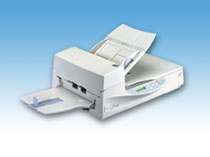
Explore this need in the finder →The fi-4340C is an earlier Fujitsu/PFU color document scanner with both an automatic document feeder and a glass document bed. It appears twice in PFU America’s U.S. “Discontinued for Service” roster. The two rows point to different replacement pages: the first opens the fi-7480 and the second the fi-7280. Those are vendor replacement destinations, not proof that the fi-4340C was two configurations or that either newer scanner has the same hardware. This review covers one old model identity; no U.S. sales part number or current seller package is established.
A useful combination for A4-size work
The archived exact-model page describes the scanner as an A4 duplex color model. Its ADF takes sheets up to A4 or Legal, and the separate flatbed is listed for A4 or Letter originals. That combination is more flexible than an ADF-only transport when an original is better placed on glass, but it is not a book-sized platen: check the exact original against the published flatbed dimensions before choosing it for bound material.
PFU lists 100 sheets as the maximum A4 feeder load. The paper basis is not consistent across its sources: the archived product page pairs 100 sheets with 80 g/m² (20 lb), while the operator’s guide prints 64 g/m² (20 lb). Because those metric and pound figures do not agree, the safest reading is that the named model has a 100-sheet A4 capacity but its applicable stock basis needs the correct loading instructions. It is a per-loading limit, not a daily-work rating or a promise for mixed weights. The page also lists a broad 52–127 g/m² range; that should not be read as permission to load 100 of the heaviest sheets at once.
Do not select a speed from the conflicting tables
The manufacturer’s archived page lists color capture at 35 pages per minute and 59 images per minute at 150 dpi, and grayscale at 40 pages per minute and 80 images per minute at 200 dpi. Its operator guide gives a different color row—34 pages and 48 sides per minute at 150 dpi—while its monochrome row is 40 pages and 80 sides per minute at 200 dpi. The manual warns that these are maximum mechanical rates and that data transfer and software add time. The color discrepancy is unresolved, so no single duplex figure is used here as a dependable job rate. These are manufacturer specifications, not a hands-on test.
The sources list 600 dpi optical resolution, a double-sided CCD arrangement, and infrared multi-feed detection. The detector may help identify a feeding problem, but it does not make every overlap or delicate page safe. The archived page also lists a long-page mode; confirm the model’s original loading instructions for unusual lengths or paper before feeding them.
Two older wired interfaces, selected one at a time
The exact-model record lists USB 2.0/1.1 and SCSI-2. The operator guide says USB, SCSI-2 and the optional board slot cannot all be used simultaneously. USB is the less specialized route, but it does not by itself establish that a current computer has a working driver. SCSI-2 may require a compatible host adapter and cable that a particular used seller may not include. Neither connection should be inferred from the model name alone; ask for a clear rear-panel photo and the exact items in the offer.
PFU’s archived model-specific support page lists TWAIN and ISIS drivers, with dated operating-system tables from the Windows 95/NT/98 era through Windows 7/8/8.1-era releases. The page warns that operating systems not listed are not compatible with those archived downloads. That history helps identify the scanner’s intended computer workflow, but it is not current support. Confirm the precise OS version, processor architecture, capture application, interface card, software media and license before planning a production workflow. A phone/tablet route, Wi-Fi mode and computer-free cloud destination are not documented in the material reviewed here.
Used-unit details matter more than the old bundle list
PFU’s archived page names consumable parts, a pad assembly and pick roller, and lists an optional imprinter and image-processing boards. These details are useful when identifying parts or asking a seller what is installed; they do not say what is in a present-day carton. The same old page has a historical equipment list, but a used listing may omit cables, tray pieces, software media or accessories. The U.S. roster’s discontinued-for-service label also means PFU says the model is no longer eligible for extended service coverage. It does not establish a particular unit’s health, repairability or seller warranty.
The manual prints dimensions of 556 × 423 × 220 mm without the ADF paper chute and stacker. It reports a 15 kg weight, but its pound conversion conflicts with the archived page, so the pound figure is left unresolved. Leave room for the actual feed/stack attachments and verify the nameplate and physical condition rather than treating the small archived product photograph as a package image.
Who should keep it on a shortlist?
This is a highly conditional candidate for someone who specifically wants both duplex ADF loading and an A4/Letter flatbed, can work with an older wired scanner, and can verify a real host/driver path before purchase. The fi-4340C is not a current wireless home-office choice and should not be bought on the assumption that its historical TWAIN interface will connect to a modern system. Buyers should compare its 100-sheet A4 limit with their paper stock, test the feeder and glass path on the exact unit, and confirm the exact accessories, consumable state, return terms and software rights.
Finally, the two different PFU replacement links should not be used as a shortcut for comparing specs: one leads to fi-7480, the other to fi-7280, and neither source says that those models are equivalent to this device. The fi-4340C’s own archived specifications and its explicit limitations are the basis for this assessment.
Sources: PFU America U.S. discontinued scanner roster; PFU/Ricoh archived fi-4340C specifications; PFU fi-4340C Operator’s Guide; PFU/Ricoh archived fi-4340C software compatibility page.
Key specifications
Key details at a glance
| Scanner class | Professional departmental flatbed adf |
|---|---|
| Automatic document feeder capacity | 100 sheets |
| Optical resolution | 600 dpi |
| Connection options | USB / SCSI-2 |
| Automatic duplex capture | Yes |
| TWAIN driver documented | Yes |
Use the exact model’s instructions for operating limits, supplied equipment and version differences.
Sources for this review
Sources for this assessment
- PFU America U.S. discontinued-for-service scanner roster
- PFU America fi-7480 replacement destination reached from the first fi-4340C row
- PFU America fi-7280 replacement destination reached from the second fi-4340C row
- PFU/Ricoh archived exact fi-4340C model page and specifications
- PFU-hosted fi-4340C Image Scanner Operator's Guide
- PFU/Ricoh archived fi-4340C software downloads and operating-system table
- Official archived fi-4340C model-page-linked scanner image

Compare the workflow before you choose
Use the finder to test your connection, paper and software requirements against the documented scanner arrangements.