
Your needs, this model
Does it fit your priorities?
Does the 50-sheet feeder meet a 50-sheet minimum?
The historical U.S. sheet rates up to 50 Letter/A4 sheets at 20 lb (80 g/m²) per load, and the PFU archive gives a matching 50-sheet A4 basis. Heavier or unusual paper can reduce a practical load; it is not a daily volume promise.
Explore this need in the finder →Is a TWAIN-based capture application a documented route?
Fujitsu lists legacy TWAIN and ISIS drivers, and PFU says TWAIN-supporting drivers were made available as downloads. This proves historical interface support, not that a present OS or application can install them. Confirm the exact host and program before relying on a used scanner.
Explore this need in the finder →Can it scan over Wi-Fi or directly from a phone?
The reviewed model specification documents USB to a host computer only. No Wi-Fi or mobile-device route is established, so this is not a fit where either is essential.
Explore this need in the finder →Review basis: This is a research-based assessment of the Fujitsu fi-5110C scanner model, not a personal test. PFU America lists it under Workgroup in its discontinued-for-service roster, whose introductory text says these models are no longer eligible for extended service. An official U.S. datasheet identifies the model and a U.S. part number, but neither source describes a particular second-hand unit or its present package.
A 50-sheet duplex claim with a defined paper basis
The fi-5110C is an automatic document-feeder scanner with two-sided capture. Fujitsu's U.S. brochure specifies up to 15 pages per minute simplex and 30 images per minute duplex for monochrome/grayscale at 200 dpi and color at 150 dpi. The archived exact-model PFU page agrees on the 15/30 rate and identifies a 600-dpi optical resolution. These are manufacturer scanner figures, not observed file-processing times; transfer, image adjustments, OCR, host speed and the selected application add work.
Its feeder is rated for 50 Letter/A4 sheets at 20 lb (80 g/m²), not for every possible stack of 50. Paper thickness, condition and alignment still matter, and the manufacturer's stated media range is 52–127 g/m². Legal-size originals fit the listed maximum of 8.5 by 14 inches; long-page scanning is specified up to 34 inches. A feeder maximum is a per-loading number, not a daily volume or an endurance rating. If your everyday paper is heavier, mixed in size, curled or difficult to separate, follow the exact loading instructions and use a smaller batch when appropriate.
USB and legacy driver assumptions
This model's documented host connection is USB 2.0, with USB 1.1 compatibility noted in the exact PFU page. There is no Wi-Fi or scanner-side network plan in the reviewed material, and no supported phone route is established. It suits a computer-centered desk only if the actual host can still run a suitable capture path. Fujitsu's U.S. brochure lists TWAIN and ISIS drivers for old Windows editions, and the archived PFU page says TWAIN-supporting drivers were available as web downloads. Those historical references do not guarantee that a present Windows build, Mac, 64-bit application or specific document-management program will recognize a used machine.
The model is therefore a poor choice if your project depends on an up-to-date driver package or on an application whose supported operating systems cannot be changed. A TWAIN label is relevant only after checking the exact scanner driver, host version and target application together. The historic brochure also lists bundled software and a USB cable, but that describes the period package, not what a seller must include now. No separate manual-feed route is documented in the inspected model material, so do not treat the ADF as a confirmed bypass for fragile one-off originals.
Maintenance and feed protection are part of the decision
PFU's archived page lists infrared multi-feed detection, a paper counter and consumables including a pad assembly and pick roller. It also gives a replacement-cycle basis tied to plain A4 paper and warns that the interval varies by paper type and condition. These items make a used unit's history consequential: worn separation parts, residue, damaged feed rollers or uncertain cleaning can matter more than the rated speed. The sensor can flag some multiple-feed events; it does not guarantee that every attached sheet, skew or jam will be detected before a bad scan.
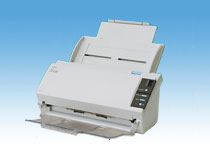
The fi-5110C is relatively compact in its historical specification—about 11.6 by 6.5 by 5.1 inches and 5.9 pounds—and the exact image shows its chassis and physical controls. That visual is not proof of a seller's cosmetic condition, working state, power adapter or carton contents. The manufacturer describes a desktop ADF rather than a flatbed, so bound material and delicate pages needing glass support belong in another workflow.
How it differs from the fi-5120C
The nearby fi-5120C shares a 50-sheet duplex ADF class but is not the same scanner. PFU's archived page gives it a selectable Ultra SCSI or USB interface, ultrasonic multi-feed detection and a faster rate in its detailed table. The fi-5110C is USB-only in the inspected specifications and uses an infrared sensor. Neither difference increases the 50-sheet per-load rating. Choose between these two only after deciding whether an old host/controller is supportable; do not assume the 5120C's SCSI connection works at the same time as USB.
Checks before considering an earlier unit
The fi-5110C may be a conditional fit for an organization with a verified legacy computer and TWAIN/ISIS workflow, ordinary Letter/legal documents, a qualified 50-sheet loading requirement and a known source for consumables. It is a mismatch for Wi-Fi/mobile capture, a touchscreen, a flatbed, a documented modern driver path or a required separate manual-feed route. This review does not claim ownership, testing, availability, or that a seller's unit works.
Before buying, confirm the model label and U.S. part, power adapter and cable, feeder trays, working condition, roller/pad history, return terms and exact driver installation on the intended computer. Treat the old bundle list as historical only: do not assume Acrobat, QuickScan, setup media, a license or a transferable service term is in the box. Preserve a test batch until both sides and the saved files have been checked.
Primary references: Fujitsu U.S. fi-5110C datasheet · PFU/Ricoh archived fi-5110C specifications and accessories · PFU America U.S. discontinued roster.
Key specifications
Key details at a glance
| Scanner class | Professional desktop sheet-fed scanner |
|---|---|
| Manufacturer-listed simplex rate | 15 ppm |
| Manufacturer-listed duplex image rate | 30 ipm |
| Automatic document feeder capacity | 50 sheets |
| Optical resolution | 600 dpi |
| Connection options | USB |
| Automatic duplex capture | Yes |
| Touchscreen | No |
| TWAIN driver documented | Yes |
Use the exact model’s instructions for operating limits, supplied equipment and version differences.
Sources for this review
Sources for this assessment

Compare the workflow before you choose
Use the finder to test your connection, paper and software requirements against the documented scanner arrangements.