
Your needs, this model
Does it fit your priorities?
How many sheets can its automatic feeder take in one load?
The U.S. fi-5530C sheet rates up to 100 Letter/A4 sheets at 20 lb (80 g/m²), but only 50 sheets for 11 x 17/A3 paper at that stock basis. The Operator's Guide reduces the plotted capacity for heavier stock. Treat 100 as the standard Letter/A4 per-load rating, not a mixed-paper promise or daily volume.
Explore this need in the finder →Is a TWAIN capture route documented?
Yes, historically: Fujitsu's U.S. sheet lists TWAIN and ISIS, and PFU's exact-model software matrix lists a TWAIN driver release dated 2021. That matrix's shown client OS support runs only through Windows 7, and it says Kofax VRS support has ended. Do not assume a current Windows/macOS/Linux app or a used unit's software license will work.
Explore this need in the finder →Can it scan bound books on a glass platen?
No. The exact fi-5530C is described as an ADF scanner, not a flatbed. A bound book or item that cannot safely travel through this model's feeder needs a different documented capture surface; do not transfer the neighboring fi-5530C2 or another model's flatbed features.
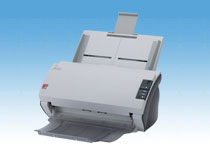
Explore this need in the finder →The fi-5530C is an earlier Fujitsu/PFU departmental scanner: an A3-capable duplex automatic document feeder, not a flatbed. This is a manufacturer-source assessment of the U.S. model and its legacy drivers. I have not used or tested the scanner, and no current seller offer, working condition, price or package is established.
Identity first: one roster model, with a part-label caveat
PFU America's U.S. Discontinued for Service roster lists fi-5530C in the Departmental column. It says those entries are no longer eligible for extended service coverage and points each scanner name to a replacement model. The fi-5530C link opens the separate fi-7480 page. That is the manufacturer's replacement pointer, not proof that the two models have interchangeable specifications, software or parts. The fi-5530C should also stay distinct from the separately named fi-5530C2 and fi-4530C.
The historical U.S. data sheet identifies fi-5530C part PA03334-B305. There is a source-level wrinkle worth preserving: the example scanner-label illustration in the Operator's Guide reads PA03334-B303. I use B305 for the data-sheet configuration reviewed here, not as a claim about every physical fi-5530C. Anyone evaluating a used unit should compare its actual nameplate and accessories with the seller's description before paying.
Large-page capture, with a smaller A3 stack
The useful headline is duplex ADF capture up to 11 x 17 inches. The U.S. specification rates 100 Letter/A4 sheets at 20 lb (80 g/m²) per load, but only 50 sheets for 11 x 17/A3 paper on the same stated stock basis. In the operator guide's loading graph, heavier paper reduces the maximum stack further. So “100-sheet feeder” is not a universal load for every document size or paper, and it is not a daily-volume rating.
PFU lists 600 dpi optical resolution and rated scanning up to 35 pages per minute / 70 images per minute in portrait at 200 dpi, rising to 47 ppm / 94 ipm in landscape at that resolution. Those are manufacturer scanner rates; data transfer, software processing and job preparation affect total time. The U.S. sheet's 3,000-page daily duty-cycle line is a planning specification, not a test result or a promise about a decades-old unit.
Feed-safety details matter here. The model materials describe ultrasonic multi-feed detection, while the guide shows overlap and length detection settings with restrictions. A sensor cannot guarantee that every overlap, jam or fragile sheet will be caught. The guide also cautions against wet documents, staples and paper clips. The U.S. sheet lists hard-card scanning but says embossed cards are not supported. Check the exact manual and card condition; don't treat that feature as permission to feed any plastic card.
An ADF-only workflow, not a book scanner
The fi-5530C's documented path is an ADF, not an integrated glass platen; the reviewed manual does not establish a separate manual-feed bypass. Bound books or fragile originals call for a documented flatbed or overhead route, not an assumed sibling feature.
The machine connects to a computer over USB 2.0/1.1 or Ultra SCSI, but PFU says not simultaneously. The SCSI route depends on a compatible host card and accessories that should not be presumed in a resale listing. The reviewed documentation does not establish Ethernet, Wi-Fi, mobile scanning or computer-free cloud delivery. A scanner's ability to create digital files through old PC software is not the same as a phone-first or network workflow.
Driver support is the central modern-use question
Fujitsu's U.S. sheet lists TWAIN and ISIS drivers for legacy Windows releases and names VRS 4.0, ScandAll 21 and Acrobat 7.0 in the historical bundle. PFU's exact-model downloads page lists a TWAIN release dated 2021 and an ISIS release dated 2012, but the displayed client operating-system matrix reaches Windows 7; the same page says Kofax VRS support has ended. These entries confirm historical TWAIN/ISIS support, not compatibility with a present OS, processor architecture, security policy or capture application. Verify the exact driver and app with the host owner first.
Conflicting specifications should stay visible rather than being blended into a more attractive promise. The U.S. sheet reports 18.7 lb; the Global archived table pairs 8.5 kg with 21.3 lb, a mismatch within that source. The U.S. sheet's part number and the manual's example label also differ, as noted above. The Global paper-weight table says 127 g/m² is for A8 sheets, while the guide's capacity graph plots higher-weight limits for larger formats. Use the model-specific loading instructions for the exact stock and unit; I have not inferred a universal 127 g/m² A3 or Letter/A4 capability.
What to verify on an individual unit
This is a research-based reference, not a statement that any fi-5530C is presently for sale or still has service coverage. Ask for clear photos of the machine nameplate, feeder, rear interface and included power supply; confirm whether the unit uses USB or SCSI, and obtain the exact driver, operating-system and application path in writing. Check the condition of feed rollers and pad, test the actual duplex path on suitable paper, and confirm what software media and license rights (if any) accompany the machine. The old documentation's listed carton contents are not evidence of a particular used seller's package.
On paper, it can suit a legacy workstation that needs A3-capable duplex feeder capture and can validate an old TWAIN/ISIS setup. It is a poor starting point when current driver support, a flatbed, wireless/mobile sharing or a guaranteed service plan is essential. Compare the exact physical unit—not only the fi-5530C name—with the workflow before treating its old ratings as relevant.
Sources: PFU America U.S. discontinued roster; Fujitsu U.S. fi-5530C datasheet; fi-5530C Operator's Guide; PFU/Ricoh archived fi-5530C specifications; PFU/Ricoh fi-5530C software matrix; PFU America fi-7480 replacement destination.
Key specifications
Key details at a glance
| Scanner class | Professional departmental sheet-fed scanner |
|---|---|
| Manufacturer-listed simplex rate | 35 ppm |
| Manufacturer-listed duplex image rate | 70 ipm |
| Automatic document feeder capacity | 100 sheets |
| Optical resolution | 600 dpi |
| Connection options | USB |
| Automatic duplex capture | Yes |
| Touchscreen | No |
| TWAIN driver documented | Yes |
Use the exact model’s instructions for operating limits, supplied equipment and version differences.
Sources for this review
Sources for this assessment
- PFU America U.S. Discontinued for Service roster; fi-5530C row and replacement link
- Fujitsu U.S. fi-5530C Color Departmental Scanner datasheet
- Fujitsu fi-5530C Image Scanner Operator's Guide P3PC-1352
- PFU/Ricoh Global archived exact fi-5530C model specifications
- PFU/Ricoh Global exact-model fi-5530C software and OS support matrix
- PFU America fi-7480 product page opened from the fi-5530C replacement link
- PFU/Ricoh official exact-model fi-5530C image

Compare the workflow before you choose
Use the finder to test your connection, paper and software requirements against the documented scanner arrangements.