
Your needs, this model
Does it fit your priorities?
Does the fi-5750C include a glass platen for books and odd-size originals?
Yes. The exact fi-5750C profile and Operator's Guide document a separate flatbed, with a listed maximum area of 12 by 18 inches; the guide describes it for books, thick originals and non-standard sizes. That is a different route from the ADF and does not prove a separate Manual Feed mode or the contents of a used package.
Explore this need in the finder →Does its 200-sheet ADF rating mean I can load 200 A3 sheets?
No. The manual gives up to 200 sheets at 80 g/m2 for A4-size paper or smaller, with a 20 mm stack limit; for sheets over A4 it gives 100 sheets at 80 g/m2 and a 10 mm stack limit. A3 originals are documented, but the 200-sheet A4 figure is not an A3 load guarantee. The model-profile and version-9.21 guide also print slightly different maximum ADF dimensions, so confirm the exact paper chart for the originals you plan to feed.
Explore this need in the finder →Will USB and the historical TWAIN driver work with my current capture computer?
The exact model sources document USB to a computer and a TWAIN driver, but the software table names older Windows generations through Windows 8, not a present-day host. USB and a TWAIN label do not establish a working modern controller, driver installer, capture application or license. Before relying on this scanner, ask for a live demonstration with the exact unit, target OS and software; SCSI is a separate legacy interface with different wording across PFU sources.
Explore this need in the finder →Are the advertised speed figures a realistic throughput promise?
No. The exact driver appendix gives 55 ppm simplex and 110 image sides per minute duplex at A4, 200 dpi, and says those figures are for the scanner alone. The archived profile separately reports 72/144 for color A4 landscape at 200/300 dpi and 55/110 for portrait. Those manufacturer ratings use different conditions and do not establish end-to-end time with a particular host, driver, paper mix or condition of a used feed path.
Explore this need in the finder →Assessment basis: this is a source-based review of PFU/Ricoh manufacturer material, not a hands-on test. I did not inspect a seller's unit, measure throughput or verify a current computer, reseller package, condition or software license.
A different machine from the fi-5650C
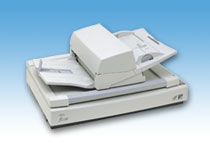
The Fujitsu fi-5750C is an earlier production-style scanner with two distinct paper routes: a duplex automatic document feeder (ADF) and a flatbed. That platen is the important difference from the separately reviewed fi-5650C, whose exact sources describe an ADF but not a flatbed. PFU's U.S. roster lists the fi-5750C under Production / Discontinued for Service. That roster status is not evidence of a current sale, a particular used unit or service that transfers to a new owner. The exact archived Global product page also warns that its material may be out of date.
The flatbed makes the 5750C more flexible for bound books, thick originals and nonstandard sizes. PFU lists a maximum flatbed area of 12 by 18 inches. In the manual's flatbed procedure, the original is placed face down on the glass; that is a separate capture path, not a second feeder tray. It does not establish a dedicated manual-feed setting for the ADF, and it does not tell us what accessories a used seller supplies. See the exact archived model profile and the model-named fi-5750C Operator's Guide.
The 200-sheet number is a qualified A4 load
PFU's archived profile lists a maximum 200-sheet ADF chute at 80 g/m² (20 lb), and the exact English Operator's Guide gives a more useful paper-size condition: for A4-size originals or smaller, it describes a stack up to 20 mm, noted as 200 sheets at 80 g/m². For documents larger than A4, it gives a 10 mm stack and 100 sheets at that stock weight. A3-capable capture therefore does not mean 200 A3 pages in one load. Paper weight and actual loading instructions still matter, especially for an older feeder.
The version-9.21 driver appendix also lists 200 A4 sheets but prints its ream-weight phrase as “80 kg,” unlike the other tables' 80 g/m². It gives a 297-by-432-mm ADF maximum; the model profile's A3 figure is 297 by 420 mm. Keep both discrepancies visible and confirm the right paper chart for a specific batch. The manual's alternate upper stacker position reduces output stacking to around 100 sheets; this is the output tray, not ADF capacity.
Duplex ratings are not end-to-end job times
The driver appendix lists 55 pages per minute simplex or 110 image sides per minute duplex at A4, 200 dpi, for color and black-and-white. It says the speed is specified for the scanner itself and that actual reading speed varies with system configuration. The archived product page has a separate color rating of 72 ppm / 144 image sides per minute for A4 landscape at 200 or 300 dpi, and 55 / 110 in portrait orientation. Those are manufacturer ratings under stated conditions, not independent results or a promise for an aging unit, a specific application or a large paper mix.
The exact page lists 600 dpi optical resolution and an ultrasonic multifeed sensor. That is not a guarantee against doubles, jams, skew or damage. PFU's manual tells operators to remove clips and staples and reduce the stack if pickup errors or doubles occur; inspect the feed path and rollers before relying on a used unit.
USB is a host connection, not proof of modern compatibility
The exact profile lists USB 2.0 (also USB 1.1) and a half-pitch 50-pin Ultra SCSI connector. The version-9.21 driver appendix instead calls the historical SCSI interface SCSI-II. The operator guide describes both USB and SCSI cables connecting to a PC. Treat them as alternative, old host interfaces and verify the actual port, cable and computer adapter; do not assume that a TWAIN label solves a modern connection.
TWAIN and ISIS appear in manufacturer records. The exact software page lists TWAIN V9.21.1307 (October 2021) for Windows 2000, XP, Vista, 7 and 8; the ISIS entry is older. This historical matrix does not establish current Windows or macOS support, a working USB controller, application, license or available installer. Ask for the exact instructions and a live scan using the unit, host and software you intend to use.
What to verify before considering a used unit
Ask for nameplate and front/back photographs of the actual unit, including the ADF, glass and ports. Verify the platen cover, chute, output stacker and needed cable instead of assuming an archived accessories list matches a seller's package. PFU lists a 35 kg (77.2 lb) chassis, so plan delivery and placement. Inspect the glass and rollers, request maintenance/counter history and watch a duplex batch plus a flatbed capture with representative originals. A demonstration cannot prove future reliability, but it is better evidence than a generic “tested” label.
Keep output-stacker capacity separate from ADF input limits. No Wi-Fi, mobile route, computer-free cloud path or touchscreen is documented; a separate Manual Feed mode remains unknown. The flatbed is the established route for books and one-off irregular originals. The old software path and actual unit condition are the main risks, not the headline speed.
Who should keep it on a shortlist?
This is a narrow reference for a team that needs both color duplex ADF work and a separate flatbed, can support a legacy computer route and can test the exact unit first. The platen distinguishes it from the fi-5650C; the 200-sheet ADF figure is for A4 or smaller stock, not a 200-sheet A3 claim. Skip it if you need current plug-and-play compatibility, wireless/mobile capture, a documented manual-feed mode or an unverified used package that works without a live demonstration.
Manufacturer references: PFU America's U.S. roster, PFU/Ricoh's archived model profile, driver reference, software page and Operator's Guide.
Key specifications
Key details at a glance
| Scanner class | Professional production adf flatbed |
|---|---|
| Manufacturer-listed simplex rate | 55 ppm |
| Manufacturer-listed duplex image rate | 110 ipm |
| Automatic document feeder capacity | 200 sheets |
| Optical resolution | 600 dpi |
| Connection options | USB / Ultra SCSI |
| Automatic duplex capture | Yes |
| Touchscreen | No |
| TWAIN driver documented | Yes |
Use the exact model’s instructions for operating limits, supplied equipment and version differences.
Sources for this review
Sources for this assessment
- PFU America U.S. discontinued-scanner roster (rendered source-reader observation)
- PFU/Ricoh Global archived exact-model fi-5750C profile
- PFU fi-5750C Image Scanner Operator's Guide P3PC-E747-03EN
- PFU TWAIN Reference Guide P3PC-3942-04ENZ0, exact fi-5750C version-9.21 appendix
- PFU/Ricoh Global fi-5750C software-download page
Compare the workflow before you choose
Use the finder to test your connection, paper and software requirements against the documented scanner arrangements.