
Your needs, this model
Does it fit your priorities?
Can the fi-6000NS send a scan to email or a network folder without a desktop computer beside it?
Yes, that is the model's standalone network architecture: after an administrator enables the function and configures the required SMTP, account or network-share details, an operator can start the documented email, fax-server or folder task from the scanner panel. A local computer does not have to be attached at scan time. This does not prove that a particular modern server or security policy will accept an old device.
Explore this need in the finder →Does its 50-sheet rating apply to every document stack or to daily volume?
No. PFU's specification bases the active 50-sheet load on Letter/A4 at 20 lb (80 g/m²), and the manual's paper guidance still controls other sizes and weights. It is a loading limit, not a daily-duty figure or independent speed test. At a 60-sheet minimum this model no longer qualifies.
Explore this need in the finder →Is the fi-6000NS a direct cloud-storage scanner or a modern app/TWAIN device?
Those routes are not established. Its documented destinations are email, a fax server and network folders, and its archived software material is old; the model pages do not document a current phone app, direct cloud-storage integration or host-side TWAIN path. An IT owner should validate the exact firmware and server policy, or choose a currently documented setup if those are requirements.
Explore this need in the finder →Short verdict: a dedicated network workflow, not a desktop scanner with an Ethernet extra
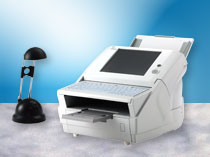
The Fujitsu fi-6000NS is an earlier duplex ADF network scanner whose point is to let staff start scans at the device and send them to configured office destinations. That is a different purchase from a USB scanner that relies on a computer, capture driver and desktop application. PFU America places this exact model in its Network / Discontinued for Service roster, so I would consider it only when the stand-alone panel workflow solves a real need and the organization can validate the aging network and software environment first. No current offer, service transfer, seller package or working unit is established by the documents reviewed here.
What “standalone” means in this model
The archived exact-model material identifies Ethernet at 10/100 rather than built-in Wi-Fi. The model-qualified operator guide describes panel-started e-mail, network-folder, fax and print jobs. It also makes the administrative prerequisite clear: the corresponding function has to be enabled and its server or destination configured before a regular user can use it. For e-mail, that means a configured mail path; for a folder, the share and its access details must be usable. A person may scan without a desktop physically attached at the time of capture, but the device is not self-configuring. Someone has to own its network setup and destination maintenance.
That design may suit an office where people scan to managed mailboxes or a file share from a shared station. It is a poor shortcut if the requirement is “send to any cloud account.” The sources list email, a fax server and network folders; they do not document a named direct cloud-storage service. Email delivered to a cloud mailbox is not the same as a verified scanner-to-cloud-drive integration. The exact page also does not establish a phone/tablet capture route, Wi-Fi, or a TWAIN driver for a computer-hosted application. The U.S. brochure's old inbox list mentions a network cable and power adapter; a cable in a historic box list does not make the scanner a USB host-scanning model.
The on-device controls are real, but do not assume modern profile management
PFU's model table lists an 8.4-inch XGA resistive touch panel and a built-in US101 keyboard. The operator guide describes regular users selecting scan/send, scan/save, scan/print and related panel actions and adjusting scan options. That is meaningful for a no-desktop workflow. It is not evidence of the more recent job/profile management, user permissions, cloud accounts or enterprise controls a buyer may expect from a modern touchscreen scanner. Treat profile setup and security administration as separate IT questions; do not infer them from screen size.
Feeder and speed are modest, qualified numbers
The ADF is specified for an active load of 50 Letter/A4 sheets at 20 lb (80 g/m²). The figure describes one loading on that paper basis—not every stock, not an unattended day's output and not a promise about aged rollers. Duplex is specified, with a color or monochrome rating of 25 pages per minute simplex and 50 images per minute duplex at A4 portrait, 200 dpi. PFU labels the figures JPEG-compressed and warns that data transfer and software processing add time. They are manufacturer ratings, not a test result or a measured office workflow. At a 60-sheet minimum, this model falls short even though another model with a larger feeder might remain eligible.
The exact specifications list 52–127 g/m² paper, with the top 127 g/m² figure limited to A8 originals, and a legal-size maximum. A separate long-paper note gives 863 mm (34 inches), but that does not mean every size, weight, resolution and feed mode reaches the maximum together. The scanner is ADF-only; no glass platen or separate manual-feed route is established. The sheet's ultrasonic multifeed sensor may help detect overlaps, but it is not a guarantee for mixed, curled, damaged or otherwise unsuitable originals. Check the exact loading instructions against the papers and cards you actually handle.
The deciding risk is the legacy network and software chain
PFU's archived software page names old system software revisions, says unlisted operating systems are not compatible, and its historical support table reaches Windows 8 / Windows Server 2012. A separate security update page identifies an older S09-01 release. These are historical references, not evidence that a unit has the right firmware today, that a current mail or SMB server accepts it, or that the scanner meets a buyer's security policy. The modern compatibility of a particular mail service, certificate policy, domain, application or network segment was not established here. Have the responsible IT administrator verify the exact scanner revision, protocols, authentication, destination behavior and security requirements before connecting it to a production network. If no one can own that check, a current product with documented support is the safer buying decision.
Identity needs care as well. PFU America's roster names the model but not a seller's unit or package. A historical U.S. Fujitsu brochure found through a document mirror names PA03544-B005; PFU's archived update pages show multiple part/revision branches for the fi-6000NS. That is useful historical context, not a substitute for a photograph of the actual nameplate. A later Global page and the old U.S. brochure also differ in their accessory-list scope and dimensions, so I do not use one list to promise what is in a used box. The separately announced fi-6010N is the successor; its newer central administration, job and encrypted-transfer features are not attributes of this fi-6000NS.
What to verify before buying an old unit
Ask for a clear label photo and confirm the fi-6000NS model and any part/revision markings. Request the actual power adapter, cable, ADF chute, trays, keyboard, any setup media and any software entitlement in writing rather than assuming the original box contents survived. Ask for a recent functional demonstration of the touch panel, ADF, duplex capture, Ethernet link and the particular destination you intend to use; check feed rollers, pad wear, error messages and service history. A listing that says “network scanner” is not proof that the old unit joins your network or saves into your current share. The U.S. roster says the model is no longer eligible for extended service, so do not assume a seller can transfer support.
Who should keep it on a shortlist?
Only a buyer who specifically wants a shared, panel-operated, wired office scanner, can work within its 50-sheet Letter/A4 loading basis, and has IT support to validate the old destination stack should spend time checking a particular fi-6000NS. For a mobile, Wi-Fi, current TWAIN, modern cloud-drive or higher-volume task, the reviewed facts do not support this model as a match. This assessment is based on the cited manufacturer material rather than hands-on use or independent testing. Read the stand-alone network workflow guide; for the exact earlier/touchscreen/duplex/50-sheet task, open the finder with those same choices.
Manufacturer references: PFU America U.S. discontinued roster; archived exact-model profile; technical specifications; operator's guide; and archived software table. Pages and update listings are historical; they do not prove present compatibility, stock, condition or package.
Key specifications
Key details at a glance
| Scanner class | Standalone ethernet network scanner |
|---|---|
| Manufacturer-listed simplex rate | 25 ppm |
| Manufacturer-listed duplex image rate | 50 ipm |
| Automatic document feeder capacity | 50 sheets |
| Optical resolution | 600 dpi |
| Connection options | Ethernet |
| Automatic duplex capture | Yes |
| Separate manual-feed route | No |
| Touchscreen | Yes |
Use the exact model’s instructions for operating limits, supplied equipment and version differences.
Sources for this review
Sources for this assessment
- PFU America U.S. Discontinued for Service roster: fi-6000NS
- PFU/Ricoh Global archived exact fi-6000NS model profile
- Fujitsu fi-6000NS technical specifications, official PDF reader observation
- Fujitsu Computer Products of America 2007 fi-6000NS U.S. brochure (mirror-hosted reader evidence)
- PFU Network Scanner fi-6000NS Operator's Guide, targeted reader observations
- PFU/Ricoh archived fi-6000NS software downloads and compatibility table
- PFU/Ricoh archived fi-6000NS update and part/revision matrix
- PFU 2008 press release identifying fi-6010N as the fi-6000NS successor
Compare the workflow before you choose
Use the finder to test your connection, paper and software requirements against the documented scanner arrangements.