
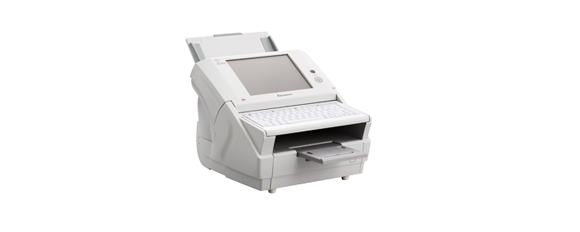
Your needs, this model
Does it fit your priorities?
Can the fi-6010N start an office scan to an email or shared folder without a computer beside it?
The archived PFU materials describe a stand-alone Ethernet workflow: an operator can start a configured scan/send or scan/save task at the panel, while an administrator supplies the network, mail, directory or share settings first. The published tasks include email, network folders, FTP, printing through a printer server and network fax through an existing RightFax server. This is not proof that a current mail, share or security policy will accept a particular 2013-era unit.
Explore this need in the finder →Does the fi-6010N's 50-sheet rating mean 50 of every stock or a day's output?
No. The catalog rates an active load of 50 Letter/A4 sheets at 20 lb (80 g/m²) and says capacity varies with paper weight. The 2,000-sheet/day figure is a separate manufacturer-stated expected volume, not a feeder load or endurance test. It meets a 50-sheet minimum on the stated paper basis and fails a 60-sheet minimum.
Explore this need in the finder →Should I consider this model if my must-have is phone scanning, Wi-Fi, direct cloud, or TWAIN?
The reviewed exact-model material documents a wired Ethernet panel workflow, not Wi-Fi, phone/tablet capture, direct cloud-drive delivery or a host-side TWAIN driver. Email and network shares are not substitutes for an integrated cloud destination or an application-level TWAIN path. Treat TWAIN as unestablished, and verify the full network, server and security path with IT before considering a used unit.
Explore this need in the finder →A separate decision for an office that wants the scan to start at the device
The Fujitsu fi-6010N is an earlier stand-alone network scanner, not a USB desktop scanner with Wi-Fi added. Its documented workflow starts at an 8.4-inch touch panel and sends scans to configured office destinations over one 10/100 Ethernet connection. That can make sense for a staffed mailroom, records desk or shared counter where a local computer beside every operator would be awkward. The trade is considerable: PFU America lists this exact model under “Discontinued for Service,” and the surviving product page and guides are archival. This assessment cannot establish the condition or compatibility of a particular used unit or any present offer.
What the network route actually does
PFU's archived model page and Operator's Guide describe panel-started email, network-folder, FTP, printer and network-fax tasks. The device has embedded software, and an administrator has to configure network identity, addressing, directory or mail settings, and each destination before staff can use the intended flow. Network fax depends on an existing RightFax server; print passes through a printer server. The guide's setup procedures explain the architecture, but they do not show that a modern mail service, server, certificate policy, shared folder or network segment will accept an old unit.
The brochure advertises job buttons and centralized scanner administration, and its old protocol list includes FTPS, LDAPS and HTTPS. Treat that as a record of documented features, not a current security certification. A buyer still needs IT to check the exact firmware and configuration against current authentication, encryption, server and retention rules. If the organization cannot assign that review, an old stand-alone network device is a risky substitute for a currently supported scanner. Email delivery to an online mailbox also is not the same as direct integration with a cloud drive.
Panel, paper and throughput are separate questions
The exact technical table specifies a resistive 8.4-inch XGA color touch panel and US 101 keyboard. The guide shows regular users selecting scan/send, scan/save and scan/print tasks, while administration remains a separate setup step. The large display may help at a shared station, but it does not itself prove modern user permissions, saved profiles compatible with a new workflow or current app support.
The rated active ADF load is 50 Letter/A4 sheets at 20 lb (80 g/m²), and PFU cautions that capacity varies with paper weight. That is one loading, not a day’s volume; the separate 2,000-sheets/day figure is an old manufacturer expectation, not an endurance test. The catalog rates 25 pages per minute simplex or 50 images per minute duplex at A4 portrait and 200 dpi, then warns that transfer and software processing affect actual scan time. Those are specifications, not measured job results. Legal documents fit the ordinary ADF; A3/B4 requires a carrier sheet, whose supported resolution is limited to 300 dpi. The 863 mm long-paper figure has its own conditions and should not be combined with every sheet size or media weight.
Do not mistake a stand-alone network scanner for a universal connector
The exact model page identifies one RJ45 Ethernet interface. It does not document a USB host-scanning, Wi-Fi, mobile-phone or tablet route. Nor do the reviewed manuals establish a host TWAIN driver: the software is described as embedded and the workflow is network-side. The separate manual-feed question is also different from placing a sheet in the ordinary ADF; the sources describe ADF feeding and a carrier-sheet accessory, not a second manual-feed mode. If any of those absent or unverified routes is essential, this model is not a supported match in those areas.
Age makes identity and operating context part of the purchase
PFU's U.S. roster supplies a useful exact model identity and service-status context but does not state the part number on an individual chassis. The archived Global page is model-specific, yet a page image and old package-content sheet cannot prove what a seller is shipping. The latter lists original multilingual contents; the actual keyboard, cable, adapter, trays, carrier sheet, maintenance parts and software must be checked on the offered unit. Ask for a clear nameplate photo and a live demonstration of the panel, duplex feed, Ethernet link and the specific destination you intend to use. Inspect rollers and separation pad, ask for service history and have an IT owner test the exact mail/share/security route before adding it to a production network.
The U.S. roster places the fi-6010N in the category that is no longer eligible for extended service. The 2013 manuals and archived server tables are not present-day OS or security evidence. A good offer description cannot repair those gaps; choose a current scanner with documented software support if the deployment needs a guaranteed current host, service or cloud path.
Who has a reason to keep it in view?
Only an organization that specifically values a shared wired panel workflow, can work within a 50-sheet Letter/A4 20-lb load, and can validate a particular unit with its own IT staff should spend time evaluating the fi-6010N. Its history includes genuine Ethernet, duplex and on-device scan tasks, but no currently verified seller package, condition, support transfer or network acceptance follows from those old specifications. This research-based assessment uses manufacturer pages and manuals; no hands-on use or independent testing is claimed. For the earlier + duplex + touchscreen + 50-sheet scenario, read the stand-alone network guide or open the finder with the same choices.
Manufacturer references: PFU America U.S. discontinued roster; archived exact-model profile; fi-6010N catalog and technical table; Operator's Guide; and Getting Started guide. The manuals are dated 2013 and the profile is archived; they do not prove current compatibility, seller condition, package or present stock.
Key specifications
Key details at a glance
| Scanner class | Standalone ethernet network scanner |
|---|---|
| Manufacturer-listed simplex rate | 25 ppm |
| Manufacturer-listed duplex image rate | 50 ipm |
| Automatic document feeder capacity | 50 sheets |
| Optical resolution | 600 dpi |
| Connection options | Ethernet |
| Automatic duplex capture | Yes |
| Separate manual-feed route | No |
| Touchscreen | Yes |
Use the exact model’s instructions for operating limits, supplied equipment and version differences.
Sources for this review
Sources for this assessment
- PFU America U.S. discontinued-for-service roster: fi-6010N
- PFU/Ricoh Global archived exact fi-6010N profile and model-image association
- PFU/Ricoh fi-6010N official product catalog and technical specifications
- PFU fi-6010N Network Scanner Operator's Guide, P3PC-2962-06ENZ0
- PFU fi-6010N Network Scanner Getting Started, P3PC-2952-05EN
- PFU fi-6010N original multilingual package-contents sheet
Compare the workflow before you choose
Use the finder to test your connection, paper and software requirements against the documented scanner arrangements.