
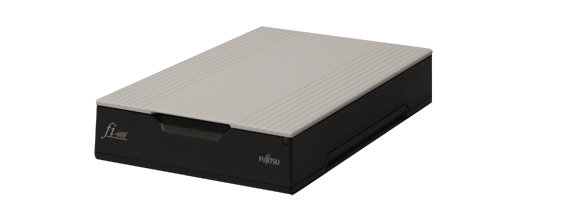
Your needs, this model
Does it fit your priorities?
Can the fi-60F automatically feed a short stack of small receipts or forms?
No. PFU identifies this as an A6 simplex flatbed, not an ADF. The glass accepts individual originals one at a time, so a 20-sheet ADF minimum excludes it; repeated placement is not automatic batch feeding.
Explore this need in the finder →What does the one-second speed claim mean?
PFU's archived page reports 1.0 second for monochrome or grayscale at 200 dpi and 1.7 seconds for 24-bit color at 200 dpi, each for an A6 flatbed original. These are manufacturer mode figures, not a ppm rating or a full workflow-time estimate.
Explore this need in the finder →Is coverless scanning always the best way to scan a fragile or curled original?
Not necessarily. The Operator's Guide says the cover can be removed, but warns that an original that does not stay against the glass may blur and that indoor fluorescent light can affect the result with the cover open. Use the closed-cover route when suitable and check each special original rather than treating coverless mode as a quality guarantee.
Explore this need in the finder →Review basis: This is a source-led assessment of the fi-60F model, not a hands-on test or a specific used listing. PFU America includes the fi-60F in its U.S. discontinued Workgroup roster and describes the listed machines as no longer for sale but eligible for extended service. The Global fi-60F page is explicitly archived, and no U.S. part number, current seller offer, condition or carton contents was verified. Treat the review as guidance about the named scanner configuration, not a promise about any particular unit.
One small original on glass
The fi-60F is an A6 simplex flatbed, not an automatic document feeder. Its maximum listed original measures 105 × 148 mm, roughly the size class of a small card or form. That makes it a plausible fit for a counter where staff repeatedly capture IDs, insurance cards, small receipts or similar pieces while leaving the scanner beside a host computer. It does not turn a pile of paperwork into a batch job: someone still has to place each original on the glass, trigger capture, and check the saved image.
PFU lists true optical resolution of 600 dpi and mode-specific capture times of one second for monochrome or 8-bit grayscale at 200 dpi and 1.7 seconds for 24-bit color at 200 dpi. These are manufacturer seconds-per-original figures; they are not a ppm rating or a complete estimate that includes operator handling, image cleanup, recognition, transfer and saving. The figures also do not say how a worn or poorly aligned used scanner will behave. Use them as a historical specification, not a speed test.
What coverless operation does—and does not—solve
The official page promotes coverless scanning, automatic cropping and deskew. Avoiding a repeated cover movement may help when small pieces arrive one at a time at a busy counter. The operator guide adds a less glamorous but important caveat: if the original does not remain against the glass, the image can blur, and room fluorescent light can affect the scan with the cover open. For a curled, fragile or uneven original, a closed cover or another suitable capture method may be safer; coverless mode is not a quality guarantee.
The removable cover is not a document feeder or a book-scanning promise. The guide discusses removing it, but the platen remains small, and the scanned area still has to fit the A6 limit. A bound or bulky original may not sit flat, and the manual warns about loss of contact affecting sharpness. If your ordinary work includes larger documents, many-sheet forms, or duplex pages, compare an ADF or larger platen rather than assuming the fi-60F can do those jobs through software.
Plan around a host computer and old drivers
The exact model page specifies high-speed USB 2.0 and TWAIN/ISIS driver connections. The page describes ScandAll Pro Lite and historical software, but names on an old page do not establish that downloads, licenses or every current host configuration remain available. The legacy compatibility list reaches Windows 10 and older Windows Server editions; it is not a current Windows, macOS, Linux or Windows-on-Arm assurance. Before purchasing an older unit for a managed workstation, identify the OS and architecture, locate the exact driver, and confirm that the target application still exposes a compatible TWAIN or ISIS path.
USB is the documented connection; the reviewed materials do not establish Wi-Fi, mobile scanning or a computer-free cloud route. This is a fixed computer workflow, even if a seller's listing casually uses words such as “portable” or “ID scanner.” The small format may fit a counter, but it does not make the scanner self-contained.
How it compares with the fi-65F
The closely related fi-65F is also an A6 simplex flatbed, but its Global documentation gives a more recent power-conditioned speed table: one second for monochrome or grayscale at 200/300 dpi on the AC adapter, two seconds for those modes when USB bus-powered, and 1.7 or two seconds for color at 200 dpi depending on power. Those are not directly interchangeable with the fi-60F's older page values. The fi-65F adds a clearly documented USB bus-power option and a physical one-button workflow. For either model, the deciding issues may be the exact unit's condition and the surviving software path more than a small difference in a historic timing table.
What to verify before considering a unit
Start with the exact fi-60F model label, platen condition, cover hinge and glass, power supply, USB cable, and any driver media or activation details the seller claims are included. The old Global page lists AC and USB setup contents, but it is not proof that an offered used machine still has them. Confirm that each original fits the A6 area and that the current host can recognize the scanner through software you actually intend to use. Ask for the seller's written return terms and inspect service eligibility separately; the U.S. roster's extended-service wording does not guarantee that a used unit qualifies or that coverage transfers.
Bottom line: on paper, the fi-60F is a compact earlier scanner for small, individual originals and a compatible USB computer. It is a poor match for automatic batch feeding, automatic duplex, wireless or mobile work, or anyone needing assured current drivers. Its coverless mode is a workflow convenience with explicit placement and lighting caveats, not a substitute for checking the original and final image.
Key specifications
Key details at a glance
| Scanner class | Professional desktop flatbed |
|---|---|
| Optical resolution | 600 dpi |
| Connection options | USB |
| Automatic duplex capture | No |
| Separate manual-feed route | No |
| TWAIN driver documented | Yes |
Use the exact model’s instructions for operating limits, supplied equipment and version differences.
Sources for this review
Sources for this assessment

Compare the workflow before you choose
Use the finder to test your connection, paper and software requirements against the documented scanner arrangements.