
Your needs, this model
Does it fit your priorities?
Does the fi-6110 meet a 50-sheet USB duplex TWAIN requirement?
Yes on the model evidence: Fujitsu's U.S. datasheet identifies PA03607-B065, duplex capture, USB and historical TWAIN/ISIS, and rates the active ADF load up to 50 Letter/A4 sheets at 20 lb. That is a one-load basis, not a promise about a used unit's feed condition or present computer support.
Explore this need in the finder →Does its carrier sheet create a flatbed or separate manual-feed route?
No. The documentation describes an ADF plus a carrier-sheet workflow for certain fragile or oversize originals, not a platen or a separate manual-feed mode. The carrier sheet itself must be present and suitable in any particular used offer.
Explore this need in the finder →Can I rely on its TWAIN label on a current computer?
Not from these documents alone. The U.S. sheet names historic Windows releases and TWAIN/ISIS drivers, but does not establish a current OS build, driver installation, application pairing or working second-hand scanner. Verify the exact unit and host before depending on it.
Explore this need in the finder →Review basis: This is a research-based assessment of the Fujitsu fi-6110 model, not a hands-on test. Fujitsu's U.S. datasheet identifies the exact model as PA03607-B065, and PFU America includes fi-6110 in its U.S. Workgroup / Discontinued for Service table. That lifecycle status does not describe a current offer, any individual machine's condition or a used seller's package.
A compact duplex feeder with a stated 50-sheet basis
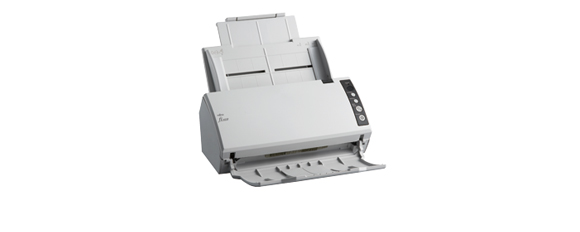
The fi-6110 is an ADF-only desktop scanner. Its documented job is feeding loose sheets from a stack and capturing both sides automatically. Fujitsu's U.S. sheet rates the feeder for up to 50 Letter/A4 sheets at 20 lb per loading. The footnote says capacity varies with paper weight, so treat 50 as a qualified tray maximum on the stated stock rather than a promise that every mixture of curled, heavy, thin or worn paper will feed as one full stack. It is not a daily-volume figure.
The same U.S. document lists 20 pages per minute simplex and 40 image sides per minute duplex at the specified Letter/A4 color settings; its grayscale and monochrome rows give comparable values at the stated resolutions. These are manufacturer specifications, not an independent scan test or an expectation for completed, searchable files. Transmission, image processing, OCR, the host computer and file destination all contribute to job time. The datasheet reports 600 dpi optical resolution, but most office workflows will also depend on consistent paper preparation, driver settings and the application used to save the result.
There is ultrasonic double-feed detection to warn about sheets feeding together. That is a safeguard, not a guarantee against jams or damage—especially in an older unit whose rollers, pad and prior maintenance are unknown. Before considering a used scanner, ask about actual feed behavior and replaceable wear parts rather than treating a published sensor or a past daily-duty rating as evidence of present condition.
The carrier sheet is not a flatbed
Fujitsu describes a carrier-sheet workflow for delicate or oversize originals, including A3 sheets on an A4-class path. The U.S. datasheet lists Legal-size originals through 8.5 by 14 inches and a long-document mode. For originals above 34 inches, it limits scanning to TWAIN at 200 dpi or less. The U.S. datasheet lists 125 inches as a maximum long dimension, while PFU's 2013 Global brochure gives 120 inches. This assessment uses the U.S.-specific datasheet for the U.S. profile and keeps the source difference explicit rather than presenting either number as a universal guarantee.
Neither the carrier-sheet feature nor a one-page loading procedure makes this a flatbed or a distinct manual-feed scanner. If your regular work includes books, bound material or fragile originals that should not contact feed rollers, this model's reviewed configuration does not provide a separate platen. And a carrier sheet mentioned in a historic base bundle is not proof that the accessory will arrive with a present used listing. Confirm it is supplied, serviceable and appropriate for the originals you need to scan.
USB and historical TWAIN/ISIS software
The U.S. datasheet specifies USB 2.0 / USB 1.1 with a Type-B connector and lists PaperStream IP drivers using TWAIN and ISIS. That makes the model a computer-centered USB candidate in the historical documentation, not a wireless or phone scanner. The cited U.S. operating-system table names older Windows editions and server versions. Those entries do not establish that a current Windows build, Mac, Linux system, 64-bit application or specific document-management program will install the driver and communicate with a particular second-hand machine.
The manufacturer's list of software and included items describes the original package at the time, not what a seller still has. Treat the setup DVD, cables, power supply, carrier sheet and software license as separate purchase checks. Ask the seller for a model-label photograph and an end-to-end scan demonstration on the exact host and software you intend to use. If your workflow depends on one named TWAIN application, confirm its operating-system and driver requirements before treating the documented interface as a practical fit.
Where it sits among nearby fi models
The fi-6110 is not the same model as the fi-6130Z, which appears separately in the U.S. roster and has a different model-specific PFU page and guide. The documents reviewed here support the fi-6110's PA03607-B065 identity and USB, duplex, 50-sheet, TWAIN/ISIS facts; they do not establish the accessories, driver media or condition of a marketplace unit. Nor does a similar name make another generation's technical table interchangeable.
The fi-6110 is most defensible as an earlier scanner for a buyer who already has a compatible USB host, needs a modest automatic duplex stack and can verify the precise unit before use. It is a poor assumption for a household that needs simple Wi-Fi/mobile capture, direct cloud sending, a glass platen or current out-of-box support. The useful decision is not whether a decades-old brochure reads impressively, but whether the exact scanner, driver, application, included equipment and paper workflow can all be confirmed together.
Sources checked: Fujitsu U.S. fi-6110 datasheet; PFU/Ricoh exact fi-6110 archived model page; PFU/Ricoh 2013 fi-6110 brochure; PFU America U.S. service-status roster.
Key specifications
Key details at a glance
| Scanner class | Professional desktop sheet-fed scanner |
|---|---|
| Manufacturer-listed simplex rate | 20 ppm |
| Manufacturer-listed duplex image rate | 40 ipm |
| Automatic document feeder capacity | 50 sheets |
| Optical resolution | 600 dpi |
| Connection options | USB |
| Automatic duplex capture | Yes |
| Touchscreen | No |
| TWAIN driver documented | Yes |
Use the exact model’s instructions for operating limits, supplied equipment and version differences.
Sources for this review
Sources for this assessment

Compare the workflow before you choose
Use the finder to test your connection, paper and software requirements against the documented scanner arrangements.