
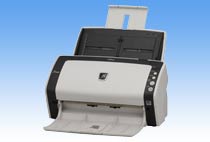
Your needs, this model
Does it fit your priorities?
Does the fi-6130Z meet an earlier 50-sheet USB duplex TWAIN scenario?
The model sources document USB, duplex capture, a historical TWAIN/ISIS host path and a 50-sheet A4/80 g/m² active ADF load. That is enough for the questionnaire's 50-sheet model-level threshold, but not proof of current driver support, the condition of an older feeder or what a seller includes.
Explore this need in the finder →Does the fi-6130Z have the same speed as the fi-6140Z?
The exact archived page gives 40/80 color at 200 dpi and 30/60 at 300 dpi for the fi-6130Z. The shared Operator's Guide instead gives 30/60 for fi-6130Z/fi-6230Z and 40/80 for fi-6140Z/fi-6240Z without that resolution split. The manufacturer sources conflict in their summary; neither statement is an independent test or a promise about a particular used unit.
Explore this need in the finder →Is the fi-6130Z Manual Bypass the manual-feed mode?
They are separate features. The U.S. datasheet’s Manual Bypass label concerns the Intelligent Multi-feed function; the family Operator’s Guide also documents a sheet-by-sheet Manual Feeding mode through the ADF, continued within a configured timeout. This is not a second tray or a glass surface, and paper protection is disabled in manual feed.
Explore this need in the finder →Review basis: This research-based assessment is for the exact Fujitsu fi-6130Z, not a test of a physical unit. PFU America lists the model in its U.S. Workgroup / Discontinued for Service roster. The sources reviewed did not establish a U.S. sales part number or any current reseller package, operating condition or software entitlement.
ADF-only duplex scanning, with a 50-sheet paper basis
The fi-6130Z is an ADF scanner for loose pages. Its exact archived PFU page lists simplex and duplex modes and up to 50 A4 sheets at 80 g/m² (20 lb) in the active-load feeder. The manufacturer notes that maximum capacity varies with paper weight. That is a one-loading limit on a stated stock, not a guarantee about a mixed stack, a daily output rating or a claim that an older unit still feeds reliably. The same specification gives a wide supported paper-weight range, with a stricter range for A8 documents, so unusually light or heavy stock deserves a manual check before use.
PFU lists 600 dpi optical resolution and ultrasonic multifeed detection. The family guide also describes paper protection and an Intelligent Multi-Feed function that can account for attached notes or other conditions that affect detection. Those features can help catch feeding problems, but they do not eliminate misfeeds, jams, maintenance or the need to check rollers and paper preparation. The page lists an expected daily volume of 4,000 sheets; that is a manufacturer specification, not a recommendation for a used device or an independently tested duty result.
The speed summaries do not line up cleanly
One part of the PFU record needs caution. The exact fi-6130Z product page gives color rates of up to 40 ppm / 80 ipm at 200 dpi and 30 ppm / 60 ipm at 300 dpi. The shared fi-6130Z / fi-6230Z / fi-6140Z / fi-6240Z Operator's Guide instead summarizes 30 ppm / 60 ipm for the fi-6130Z and fi-6230Z, and 40 ppm / 80 ipm for the fi-6140Z and fi-6240Z, without the same resolution breakdown. These are conflicting manufacturer summaries, so this review does not collapse them into one general speed claim or treat either as observed throughput.
The difference matters when comparing the fi-6130Z with the separately named fi-6140Z. The shared manual explicitly places those models in different speed tiers, while the archived page gives resolution-specific rates for the 6130Z. If a procurement decision depends on a particular pages-per-minute figure, obtain the model-specific current support statement for the exact unit and software rather than relying on a short summary badge. Even an accurate scanner rate excludes data transfer, image processing, OCR, saving time and the effect of a particular host.
Special originals: carrier sheet and cards are not a second feeder
PFU describes scanning originals larger than A4 up to A3 with a carrier sheet, in single-sided mode. Its long-page limits include a 34-inch mode and a 120-inch mode; beyond 34 inches, the exact page says the scan is limited to TWAIN at 200 dpi or less. A carrier sheet is a useful feed aid for specified originals, but it is not a glass platen and it does not add a separate manual-feed path.
The exact product page and manual discuss plastic-card handling up to 1.4 mm thick and continuous loading of as many as three standard cards. Embossed cards require more care: the manual says only one can be loaded at a time, and it cautions that rigid cards may not feed properly. These details help distinguish a documented card workflow from a generic promise that any card will run through the ADF. The family Operator’s Guide separately documents Manual Feeding: pages are loaded one at a time through the same ADF and scanning can continue when the next page is loaded within a configured timeout. That mode is not a second tray or a flatbed, and the guide says paper protection is disabled during manual feeding. It is distinct from “Manual Bypass,” the Intelligent Multi-Feed function described in the product literature. The flatbed-equipped fi-6230Z and fi-6240Z are different sibling models; their glass platen is not part of the fi-6130Z assessment.
USB, legacy drivers and the regional package boundary
The reviewed fi-6130Z sources specify USB 2.0 / USB 1.1 through a Type-B connection and list historical TWAIN and ISIS drivers. The archived page also describes Kofax VRS, ScandAll PRO and other software from its release era. These references identify a past host-computer workflow; they do not show that a present Windows build, Mac or Linux host, 64-bit application or named capture program will work with an individual used scanner.
Package details also need restraint. The archived page notes that the regional PA03630-B057 model sold in China, Hong Kong SAR and Macau does not include VRS. That regional identifier is not used here as a U.S. part or bundle. The U.S. roster's exact model name and the Global technical specification are enough to establish the scanner identity and documented function, but not a seller's regional SKU, license, setup media, cable, power supply or current condition. Ask for a label photo, a scan demonstration on your intended host and an itemized list of what is actually included.
Who should consider it
The fi-6130Z is a plausible earlier-model candidate if you have a compatible USB capture setup, regularly need duplex feeding and can work within the 50-sheet A4/80 g/m² load basis. Its ultrasonic and paper-protection functions, carrier-sheet route and card guidance are more informative than a generic “office scanner” label. It is not a fit if Wi-Fi, phone scanning, computer-free cloud transfer, touchscreen selection or a flatbed is essential. The family guide does document manual feeding one sheet at a time through the same ADF; test whether that older mode works on the actual unit and compatible host rather than interpreting it as a second inlet. Nor should the machine's age or historical driver acronyms be mistaken for current support. Verify the exact unit's hardware, maintenance, interface, software and package before treating the model documentation as a purchase-ready workflow.
Sources checked: PFU/Ricoh archived exact fi-6130Z page; PFU/Ricoh fi-6x30Z/40Z Operator's Guide; PFU America U.S. service-status roster.
Key specifications
Key details at a glance
| Scanner class | Professional desktop sheet-fed scanner |
|---|---|
| Automatic document feeder capacity | 50 sheets |
| Optical resolution | 600 dpi |
| Connection options | USB |
| Automatic duplex capture | Yes |
| Separate manual-feed route | Yes |
| Touchscreen | No |
| TWAIN driver documented | Yes |
Use the exact model’s instructions for operating limits, supplied equipment and version differences.
Sources for this review
Sources for this assessment

Compare the workflow before you choose
Use the finder to test your connection, paper and software requirements against the documented scanner arrangements.