
Your needs, this model
Does it fit your priorities?
Can the fi-6140Z cover a wired 50-sheet duplex workflow when TWAIN is required?
Yes, at the model-specification level: the exact fi-6140Z profile lists USB, automatic duplex, TWAIN/ISIS and a 50-sheet A4/80 g/m² feeder load. The current PaperStream IP compatibility page lists the model as discontinued for compatible Windows systems. This does not verify the installed unit, its driver architecture or a specific application; test the exact host before relying on it.
Explore this need in the finder →Does the fi-6140Z provide Wi-Fi, mobile scanning or computer-free cloud upload?
No such route is documented for this configuration. Its listed interfaces are USB and selectable Ultra SCSI; a computer-based scan can still be sent onward by compatible software, but that would not make the scanner itself wireless or computer-free.
Explore this need in the finder →Is the fi-6140Z manual-feed setting a second tray for fragile documents?
No. The guide describes one original at a time through the same ADF while it waits for the next sheet. That can help with originals that multifeed in a batch, but it is not a second inlet or guarantee of safe handling: paper protection is disabled in this mode and frequent manual feed can shorten consumable life.
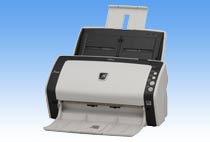
Explore this need in the finder →The Fujitsu fi-6140Z is an earlier desktop scanner built around a duplex automatic document feeder, not a hybrid flatbed. Its strongest documented case is a wired office workflow needing two-sided batches, a qualified 50-sheet load and a host driver. PFU America names it in the U.S. Departmental “Discontinued for Service” roster: lifecycle evidence, not a current offer or seller package. Its link points to a different fi-7180 replacement page; that does not make the two models equivalent. PFU America roster.
What the ADF can—and cannot—do
PFU's archived exact-model page specifies simplex or duplex scanning and a paper chute capacity of 50 sheets at A4 80 g/m² (20 lb). The shared Operator's Guide further caps the stack at 5 mm total thickness and warns that capacity varies with paper weight. The path accepts A4 portrait and legal originals up to 8.5 by 14 inches; A8 is the listed smallest feed size. Those numbers describe a paper-loading limit, not a guaranteed uninterrupted run or daily pace.
The model is ADF-only, so bound pages, a book cover, or a single delicate sheet that cannot travel through rollers require a different workflow or scanner. The family manual documents manual feeding one sheet at a time through the same ADF, with a configurable wait for the next sheet. It is useful for originals that tend to multifeed in a stack or for checking pages individually, but it is not another tray and does not turn the machine into a flatbed. A critical caveat: paper protection is disabled in this manual-feed mode, and PFU says frequent manual feeding may shorten consumable replacement intervals. This is a constrained handling choice, not a blanket fragile-original guarantee. Fujitsu/PFU family Operator's Guide.
Speed figures need their resolution beside them
PFU's technical table gives the fi-6140Z a color rate of up to 60 pages per minute / 120 images per minute at 200 dpi and 40 ppm / 80 ipm at 300 dpi. The figures use JPEG compression and describe scanner-side speed, not results from testing here: data transfer, image cleanup, OCR and saving add time. PFU separately lists 6,000 sheets a day as expected volume, a manufacturer planning figure rather than an endurance result for a used scanner. For high-volume procurement, inspect the unit's counters, feed path and maintenance history instead of treating a brochure rate as a condition report. Exact fi-6140Z specifications.
The 6140Z is the faster ADF-only member of the four-model Z family described in the guide. The fi-6130Z is in the lower speed group; fi-6230Z and fi-6240Z add a flatbed, with the 6240Z sharing the faster tier. Choosing a flatbed changes the scanning route; the 6140Z itself has no platen.
Choose one host connection and verify the software
The exact page lists USB 2.0/1.1 through a Type-B connector or Ultra SCSI, selected as alternatives. The guide says the interfaces cannot operate simultaneously and warns against connecting multiple computers through both cables at once. There is no documented Wi-Fi, phone/tablet scanning or computer-free cloud route. A desktop scanning application may send a file to a shared folder or cloud service, but that is a host-computer workflow, not a scanner-side cloud feature.
A current driver route exists: as of June 30, 2026, PFU's PaperStream IP page lists fi-6140Z among discontinued supported models and Windows 11/10/selected Server versions. The archive also lists TWAIN/ISIS and older ScandAll PRO/VRS software. This does not guarantee that a particular unit, architecture or application will work; confirm the exact host, driver version, interface, firmware and license. An old DVD or software bundle is not established by a marketplace listing. PFU PaperStream IP compatibility.
Paper handling, space and ownership checks
PFU lists paper from 41 to 209 g/m² for the ADF, with a higher minimum for A8. The manual allows a long-page mode up to 120 inches, but documents longer than 34 inches require TWAIN at 200 dpi or less. A3-size sheets use an optional carrier sheet and are scanned single-sided; do not assume it is in a seller's box. Plastic-card use also has qualifications: the exact page allows standard cards up to 1.4 mm and up to three continuous cards, while warning that multi-embossed cards are unsupported. The guide's special thick-card setting slows scanning. None of this means every rigid card, glossy sheet or worn original will feed cleanly.
The scanner body is listed at about 11.8 by 6.4 by 6.2 inches, excluding the paper chute and stacker; PFU's recommended A4 installation space is about 15.8 by 27.6 by 15 inches. Leave the full operating space rather than comparing only the case footprint. Replacement rollers are routine ownership items: the archived page gives rough cycle guidance of 200,000 sheets or one year for brake and pick rollers and cautions that actual life depends on stock, use and cleaning. Ask for service history, feeder condition, all required cables, the exact model label and the included software/accessories. The guide's specifications and replacement cycles do not tell us the state of a particular used unit.
Who should keep it on the shortlist?
The fi-6140Z can make sense when an earlier scanner is acceptable, the job is host-connected, USB or a supported SCSI arrangement is available, and a duplex 50-sheet ADF is enough. It is a poor match if you need a platen for books, wireless/mobile convenience, direct cloud routing, current retail support, or an assumption that the optional carrier sheet and legacy software are included. The images and specifications here are manufacturer references; no hands-on scan, speed test, ownership, seller inventory, price or customer experience is claimed. Exact package, driver, condition and availability remain offer-specific checks.
Key specifications
Key details at a glance
| Scanner class | Professional departmental sheet-fed scanner |
|---|---|
| Automatic document feeder capacity | 50 sheets |
| Optical resolution | 600 dpi |
| Connection options | USB / Ultra SCSI |
| Automatic duplex capture | Yes |
| Separate manual-feed route | Yes |
| Touchscreen | No |
| TWAIN driver documented | Yes |
Use the exact model’s instructions for operating limits, supplied equipment and version differences.
Sources for this review
Sources for this assessment
- PFU America U.S. Discontinued for Service roster: fi-6140Z
- PFU/Ricoh archived exact fi-6140Z product and specification page
- Fujitsu fi-6130Z/fi-6230Z/fi-6140Z/fi-6240Z Operator's Guide, English
- PFU/Ricoh PaperStream IP compatibility, current page as of 2026-06-30
- PFU/Ricoh official exact fi-6140Z page-linked image

Compare the workflow before you choose
Use the finder to test your connection, paper and software requirements against the documented scanner arrangements.