
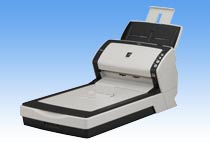
Your needs, this model
Does it fit your priorities?
Does fi-6230Z include a flatbed and a 50-sheet ADF?
Yes at the model level: the exact page lists both the glass platen and 50 A4/80 g/m² active-load ADF capacity. The ADF rating varies with paper; it is not a daily throughput promise. The Global archive is not a U.S. seller package or current offer.
Explore this need in the finder →Does fi-6230Z have manual feed?
The shared family guide describes a separate one-sheet-at-a-time Manual Feeding mode through the same ADF, controlled by a timeout. It is not another tray, not the flatbed and not the “Manual” choice within Intelligent Multi-feed bypass.
Explore this need in the finder →What speed should I expect?
The exact fi-6230Z page lists 40/80 at 200 dpi and 30/60 at 300 dpi; its family guide summarizes the 6230Z/6130Z tier as 30/60. This source conflict is left open rather than converted to a single general speed or a test claim.
Explore this need in the finder →Review basis: This is a research-based assessment of the exact Fujitsu fi-6230Z model shown in PFU America’s U.S. discontinued-for-service roster. I did not test, own or install a unit. The roster does not state a U.S. sales part; this review uses PFU’s exact Global archive page and the model-family operator guide without transferring a regional part number or seller package to the U.S. entry.
A workgroup feeder with glass, not a current all-in-one
The fi-6230Z combines an automatic document feeder with a separate flatbed. In the archive, the feeder takes Letter/Legal-sized originals and duplexes them; the glass area tops out at 8.5 by 11.69 inches. That makes the two paths useful for different work: a prepared paper stack can pass through the ADF, while a book page, bound item or single fragile sheet can be placed on the glass. The platen does not increase the number of pages the ADF can hold, and the fi-6230Z is not the same configuration as the ADF-only fi-6130Z.
PFU’s stated active-load maximum is 50 A4 sheets at 80 g/m² (20 lb), with the important qualification that capacity varies by paper weight. Treat that as a stock-specific tray ceiling, not a promise that a used feeder will accept any 50 mixed, curled or worn sheets, and not as a daily-volume measure. The page separately lists an expected daily volume of 4,000 sheets. That is a manufacturer specification, not an independent endurance test or an estimate of what a particular older machine can safely do now.
The published speed rows are not a simple single-number verdict. The exact fi-6230Z page lists color at 40 ppm/80 ipm at 200 dpi and 30/60 at 300 dpi. Its shared family Operator’s Guide summarizes fi-6130Z/fi-6230Z at 30/60 and fi-6140Z/fi-6240Z at 40/80 without the same resolution breakdown. The source statements conflict in their general summary; I leave both visible rather than treating one as a measured, universal rate. PFU also qualifies its speed data for compression and notes that transmission and software processing affect real job time.
Manual feeding is an ADF mode, not another port
The family Operator’s Guide does document Manual Feeding: load a page into the ADF one at a time, then add the next sheet during the configured timeout if the scan should continue. The guide describes this as useful when checking pages individually or when originals are awkward to batch. It is distinct from the “Manual” setting under Intelligent Multi-feed, which handles learned overlap patterns. Neither is an extra feed tray. The fi-6230Z flatbed is another capture surface, not the ADF manual-feed mode. The guide also notes that paper-protection behavior is disabled in manual feeding, so this feature is not a blanket safety claim for fragile media.
For larger originals, PFU describes an A3 carrier-sheet workflow through the ADF in single-sided mode. That option is not a larger glass bed and is not proof that a carrier sheet is included with a present used unit. The manual’s card guidance is also conditional: supported ID cards may be fed continuously up to three at a time, but multi-embossed cards are unsupported, and an item that is rigid or worn may still present a feed problem. The device’s ultrasonic detection and paper-protection functions are safeguards, not guarantees against jams or damage.
USB host capture and an old software context
The exact page lists selectable USB 2.0/1.1 through a Type-B connector and historical TWAIN and ISIS driver support. That is a computer-centered arrangement. The page’s dated Windows and capture-software references establish what PFU documented for the product at the time; they do not show that a current Windows build, Mac, Linux host, 64-bit application or document-management program will work with an old unit. Driver availability, installation privileges, application requirements and any software licence should be checked for the actual scanner and computer before purchase.
The archived web page lists Kofax VRS and other software, plus original accessories and consumables. Those tables describe a historic configuration, not what a seller has today. Its VRS footnote also identifies PA03630-B557 as the China/HKSAR/Macau edition without VRS. That regional exception should not be treated as a U.S. part mapping, and no U.S. part is established for the roster’s unqualified fi-6230Z label.
How it differs from fi-6230
The fi-6230 and fi-6230Z both pair a duplex feeder with a letter-size flatbed, but they are separately named models with separate documentation. The non-Z fi-6230 has an exact U.S. part PA03540-B555 in the U.S. datasheet, while no equivalent U.S. sales part was established here for fi-6230Z. The Z model’s exact page and guide also produce the speed-summary conflict described above. Do not use one model’s part, package, software or rates as a shortcut for identifying the other.
The fi-6230Z is a plausible match only for someone who specifically needs an earlier USB-connected feeder plus a small flatbed and can verify the exact unit and legacy host path. It is a poor default for a buyer who needs current out-of-box software, a known regional package, wireless or phone scanning, or a guaranteed used-machine condition. Before considering an offer, ask for a clear nameplate photo, confirm the exact fi-6230Z identity, request a duplex ADF and flatbed demonstration on the intended host, and inspect roller/pad wear, power supply, cables, software media, return rights and any optional carrier sheet. None of those details can be read from the archived model image or U.S. roster.
Sources checked: PFU America U.S. discontinued-for-service roster; PFU/Ricoh exact fi-6230Z archived model page; official fi-Z family manuals index.
Key specifications
Key details at a glance
| Scanner class | Professional desktop sheet-fed scanner |
|---|---|
| Automatic document feeder capacity | 50 sheets |
| Optical resolution | 600 dpi |
| Connection options | USB |
| Automatic duplex capture | Yes |
| Separate manual-feed route | Yes |
| Touchscreen | No |
| TWAIN driver documented | Yes |
Use the exact model’s instructions for operating limits, supplied equipment and version differences.
Sources for this review
Sources for this assessment

Compare the workflow before you choose
Use the finder to test your connection, paper and software requirements against the documented scanner arrangements.