
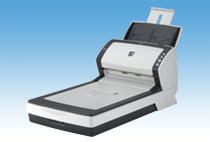
Your needs, this model
Does it fit your priorities?
Can the base fi-6240 combine a 50-sheet USB duplex workflow with a separate glass bed?
At the documented model level, yes: the exact page identifies a duplex ADF plus a separate flatbed, selectable USB, TWAIN/ISIS and a 50-sheet A4 load at 80 g/m²; the guide adds a 5 mm stack-height limit. The platen is one original at a time and does not add feeder capacity. This is not a confirmation that a particular old unit, driver, host or license works.
Explore this need in the finder →Does Manual Feeding give the fi-6240 another tray or replace its flatbed?
No. The non-Z operator guide describes loading sheets one at a time through the same ADF, with a configurable wait between batches. The fi-6240's glass bed is a distinct page-by-page route; it does not raise the 50-sheet ADF limit. Confirm how the exact unit handles the originals you need to scan.
Explore this need in the finder →Can the base fi-6240 scan to a phone or a cloud account directly over Wi-Fi?
No integrated wireless, mobile or computer-free cloud route is documented. PFU lists selectable USB or Ultra SCSI host connections; any later upload would depend on external host software and a compatible setup not established for a particular older unit.
Explore this need in the finder →This is a source-based assessment of the exact base fi-6240, not a hands-on test, current offer, or statement about an individual used unit. PFU America's U.S. roster lists fi-6240 under Departmental / Discontinued for Service, a section the company says is no longer eligible for extended service coverage. The roster's fi-7280 link is a replacement destination, not evidence that the models are equivalent.
The glass is the reason to choose this version
The fi-6240 pairs an automatic document feeder with a separate flatbed. It can handle a bound page, a single original that should not pass through rollers, or a page outside the ADF's punched-hole guidance. The manufacturer's guide describes the glass as a one-sheet-at-a-time path; it does not turn the scanner into a large-format flatbed. The archived Global page gives a maximum platen area of 216 by 297 mm (about 8.5 by 11.69 inches). An official Japanese specification instead lists 210 by 297 mm, so check the exact regional unit and do not assume every glass bed is Letter-width.
For ordinary sheets, use the ADF. Its listed maximum is 50 A4/Letter sheets at 80 g/m² (20 lb) with a 5 mm total-stack ceiling in the guide. PFU says the maximum count changes with paper weight. It is a per-load figure, not a daily rating, and a flatbed page does not add to that feeder stack. The guide specifies 41–210 g/m² for the ADF and raises the minimum for A8-size sheets to 127 g/m²; it also warns about curled, coated, stapled, wet-ink and other difficult originals. Treat a paper-weight range as a screening aid, not a promise that every stock or aged feed mechanism will behave alike.
Duplex is automatic; special-page handling is not a second tray
The archived specification lists simplex and duplex modes, so a two-sided sheet can be captured in one ADF pass. PFU's A4-portrait table reports, at 200 dpi, up to 40 pages per minute in color and 60 in grayscale or monochrome, with duplex image rates of 80 and 120 ipm respectively. At 300 dpi the table gives 40 ppm / 80 ipm. These are historical hardware specifications, not measured output; the manufacturer notes that data transfer and software processing add time. The claimed 600 dpi optical resolution is also a specification, not a guarantee that every high-resolution mode works for every page size and host.
The shared operator guide has a Manual Feeding mode: the operator loads sheets one at a time into the ADF, and a configured timeout can let later sheets join the same scan file. That is useful as a controlled alternative to batching certain originals, but it is neither a second inlet nor the glass bed. The same guide says the fi-6240 flatbed can be used for perforated pages that may cause trouble in the ADF. An A3 original is not a fit for the platen; the archived page describes carrier-sheet ADF scanning for larger originals as a different single-sided workflow. The guide's card instructions are similarly qualified: ISO ID-1 cards may feed, with a one-card-at-a-time instruction for embossed cards and a 1.25 mm limit for a specific 200 dpi monochrome mode.
Plan the host and software before considering an older unit
PFU lists USB 2.0/1.1 Type-B and Ultra SCSI as selectable host connections, not concurrent paths. The U.S. model profile and operator guide list TWAIN and ISIS drivers, but these historical sources do not establish that a particular current computer, operating-system architecture, capture application, license or seller's unit will work. No Wi-Fi, mobile route or scanner-side computer-free cloud workflow is documented. If a job depends on a named TWAIN application, verify that exact combination with the physical scanner before relying on it; if the unit uses SCSI, include the compatible host adapter and cabling in the plan.
The guide describes a Function Number display and physical buttons rather than a touchscreen for profile selection. The original product page lists period software and bundled media, but old package contents do not show what a seller will include today. It also lists an ultrasonic multifeed detector and a Paper Protection setting; neither feature guarantees safe handling, especially for delicate originals or an unknown-condition device.
Space, maintenance and seller checks
PFU lists body dimensions of 301 × 567 × 229 mm, excluding the chute and stacker, an installation-space reference of 400 × 800 × 450 mm, and weight of 8.8 kg. The printed 22.9-inch depth does not match a direct conversion of 567 mm (about 22.3 inches), so measure the actual desk opening and leave the chute/stacker clearance rather than relying on that converted figure. The separate platen also adds a larger footprint and more glass to inspect than the ADF-only fi-6140.
The manufacturer's brake- and pick-roller guidance is 200,000 sheets or one year, described as a rough interval that varies with paper, use and cleaning. It says nothing about whether a particular used scanner has been serviced or whether replacement consumables are currently available. Ask for the nameplate, page counter and maintenance history if available; inspect the platen, ADF glass and rollers; confirm which cables, power supply and software media are actually in the box; and check return terms and support options. The archive's accessory list is not a seller's package guarantee.
Bottom line
The base fi-6240 is a historical fit when a separate letter-class glass bed and duplex batch feeder solve one mixed-originals workflow, and a compatible host/software chain is already established. Its 50-sheet paper-qualified load is modest compared with larger departmental feeders, while its selectable legacy interfaces and discontinued service status make verification unusually important. Do not confuse it with the ADF-only fi-6140, the distinct fi-6240Z, or the roster's fi-7280 replacement link.
Primary references: PFU America U.S. discontinued roster, archived exact fi-6240 profile, fi-6140 / fi-6240 Operator's Guide, and official Japanese fi-6240 specification.
Key specifications
Key details at a glance
| Scanner class | Professional departmental flatbed adf |
|---|---|
| Automatic document feeder capacity | 50 sheets |
| Optical resolution | 600 dpi |
| Connection options | USB / Ultra SCSI |
| Automatic duplex capture | Yes |
| Separate manual-feed route | Yes |
| Touchscreen | No |
| TWAIN driver documented | Yes |
Use the exact model’s instructions for operating limits, supplied equipment and version differences.
Sources for this review
Sources for this assessment
- PFU America U.S. Departmental / Discontinued for Service roster: fi-6240
- PFU/Ricoh Global archived exact fi-6240 product and specification page
- Fujitsu fi-6140 / fi-6240 Image Scanner Operator's Guide, English
- PFU/Ricoh Japan exact fi-6240 specification
- PFU/Ricoh official exact fi-6240 page-linked product image

Compare the workflow before you choose
Use the finder to test your connection, paper and software requirements against the documented scanner arrangements.