
Your needs, this model
Does it fit your priorities?
Can the fi-65F handle 20 originals in one unattended load?
No. PFU specifies a simplex flatbed with a maximum A6 original size, not an ADF. A 20-sheet ADF minimum does not apply to repeated one-at-a-time placement on glass.
Explore this need in the finder →How does the AC versus USB-powered speed differ?
For an A6 original, PFU lists monochrome/grayscale at 1.0 second and color at 1.7 seconds on AC power under the named resolutions. With USB bus power, those listed modes are 2.0 seconds. These are manufacturer per-original figures, not an observed desk throughput test.
Explore this need in the finder →Does its physical scan button mean it has a touchscreen?
No touchscreen selection panel is documented. PFU describes a single front scan button; that is different from navigating on-screen profiles. TWAIN/ISIS/WIA describe host driver routes, whose compatibility still depends on your OS and application.
Explore this need in the finder →Review basis: This is a source-led assessment of the fi-65F model, not a hands-on review of a physical sample. PFU America identifies the exact U.S. model as discontinued and replaced by the fi-70F; its U.S. discontinued roster places the fi-65F among scanners no longer for sale but eligible for extended service. The reviewed records establish no U.S. part number, seller condition, current offer or exact carton. Global technical details below are model-specific reference evidence, not a claim about a particular used listing.
A compact glass platen for small originals
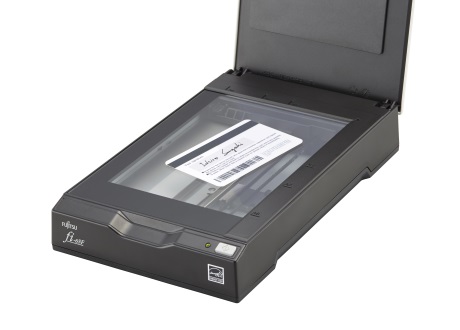
The fi-65F is a simplex flatbed whose maximum original is 105 × 148 mm (A6). It suits a desk or counter where an operator needs to capture an ID, insurance card, passport-sized item, photograph or small survey form without pulling out a larger office scanner. It is still a one-at-a-time glass workflow. PFU does not specify an ADF capacity, so the platen should not be read as a feeder for a stack or as a route that meets a 20-sheet batch minimum.
PFU specifies 600 dpi optical resolution, auto-cropping, deskew and rotation, and a front scan button. The button provides a straightforward physical trigger; it is not an on-device touchscreen for selecting profiles. The manufacturer presents coverless capture as a way to avoid repeatedly opening and closing the removable cover, which can be useful for a stream of small pieces. A curled or poorly seated original still needs attention, and no automatic duplex mode is documented.
Read the speed figures with their power conditions
For an A6 original on the AC adapter, the Global table lists monochrome or grayscale capture in one second at 200/300 dpi and color in 1.7 seconds at 200 dpi. The USB bus-powered column lists two seconds for monochrome/grayscale at 200/300 dpi and two seconds for color at 200 dpi. These are manufacturer mode timings rather than pages per minute, independent tests or end-to-end desk throughput. The difference also means the convenience of drawing power from a host USB port comes with a slower rated scan time than the AC figures.
USB bus power does not make the fi-65F wireless or computer-free: a host computer remains part of the documented setup. The U.S. page says USB 2.0; the Global table lists USB 2.0/1.1. Its driver references include TWAIN, TWAIN x64, ISIS and WIA, which gives more host software paths to check, not a guarantee that every current operating system or application will support an old device. Confirm the exact driver version and computer architecture before planning a permanent workstation around one.
Why it is not identical to the fi-60F or fi-70F
The fi-60F shares the A6 flatbed and 600-dpi class, but its archived page reports one second for monochrome/grayscale at 200 dpi and 1.7 seconds for 24-bit color at 200 dpi without the same AC-versus-bus-powered breakdown. Do not infer equivalent timing conditions from those older numbers. The fi-65F has a clearly described USB bus-power option, current Global materials describe PaperStream IP and Capture, and PFU's U.S. page says it was replaced by the fi-70F. The replacement notice does not mean the models are identical or that a modern driver can be used on the older scanner.
Compared with a sheet-fed compact scanner, the fi-65F trades batch automation and two-sided capture for a glass surface that can be easier to position small originals on. Compared with a larger flatbed, it gives up scan area. It therefore makes the most sense for a specific small-original desk, not as a general-purpose digitization station for letter pages, bound volumes or high-volume stacks.
Software and seller questions come first
The official Global page describes PaperStream IP and PaperStream Capture as part of the fi Series workflow and notes optional Capture Pro licensing. Because the model is discontinued, those page descriptions do not prove that the downloads, software version or licenses accompany a reseller's unit. Confirm a working host-driver combination and what is actually included in writing. The 2022 datasheet's old list of AC cable, AC adapter, USB data cable, USB power cable and setup DVD is not proof that those pieces are present in the machine you are considering.
Also check the model marking, flatbed glass and cover, scan button, power supply, USB sockets, seller condition description, and return terms. The U.S. page's extended-service language describes eligibility at the roster level; it does not establish coverage transfer for an individual used scanner. Ask PFU or the seller about the exact serial/condition if service support matters.
Bottom line: the fi-65F is an earlier, small-area USB flatbed for individual A6-or-smaller originals and a compatible host. Its bus-powered option may help where an AC outlet is inconvenient, but the rate is slower under that condition. It is not a substitute for an ADF, duplex feeder, Wi-Fi/mobile scanner, or a larger platen, and its discontinued status makes driver and unit verification part of the decision rather than an afterthought.
Key specifications
Key details at a glance
| Scanner class | Professional desktop flatbed |
|---|---|
| Optical resolution | 600 dpi |
| Connection options | USB |
| Automatic duplex capture | No |
| Separate manual-feed route | No |
| Touchscreen | No |
| TWAIN driver documented | Yes |
Use the exact model’s instructions for operating limits, supplied equipment and version differences.
Sources for this review
Sources for this assessment

Compare the workflow before you choose
Use the finder to test your connection, paper and software requirements against the documented scanner arrangements.