
Your needs, this model
Does it fit your priorities?
Is the fi-6800 meaningfully faster than the fi-6400?
Its published landscape rate is higher: 130 ppm / 260 ipm in color or grayscale at up to 300 dpi, compared with 100/200 for the fi-6400. In portrait the fi-6800 is listed at 100/200, so the difference is smaller than a single headline suggests. These are manufacturer ratings; a host, driver, profiles, media and job handling affect actual time.
Explore this need in the finder →Can I use the fi-6800's USB and SCSI connections at once?
No. The U.S. datasheet and shared Operator's Guide state USB and SCSI are alternatives, not simultaneous host routes, and they do not establish support for two computers at once. Inspect the actual unit's connector, cable and interface and match it to the workstation you intend to use.
Explore this need in the finder →Is 500 sheets a daily recommended workload for the fi-6800?
No. Five hundred is a qualified single loading at 80 g/m2 (20 lb), with paper-weight and stack limits. Global manufacturer documents also disagree about expected daily volume (60,000 versus 110,000 sheets); those labels do not predict your real daily throughput or guarantee a used feed path. Choose based on the task, host, media and condition rather than extrapolating from hopper size.
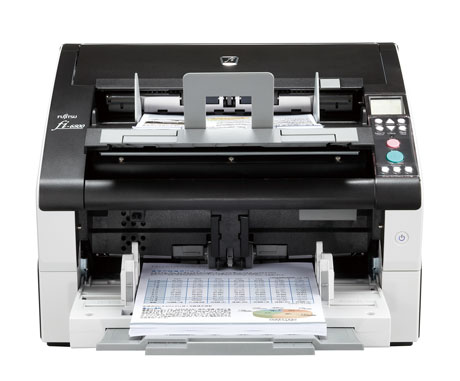
Explore this need in the finder →The Fujitsu fi-6800 is an earlier production ADF for teams that need a higher published landscape rate than the fi-6400 while working through a computer-based capture process. Both machines share a 500-sheet, duplex A3 path and a one-at-a-time manual-feed mode. The fi-6800 is rated at 130 ppm / 260 ipm in landscape, compared with the fi-6400’s 100 / 200, and its documented interface choices include both USB and Ultra Wide SCSI. These are useful distinctions, not a reason to treat a discontinued scanner as a ready-to-run modern workstation.
Choose by the job orientation and host path
The U.S. datasheet rates the fi-6800 at up to 130 pages and 260 images per minute for landscape color or grayscale at up to 300 dpi. The listed portrait rate is 100 ppm / 200 ipm. Those numbers are manufacturer speeds, not a test of your application, paper mix or workflow; the official sources warn that system environment, data transfer and image processing affect real timing. A high OCR resolution or a document-checking step may change the number of batches a team can complete.
For the host, the important advantage over the fi-6400 is not wireless convenience. The fi-6800 adds Ultra Wide SCSI beside USB 2.0. PFU says the interfaces cannot be used simultaneously, and the manual does not support connecting multiple computers by those routes at once. Choose the connector that matches the specific scanner and host, then confirm the cable, card or adapter, driver and capture application. Do not read “USB and SCSI” as two independent simultaneous workstations.
Batch handling still has manual-feed limits
The 500-sheet ADF rating is based on A4/Letter stock at 80 g/m² (20 lb), with paper weight and stack limits that remain relevant. It is not a daily duty rating or an assurance that an unknown used feeder can take every 500-sheet load. PFU documents multifeed sensors, Intelligent MultiFeed and an Active Stacker to help organize mixed jobs and exiting pages. Such mechanisms can support a repeatable workflow, but they do not eliminate the need to inspect sensitive originals or confirm the roller path on the individual scanner.
The shared fi-6400/fi-6800 Operator’s Guide describes two manual-feed modes: one-sheet feeding and continuous one-at-a-time feeding. This is helpful for occasional thick, folded or otherwise special pages, but it is not a separate tray. The guide specifically says Paper Protection is disabled and no paper-separation force is applied during manual feed. Use its steps and paper restrictions rather than assuming this mode offers the same safeguards as automatic feeding.
At 70.5 pounds, with a body measuring about 18.1 by 16.9 by 12.2 inches before the hopper, the fi-6800 needs planning for support, lifting and operator access. The dimensions are not a footprint recommendation; the cited installation space is larger. The scanner is still a substantial piece of equipment even though it is smaller than some production machines.
Driver support is better documented than for the fi-6400, not automatic
Historical model material lists TWAIN/ISIS capture software and PaperStream Capture. PFU’s PaperStream IP table, dated October 6, 2026, includes the fi-6800 under discontinued models and names current Windows and Server versions. That is a meaningful support signal, but it does not prove that a particular used unit’s interface, serial, driver version, computer architecture, third-party application or software license will work. Check the exact installation path before treating a used scanner as an upgrade.
The U.S. datasheet assigns historical part number PA03575-B065. This helps distinguish the exact model in old records; it is not a live product page or proof of a particular carton. PFU America’s U.S. roster says the model is no longer for sale while eligible for extended service, which does not demonstrate service transfer to a used purchaser.
Do not mistake a hopper or a dated estimate for daily output
Global product literature disagrees about expected daily volume: the 2013 catalog says 60,000 sheets per day, while the later exact-model table says 110,000. Those are inconsistent historical manufacturer estimates, not measured output or a promise for an old unit. This review does not choose one as a reliable daily workload. The 500-sheet input and high nominal speed are also not sufficient to predict real throughput without the paper, operator, driver, host and post-scan workflow.
There is no separate flatbed documented in the reviewed fi-6800 materials; its special-original path remains the ADF manual-feed mode. Optional post-imprinters and capture extras are not assumed to be fitted. Ask for the exact label, installed interface, included guides and accessories, hardware condition, counter/roller history, available drivers and return terms. A product photo cannot verify those details. The fi-6800 may suit a staffed office or service bureau with a known capture chain, but it is a poor choice if the project depends on undocumented mobile, Wi-Fi or computer-free cloud operation.
Key specifications
Key details at a glance
| Scanner class | Professional production sheet-fed scanner |
|---|---|
| Manufacturer-listed simplex rate | 130 ppm |
| Manufacturer-listed duplex image rate | 260 ipm |
| Automatic document feeder capacity | 500 sheets |
| Optical resolution | 600 dpi |
| Connection options | USB / Ultra Wide SCSI |
| Automatic duplex capture | Yes |
| Separate manual-feed route | Yes |
| TWAIN driver documented | Yes |
Use the exact model’s instructions for operating limits, supplied equipment and version differences.
Sources for this review
Sources for this assessment
- PFU America U.S. discontinued-scanner roster
- PFU/Ricoh Global archived fi-6800 exact-model specifications and features
- Fujitsu U.S. fi-6800 product datasheet, v2 (PDF-reader observation)
- PFU/Ricoh fi-6400/fi-6800 Operator's Guide
- PFU/Ricoh PaperStream IP current supported-model and OS table
- PFU/Fujitsu Global fi-6800 catalog, December 2013 (PDF-reader observation)
- PFU/Ricoh official exact fi-6800 page-linked product image

Compare the workflow before you choose
Use the finder to test your connection, paper and software requirements against the documented scanner arrangements.