
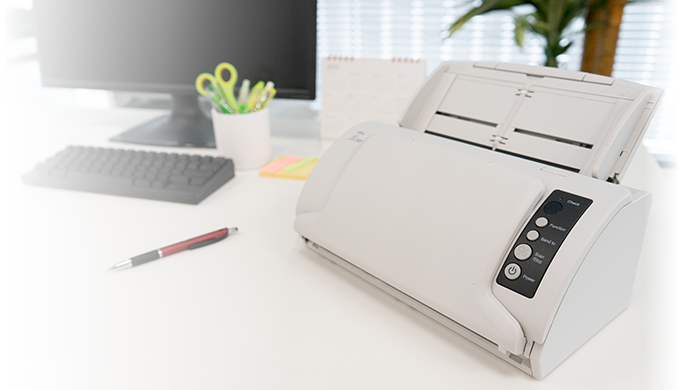
Your needs, this model
Does it fit your priorities?
Can the fi-7030 support a USB computer workflow that needs TWAIN?
PFU identifies USB on the U.S. model page, and the exact-model driver table lists TWAIN/TWAIN x64 and ISIS. The documented arrangement is a connected computer; Wi-Fi, phone scanning and computer-free cloud are not established. Confirm the current driver for the exact operating system and application.
Explore this need in the finder →Does it meet a 50-sheet duplex loading minimum?
The manufacturer lists duplex capture and a 50-sheet ADF, specifying A4 at 80 g/m² in its technical table. Capacity can vary with paper thickness. At a 60-sheet minimum, the documented ADF no longer qualifies; neither figure is a daily-output rating.
Explore this need in the finder →Can it handle plastic cards in recurring batches without a separate feed?
The ADF accepts supported cards up to 0.76 mm, but the exact-model table says consecutive card feeding is not supported; it recommends cross-feed for embossed cards. The inspected sources do not document a separate Manual Feed mode, so this is not a good fit when that distinct route is essential.
Explore this need in the finder →Review basis: This is a source-led assessment of the U.S. fi-7030 model, not a hands-on test. The rate, feeder limit and daily-volume figure below are manufacturer statements, not results from our own workload. PFU's U.S. pages list the model as discontinued and do not establish a current offer, U.S. part number, seller condition or box contents.
Where the fi-7030 fits
The Ricoh fi-7030 is an earlier, compact USB document scanner built around an automatic document feeder. It captures both sides automatically and is rated for up to 27 pages per minute or 54 images per minute at 200/300 dpi. Those figures make it a modest workgroup machine rather than a high-throughput production scanner. The Japanese exact-model table says A4 portrait; an archived global page says portrait in its overview but labels the speed row A4 landscape. We therefore do not attach an orientation-specific speed promise to the number. Actual time also includes paper preparation, computer transfer, image processing and saving.
PFU lists a 50-sheet ADF, which is the practical boundary that matters more than its 4,000-sheets-per-day estimate for many small-office routines. The exact-model technical table sets the 50-sheet load at A4 paper weighing 80 g/m² and says maximum capacity varies with paper thickness. The daily number is a manufacturer planning estimate based on assumed use and speed; PFU says it does not guarantee a customer's result or the scanner's durability. Treat the ADF as a way to avoid feeding one page at a time, not as a promise that every mixed stack fits or that a daily target is sustainable.
Paper, cards and one-sided exceptions
The normal ADF document limit is up to 8.5 × 14 inches. The exact-model table describes paper from 40 to 209 g/m², with a separate 127–209 g/m² range for A8-or-smaller originals. Long-page capture reaches 220 inches only under the stated low-resolution, PaperStream IP TWAIN/ISIS condition; that maximum is not available at every resolution. These are operating limits to check against the actual originals, not evidence that the feeder will accept an arbitrary stack of receipts, curled pages or mixed stocks.
Plastic cards up to 0.76 mm are documented, but this is not a card-batch scanner: the specifications say consecutive card feeding is not supported, and embossed cards should be cross-fed. An optional A3 carrier sheet can handle a folded larger original one side at a time. That is a separate accessory, and neither the reviewed U.S. pages nor a specific package listing established that it comes with any particular seller's unit. There is no flatbed for books, bound records or delicate pages, and no distinct Manual Feed mode is documented. The card path and carrier sheet should not be mistaken for a general-purpose second feed route.
A wired software workflow, not a standalone cloud device
PFU's U.S. page identifies USB 2.0 and integrated TWAIN/ISIS connectivity. The exact-model technical table lists USB 2.0/1.1 Type B, TWAIN/TWAIN x64, ISIS, WIA, macOS ICA and Linux SANE driver interfaces, alongside PaperStream IP, Capture and ClickScan software. PaperStream Capture Pro is described as a premium option, not a confirmed entitlement in an unknown U.S. package. The documented operating plan is a computer attached over USB; Wi-Fi, mobile scanning and scanner-direct cloud delivery were not established by the sources reviewed here.
Driver age matters. PFU's PaperStream IP page, marked current as of October 6, 2026, lists the fi-7030 in its discontinued-model group. That is useful evidence that the model remains named in a current software table, but it is not a guarantee for every operating system, host architecture, driver version or third-party application. Before buying an older unit for an existing office, identify the exact host and capture software, then confirm the current download path and test any required TWAIN/ISIS workflow against the manufacturer's instructions.
Buying an earlier unit requires more checking
The official U.S. lifecycle roster says the fi-7030 is no longer available for sale but remains eligible for extended service coverage. That statement describes manufacturer lifecycle status; it does not mean service coverage transfers to every used unit or that a seller has stock. A U.S. retail part number was not established on the inspected U.S. model page. Search listings may therefore mix different conditions or accessories, and the model assessment should not be read as a warranty or package promise.
On paper, the fi-7030 is worth considering only when an earlier USB desktop scanner, duplex capture, a 50-sheet ADF and a documented host-driver interface match the job. It is a poor fit when Wi-Fi, phone-first operation, more than 50 sheets per load, a flatbed, a separate manual-feed route or a confirmed current support path is essential. PFU identifies the fi-8040 as the later replacement, but that does not establish that the newer model is an identical configuration or that the two are interchangeable. Check the exact fi-7030 identity on the unit, working condition, included power and USB accessories, driver support, return terms and any carrier sheet separately before proceeding.
Key specifications
Key details at a glance
| Scanner class | Compact workgroup desktop document scanner |
|---|---|
| Manufacturer-listed simplex rate | 27 ppm |
| Manufacturer-listed duplex image rate | 54 ipm |
| Automatic document feeder capacity | 50 sheets |
| Optical resolution | 600 dpi |
| Connection options | USB |
| Automatic duplex capture | Yes |
| Touchscreen | No |
| TWAIN driver documented | Yes |
Use the exact model’s instructions for operating limits, supplied equipment and version differences.
Sources for this review
Sources for this assessment
- PFU America: fi-7030 exact U.S. model page
- PFU America: U.S. discontinued scanner and service-status roster
- PFU/Ricoh: exact-model fi-7030 product page (global model identity; Japan market page)
- PFU/Ricoh: exact-model fi-7030 technical specifications (global model identity; Japan market page)
- PFU/Ricoh Global: archived exact-model fi-7030 page
- PFU/Ricoh: PaperStream IP supported-scanner table, current as of October 6, 2026
- PFU/Ricoh: exact-model fi-7030 product photograph linked from the model page

Compare the workflow before you choose
Use the finder to test your connection, paper and software requirements against the documented scanner arrangements.