
Your needs, this model
Does it fit your priorities?
Can the fi-70F capture small originals at a PC-connected front desk without an AC outlet nearby?
PFU documents USB bus power as an option while the scanner remains connected to a supported computer. The USB-powered published A6 times are slower than the AC adapter figures, so confirm both the host port and your job pace.
Explore this need in the finder →Does it feed a small stack automatically?
No. The fi-70F is a simplex A6 flatbed and PFU does not document an ADF capacity. A glass platen size is not an automatic feeder or a batch-load rating; a 20-sheet minimum requires a model with a sourced feeder figure.
Explore this need in the finder →Does it capture both sides of a form automatically?
No automatic duplex mode is documented. The specifications identify a simplex flatbed; each original is placed on the glass, and a second side would require separate handling in the host workflow.
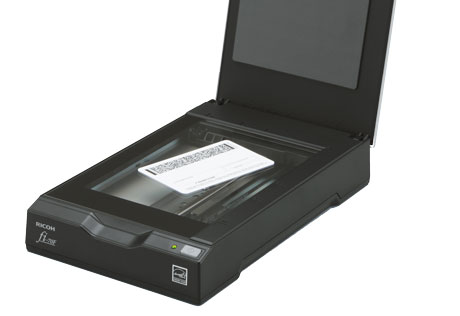
Explore this need in the finder →The Ricoh fi-70F is a specialist flatbed for small originals, not a compact substitute for a full-page document feeder. PFU describes it for reception desks and other tight work areas where an operator repeatedly captures IDs, passports, cards, photos, or forms no larger than A6. The manufacturer lists a 105 × 148 mm (4.1 × 5.8 in.) maximum, a single-sided flatbed mechanism, and USB connectivity. Those boundaries matter more than the “high-speed” label: the workflow is one item on glass at a time, with the host computer still doing the scan job.
What its glass bed is designed to handle
On the fi-70F, the original is placed face-down on the glass; there is no stack ADF to load and no automatic two-sided path. PFU’s current specifications identify the device as “Flatbed, Simplex” and give A6 as the maximum scanning area. That makes the model plausible for small card-oriented intake, but unsuitable for a routine built around letter or legal pages, multi-page packets, or unattended stacks. A regular paper contract is not made to fit by turning it sideways: the stated scan area remains the limiting factor.
The flatbed does offer a different kind of flexibility from a sheet-fed scanner. The manual documents scanning a book after removing the cover, but that is not a blanket promise that every bound volume or thick original can be captured. A curled or folded page can leave a gap above the glass and blur; with the cover open, outside light can affect thin originals. These are practical setup caveats, not evidence of a measured image-quality result. If the expected work includes full-size books, forms, or large photo layouts, compare against a full-size flatbed rather than assuming the fi-70F’s compact glass will cover them.
USB power is useful, but not a wireless mode
PFU lists both an AC adapter and USB bus-power option. Bus power can help at a counter without a nearby outlet, but the scanner still connects to a computer and depends on a supported desktop driver/application. The manual’s basic procedure is to place an original, close the cover as appropriate, and use the connected computer’s scanning application or the configured Scan button. There is no documented Wi-Fi, phone/tablet capture path, or scanner-to-cloud destination for this model. A “portable” installation therefore means a small USB-hosted setup, not a self-contained mobile workflow.
Software compatibility is one of the stronger documented points for a wired station. PFU lists TWAIN and TWAIN x64, ISIS, and WIA driver options, alongside PaperStream software. Its current specifications list Windows 10/11 and selected Windows Server versions, while expressly excluding Windows ARM-based PCs. Verify the exact computer, driver version, and capture application before buying—especially if your workplace uses a non-Windows host or a specialized TWAIN workflow. The manufacturer’s generic MRZ material for passport and ID processing is tied to its software workflow; it should not be read as a claim that the scanner by itself extracts identity data.
Read the speed figures with the original size attached
PFU publishes times per A6 original at named resolutions, rather than a batch pages-per-minute figure. With AC power, its current model table lists color at 1.3 seconds per page at 200 dpi and 2 seconds at 300 dpi; the corresponding USB bus-powered color values are 2 and 2.5 seconds. Grayscale or monochrome is listed at 0.9 and 1 second on AC, versus 2 seconds under the listed bus-powered settings. These are manufacturer measurements under a stated computer setup, not an independent test or a sustained-job guarantee. They also describe a small A6 scan, not a letter-size page or a full intake transaction that includes entering data and saving a file.
The practical comparison is straightforward: a duplex ADF scanner such as the fi-800R suits short batches and common office sheets better, while the fi-70F offers a small glass surface for placing rigid or delicate small originals rather than feeding them through a path. The fi-800R’s own restrictions still matter, and the fi-70F is not an all-purpose alternative. Choose based on the original dimensions and handling route your staff actually need.
Space, setup, and upkeep
The manufacturer lists a body about 5.7 × 9.2 × 1.6 inches and a weight of 1.98 pounds. The manual’s larger installation-space figure accounts for opening and closing the cover, so leave more room than the body measurements alone suggest. A scan button is provided on the unit, but it launches a configured computer application; it is not a screen for choosing destinations. USB 2.0 is preferred for the stated interface, and PFU notes that USB 1.1 can slow operation.
Routine care is part of ownership. The fi-70F guide specifies cleaning the flatbed’s document pad and glass every 1,000 sheets, while noting that actual cleaning needs vary with document condition. That count is the manufacturer’s maintenance instruction, not a test result or a life-cycle rating. PFU’s 2025 U.S. datasheet lists a one-year depot warranty and setup items including AC power, USB cables, and a Setup DVD-ROM; confirm the exact part, included cables, current driver access, warranty terms, seller condition, and return policy for the package actually offered.
Bottom line
The fi-70F is a narrow, understandable choice when the job is small originals on a glass bed, a USB-connected supported computer, and one-sided capture. Its coverless design, light body, one-button start, and optional USB bus power may simplify a constrained front-desk installation. The same design makes it a poor match for everyday letter-size paperwork, batch feeding, automatic duplex, phone-first scanning, or stand-alone cloud filing. There is no published duty-cycle figure in the reviewed model sources, and no independent speed, OCR, durability, or productivity test is claimed here.
Sources: PFU America fi-70F product page, PFU/Ricoh current fi-70F specifications, exact-model manual index, and the fi-70F Operator’s Guide. Research-based assessment; not a hands-on test.
Key specifications
Key details at a glance
| Scanner class | Professional desktop flatbed |
|---|---|
| Optical resolution | 600 dpi |
| Connection options | USB |
| Automatic duplex capture | No |
| Separate manual-feed route | No |
| Touchscreen | No |
| TWAIN driver documented | Yes |
Use the exact model’s instructions for operating limits, supplied equipment and version differences.
Sources for this review
Sources for this assessment
- PFU America U.S. fi-70F product and downloads page
- PFU America U.S. fi-70F datasheet (2025-04-14 edition)
- PFU/Ricoh Global fi-70F product and specifications page
- PFU/Ricoh Global fi-70F manual download index
- PFU fi-70F Operator's Guide, revision P3PC-7172-05ENZ2
- PFU America U.S. all-scanners directory card
Compare the workflow before you choose
Use the finder to test your connection, paper and software requirements against the documented scanner arrangements.