
Your needs, this model
Does it fit your priorities?
Does the fi-7180 include glass for books or fragile pages?
No built-in flatbed is listed for the exact fi-7180; it is an ADF-only duplex model. A separate manual-feed setting lets an operator load one sheet at a time into the ADF, but that is not a glass platen and does not solve a bound-book job.
Explore this need in the finder →How much can I load, and what does the 80/160 rate mean?
The manufacturer rates the ADF at up to 80 pages per minute simplex or 160 images per minute duplex for A4 portrait at 200/300 dpi. Its 80-sheet load is stated for Letter 20 lb or A4 80 g/m² stock; the guide limits the stack to under 8 mm and says loading capacity varies with paper. Treat both speed and capacity as conditional specifications, not independent results.
Explore this need in the finder →Is there a manual-feed route for originals that should not go through a batch?
Yes. The shared Operator's Guide describes feeding a single sheet into the ADF at a time and waiting for the next page after a timeout is enabled from the operator panel or Software Operation Panel. It is not a separate bypass tray, and the manual warns that frequent use can shorten consumable intervals. Confirm the exact paper/card instructions and current driver route for the unit.
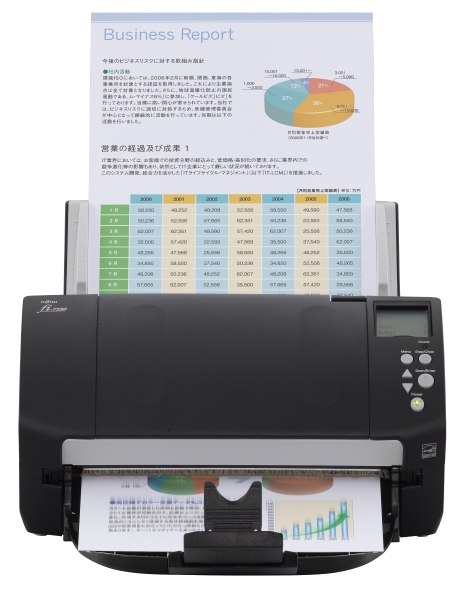
Explore this need in the finder →The Ricoh fi-7180 is an earlier, wired departmental scanner built around a duplex automatic document feeder. Its headline combination is an 80-sheet load with a manufacturer-rated 80 pages per minute simplex or 160 images per minute duplex under A4 portrait, 200/300 dpi conditions. The important boundary is just as clear: the fi-7180 has no built-in flatbed. This is a specification-based assessment, not a hands-on test; a stated rate does not predict the time for a real job after setup, image processing, OCR and saving.
A fast feeder for loose-paper batches
For a team scanning ordinary documents to a connected computer, the appeal is its full-duplex ADF and compact chassis. PFU lists 80 pages for one loading when using A4 80 g/m² or Letter 20 lb paper. The Operator's Guide also limits the document stack to under 8 mm and warns that loading capacity varies with paper. That qualification matters: an 80-sheet headline is not permission to put every mixed stack, heavier stock or odd original through at the same limit.
The scanner's advertised 80 ppm/160 ipm figure is a rated ADF speed, not a promise that a real folder will be captured, cleaned up and routed at that rate. The listed 11,000-sheet expected daily volume is also not a durability guarantee or measured duty cycle. For a purchase decision, the useful questions are how much paper is actually loaded at once, whether the documents meet the manufacturer's conditions, and what application will process the output.
Manual feed is a mode, not another tray
One useful capability is easy to miss in a comparison chart. The shared fi-7x80 Operator's Guide describes manual feeding as loading one sheet into the ADF at a time while the scanner waits for the next page. The operator enables a timeout through the panel or Software Operation Panel, then can feed pages individually while checking them or continue with pages that are awkward to load as one batch. This gives the fi-7180 a documented occasional-special-original route, but it is not a second bypass tray and does not turn the machine into a flatbed.
PFU's guide also notes that frequent manual feeding can shorten consumable intervals. The exact guide should be checked before scanning unusually delicate, thick, taped or card-like media. A separate card setting for fi-7180/fi-7280 has its own orientation and resolution restrictions; it should not be conflated with routine manual feeding or treated as a universal mixed-stock feature.
The missing platen is the deciding tradeoff
The fi-7180 is an ADF-only model. A bound book, a rigid passport, an old photograph or a fragile single sheet that should rest on glass needs another scanner or a different device. The related fi-7280 runs at the same published 80/160 ADF tier and has the same 80-sheet load, but adds a separate Letter-size flatbed. That additional glass path makes the fi-7280 a different desk job, not merely a larger version of the fi-7180. Its body is also substantially deeper and heavier. If you do not need the platen, the fi-7180's smaller 11.8 × 6.7 × 6.4-inch body is the more compact of the two; if you do, do not assume a paper-feed mode fills the gap.
PFU's Global specifications list up to 220 inches of long-page scanning at 200 dpi or lower and ADF paper from 27 to 413 g/m², but such ranges do not override instructions for document type, page size or thickness. The product's skew reduction, ultrasonic multifeed detection and acoustic paper-protection features address common feeding risks; they do not make jams, missed feeds or damage impossible.
Wired software means checking the exact host
The sources document USB to a computer and TWAIN, TWAIN x64 and ISIS interfaces. The U.S. model page calls the port USB 3.2, while the exact Global page and datasheet list USB 3.0/2.0/1.1. Both sources support the generic USB route, but the protocol-generation discrepancy is not resolved here. Confirm the actual port, cable and scanner unit rather than buying on a generation label alone. The official image shows an LCD and physical keys; the reviewed sources do not establish a touchscreen for choosing profiles.
A current PFU compatibility FAQ lists fi-7180 in its Windows, Linux and macOS model groups, but it excludes Windows on ARM. The same FAQ warns that legacy software may not be bundled and that the download service for it has ended. That makes a concrete host/app check important: confirm the operating system and architecture, the exact driver build, whether it can still be obtained, and that the intended capture software recognizes the model. A TWAIN listing is useful evidence, not a guarantee for every program or future update.
Only consider the exact earlier unit
PFU says the fi-7180 is no longer available and recommends the newer fi-8190; the U.S. discontinued roster separately places the 7180 among models no longer for sale but still eligible for extended service. These are lifecycle statements, not proof that a specific seller has a working scanner or that service transfers to a buyer. For a used or refurbished unit, verify the exact model marking, feeder and roller condition, included power and USB accessories, return terms, software access and support path before comparing it with a current model. No package contents, current offer, seller condition or price are inferred in this assessment.
The fi-7180 makes sense only if the workflow is a wired computer, loose-paper batches, automatic two-sided capture and occasional one-page manual feed—and if its earlier status is acceptable. For glass scanning, wireless use, touchscreen control, a guaranteed current software package or a new-unit purchase, look elsewhere. I based this assessment on PFU America's exact U.S. product and lifecycle pages, the Global model specifications, its datasheet, the shared Operator's Guide and PFU's dated OS FAQ; none of that is a claim of personal ownership or testing.
PFU America fi-7180 page · PFU/Ricoh Global fi-7180 specifications · PFU/Ricoh Global fi-7280 specifications · PFU fi-series OS compatibility FAQ.
Key specifications
Key details at a glance
| Scanner class | Professional desktop sheet-fed scanner |
|---|---|
| Manufacturer-listed simplex rate | 80 ppm |
| Manufacturer-listed duplex image rate | 160 ipm |
| Automatic document feeder capacity | 80 sheets |
| Optical resolution | 600 dpi |
| Connection options | USB |
| Automatic duplex capture | Yes |
| Separate manual-feed route | Yes |
| TWAIN driver documented | Yes |
Use the exact model’s instructions for operating limits, supplied equipment and version differences.
Sources for this review
Sources for this assessment
- PFU America: exact U.S. fi-7180 model and driver page
- PFU America: U.S. discontinued scanner and service-status roster
- PFU/Ricoh Global: exact-model fi-7180 product and specifications page
- PFU/Ricoh Global: exact-model fi-7180 datasheet, 2022 edition
- PFU/Ricoh Global: fi-7180/fi-7280 Operator's Guide
- PFU/Ricoh: fi-7140/fi-7160/fi-7180/fi-7240/fi-7260/fi-7280 OS and software compatibility FAQ
- PFU/Ricoh Global: exact-model fi-7180 product photograph

Compare the workflow before you choose
Use the finder to test your connection, paper and software requirements against the documented scanner arrangements.