
Your needs, this model
Does it fit your priorities?
Does the base fi-7300NX include the same EdgeXperience subscription as the service bundle?
No. The exact base part PA03768-B005 is separate from bundle CG01000-307601, whose offer includes one year of EdgeXperience Capture Service. Do not assume the PC-less cloud service is included with the base scanner.
Explore this need in the finder →Can a shared team use a wireless network plan without treating Wi-Fi as phone scanning?
The base sources list Wi-Fi as a connection option and a color touchscreen for prepared jobs, but the reviewed material does not establish a mobile-device route. Check the actual host, network software and destination setup.
Explore this need in the finder →Do the published speeds say how long our OCR workflow will take?
PFU rates the fi-7300NX at up to 60 ppm/120 ipm at stated 200/300 dpi settings and specifies an 80-sheet ADF. These are manufacturer specifications, not an end-to-end result that includes image processing, OCR, transfer, review or exception handling.
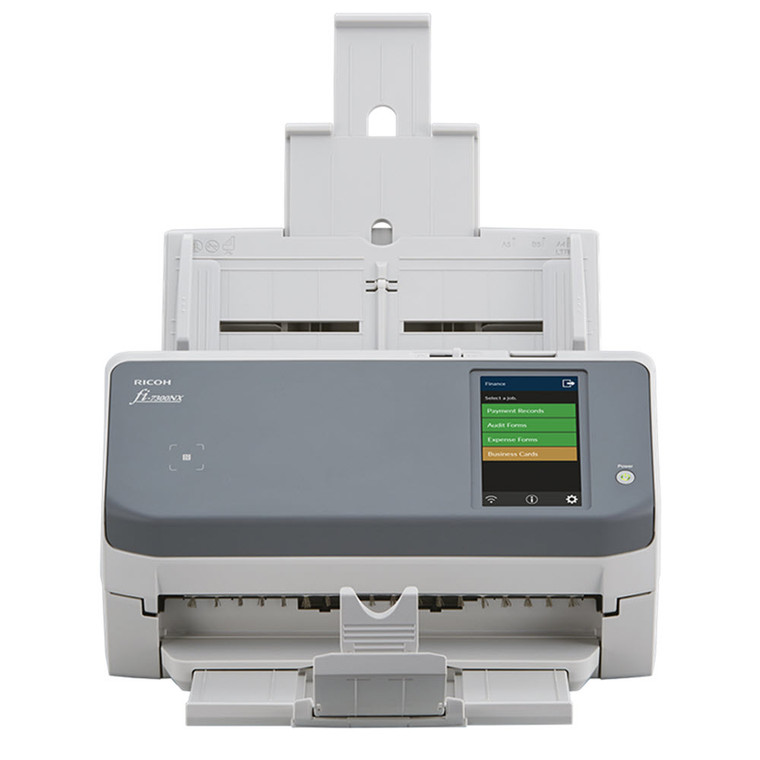
Explore this need in the finder →The base fi-7300NX is a network-capable workgroup document scanner, but it is important to separate the scanner from PFU’s EdgeXperience Capture Service bundle. This review covers the US base part PA03768-B005. The separate bundle CG01000-307601 includes one year of that service; the base offer does not establish the same subscription or its PC-less cloud route. This is a research-based assessment of manufacturer information, not a hands-on test or a claim about measured feed reliability.
A shared station with more than one route
PFU lists duplex capture, an 80-sheet automatic document feeder and a maximum rated rate of 60 pages per minute or 120 images per minute at 200/300 dpi. That puts the fi-7300NX in a workgroup role rather than a one-page-at-a-time portable role. The numbers are manufacturer ratings under stated settings; they do not predict a complete business job that includes profile selection, OCR, output naming, network transfer and document review.
The base scanner offers USB 3.0, Wi-Fi and Ethernet, so a deployment can consider a directly connected computer routine or a networked scanner workflow. Those interfaces should not be collapsed into a single promise: the actual destination depends on the software and configuration selected. PFU’s product materials identify PaperStream IP on Net and PaperStream NX Manager, while the EdgeXperience subscription is offered separately. A buyer who specifically wants service-hosted, PC-less capture should match the bundle part and its subscription terms rather than assume that the base model’s wireless connection includes the same service.
Touchscreen jobs are an administrative project
The color touchscreen, job buttons and thumbnail review are relevant when several people share a device. The administrator can prepare repeatable jobs, while an operator selects a task and checks the preview instead of finding a desktop shortcut. The NFC/card reader is documented as a user-authentication feature. It should not be mistaken for a mobile-scanning route: the sources reviewed for this base product do not establish phone or tablet capture.
Before buying for a shared office, decide who will create and maintain profiles, which network segment the scanner will use, and where scans are allowed to go. A touchscreen makes a configured workflow easier to select; it does not establish file retention, access policy, cloud approval or correct routing by itself. Test those choices with the software and security owners using the precise network and driver plan intended for the unit.
Paper handling is still bounded by the manual
PFU describes the 80-sheet feeder, duplex capture, ultrasonic double-feed detection and paper-protection features. Its base offer also lists embossed-card handling up to 1.4 mm. Those specifications help frame the sort of routine it is designed to support, but they do not mean every mixed, curled, stapled, damaged or unusually thick original belongs in the ADF. Sort and prepare batches, consult the current manual for supported media, and use a separately documented special-original path only when one is specified for the exact model.
The maximum 60/120 rate should be read as a feed specification under stated test conditions, not as an OCR throughput guarantee. For a records workflow, downstream work can dominate: naming, review, exception handling and destination permissions all add time. Ask for a representative workflow demonstration if measured job duration is important; this review contains no independently measured comparison.
Choose a service package deliberately
Some offices may choose the base fi-7300NX because it supplies wired and wireless network interfaces alongside USB. Others may want the packaged EdgeXperience service to create a PC-less hosted workflow. The bundle’s one-year subscription is an important product difference, not a minor accessory. PFU’s support material requires firmware 0M00 or later for EdgeXperience and supplies tenant-registration and connection guidance. Renewal cost, the availability of service after the included year, retention, and a later subscription’s terms are not settled by the reviewed pages. Ask PFU or the seller to confirm these details before deployment.
Compare the intended route with other fi-series designs. The fi-8150 offers a larger 100-sheet feeder and wired USB/Ethernet setup, without a base EdgeXperience subscription established in its offer. The fi-8040 has DirectScan for network destinations, but PFU describes that as a PC-less local-network route that does not require a cloud service. Their headline speed and workflow context differ; none is a drop-in substitute for a service plan that has not passed organizational approval.
Check drivers and the exact offer
PFU’s driver notice says fi-7300NX units manufactured on or after April 1, 2026 have updated identification that PaperStream IP 3.36.0 and earlier will not recognize; PFU recommends version 3.40.1 or later. This is conditional on the unit’s manufacture date, so check the label and driver release rather than treating every scanner as affected. The current Store page, package part, included subscription, firmware, tenant administration, destinations and desired host compatibility are all worth confirming before an order. The available material supports a capable shared scanner with several possible operating plans; it does not establish live stock, independent performance or a phone workflow.
Key specifications
Key details at a glance
| Scanner class | Professional desktop sheet-fed scanner |
|---|---|
| Manufacturer-listed simplex rate | 60 ppm |
| Manufacturer-listed duplex image rate | 120 ipm |
| Automatic document feeder capacity | 80 sheets |
| Optical resolution | 600 dpi |
| Connection options | USB / Wi-Fi / Ethernet |
| Automatic duplex capture | Yes |
| Touchscreen | Yes |
| TWAIN driver documented | Yes |
Use the exact model’s instructions for operating limits, supplied equipment and version differences.
Sources for this review
Sources for this assessment
Compare the workflow before you choose
Use the finder to test your connection, paper and software requirements against the documented scanner arrangements.