
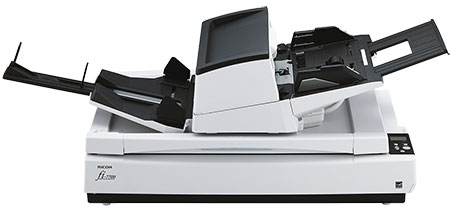
Your needs, this model
Does it fit your priorities?
Does the fi-7700 hold 300 sheets of double-letter paper too?
No. PFU's shared U.S. guide gives 300 sheets for A4/Letter-or-smaller pages and 100 for pages larger than A4/Letter at 80 g/m² (20 lb); the two loads also have different maximum stack heights. Use 300 only for the stated smaller-paper basis. Heavier stock and the exact feed instructions can reduce the load further.
Explore this need in the finder →When is the fi-7700 flatbed more useful than its ADF?
The ADF is the stack-feeding route, rated for duplex batches and documents up to 12 by 17 inches. The separate flatbed reaches 12 by 18 inches and is intended for supported bound, bulky or delicate originals that should not be sent through the feeder. It is a one-original-at-a-time surface, not added ADF capacity; check the manual's size and handling limits for the item in question.
Explore this need in the finder →Will an older PaperStream IP driver recognize a newly manufactured fi-7700?
Not if the unit was manufactured on or after April 1, 2026 and the host still uses PaperStream IP 3.36.0 or earlier: PFU says those versions will not recognize the updated RICOH USB ID and recommends 3.40.1 or later. Ask for the unit's manufacture date and verify the driver, Windows build and capture application's support before deployment.
Explore this need in the finder →The fi-7700 combines two distinct paper routes: a duplex automatic document feeder (ADF) for loose batches and a large flatbed for supported bound or bulky originals. That combination distinguishes it from the ADF-only fi-7600, even though both are rated for a 300-sheet A4/Letter load and up to 100 pages per minute in the manufacturer's stated landscape mode. This is a source-led assessment of PFU's U.S. page, datasheet, shared Operator's Guide and model page, not a hands-on test.
Two capture surfaces, with different jobs
The ADF handles loose stacks, duplex capture and mixed document batches. PFU's U.S. materials list a maximum ADF page size of 12 by 17 inches; the integrated flatbed reaches 12 by 18 inches. Use the glass for supported bound, bulky or delicate originals that should not pass through the feeder, but do not treat that as a blanket promise for every fragile object. Check the manual for its actual size, media and handling limits.
The flatbed also matters when a document cannot be unfolded or separated from its binding. The guide gives a flatbed speed figure of 0.9 seconds per A4 sheet under the stated mode, while the ADF's rated speed reaches 100 pages per minute simplex or 200 images per minute duplex for A4 landscape at 200 or 300 dpi. Those are manufacturer component ratings, not the time to scan, transfer, name, OCR and file a real job. Portrait speed, image settings, software and the host computer change the workflow.
Capacity changes with paper size
Do not read “300 sheets” as a universal feeder load. PFU's datasheet bases that maximum on A4/Letter stock at 80 g/m² (20 lb). The shared U.S. guide lists 100 sheets for documents larger than A4/Letter at the same paper weight. It also limits stack height to 30 mm or less for the smaller-format load and 10 mm or less for larger documents. Paper weight can reduce capacity; the guide narrows ADF paper weight for larger-than-A4/Letter originals and A8 stock, and gives card-specific limits.
That distinction is important for double-letter, A3 and other wide batches: the ADF accepts pages up to 12 by 17 inches, but the 300-sheet claim belongs to the smaller Letter/A4 load. A flatbed scan does not add sheets to the ADF or turn one-at-a-time originals into a bulk feed job. Fan and align stacks as the instructions specify, and use a lower load when the paper or stack height requires it.
Manual feed is not the flatbed
A switch selects Manual/Single mode for supported special originals such as folded paper, envelopes and multilayer transfer stock. This still uses the ADF path, one original at a time; it is neither a second tray nor the glass bed. PFU says the mode reduces load on the original, but its guide also warns that thick folds can skew. More importantly, Manual/Single mode disables ultrasonic overlap checking. Treat the paper-protection functions as safeguards, not a guarantee against a missed or damaged page.
The flatbed can be a better route for a supported bound or bulky item, but it has its own 12-by-18-inch area and single-page workflow. Select between these routes by the original's dimensions and condition, not by assuming that every special item is safe on either surface. The guide also identifies an optional black document pad; it is not included by implication in the image or standard package.
Plan for a wired host and the current driver
This is a USB-connected production scanner. PFU lists TWAIN/TWAIN x64 and ISIS drivers alongside PaperStream IP, Capture and ClickScan software. The reviewed U.S. materials establish a Windows host workflow, not a built-in Wi-Fi, mobile scan or computer-free cloud route. Verify your particular operating-system build, scanning application and software license before fitting it into a records system.
There is also a date-sensitive compatibility check: PFU says fi-7700 units manufactured on or after April 1, 2026 use an updated RICOH USB ID that PaperStream IP 3.36.0 and earlier will not recognize. Its notice recommends version 3.40.1 or later. Ask the seller for the unit's manufacture date and check the installed driver before a mixed-fleet deployment; the model name alone does not establish the software version on a particular host.
Size, package and service need confirmation
The U.S. datasheet lists body dimensions of about 27.8 by 19.7 by 13.6 inches and a weight around 77 pounds. The shared guide gives a larger installation space—about 50.6 by 32.1 by 27.7 inches—so allow room for the feed and output paths, not just the chassis. PFU lists a three-month basic onsite service term in its U.S. comparison/specification materials; confirm the actual seller's warranty, eligibility and service language.
PFU's U.S. product page shows a demo request rather than a standard part-specific cart or base part number. Its datasheet lists a stacker, ADF chute, AC cable/adapter, USB cable and setup DVD-ROM, but the exact seller carton, media/license and unit condition remain checks for the offer in front of you. Do not confuse this base model with the separately identified fi-7700 FADGI package CG01000-308201; that package adds a distinct service/target layer, which is not assumed here. No price, stock or current quote is inferred.
Who should shortlist the fi-7700?
It is worth considering when a wired office needs both duplex ADF batching and a same-device flatbed for compatible originals that cannot go through a feeder. It is less suitable for a small desk, a mobile or wireless workflow, or a requirement to load more than 100 larger-than-Letter/A4 pages at once. Before selecting it, confirm the exact base configuration, package, host/driver date, media, working clearance and service terms against the seller's documentation.
Sources: PFU America fi-7700 product page; PFU America U.S. datasheet; fi-7600/fi-7700 Operator's Guide; PFU/Ricoh Global fi-7700 specifications; PFU PaperStream IP compatibility notice.
Key specifications
Key details at a glance
| Scanner class | Professional production flatbed adf |
|---|---|
| Manufacturer-listed simplex rate | 100 ppm |
| Manufacturer-listed duplex image rate | 200 ipm |
| Automatic document feeder capacity | 300 sheets |
| Optical resolution | 600 dpi |
| Connection options | USB |
| Automatic duplex capture | Yes |
| Separate manual-feed route | Yes |
| Touchscreen | No |
| TWAIN driver documented | Yes |
Use the exact model’s instructions for operating limits, supplied equipment and version differences.
Sources for this review
Sources for this assessment
- PFU America all-scanners catalogue card: fi-7700
- PFU America: fi-7700 Flexible High Volume ADF Scanner with Flatbed
- PFU America: fi-7700 U.S. scanner datasheet (2025-04-01)
- PFU America: fi-7600/fi-7700 Operator's Guide P3PC-6092-06ENZ0
- PFU/Ricoh Global: fi-7700 model overview and specifications (as of 2026-06-30)
- PFU America: Important Announcement—Update Your PaperStream IP Drivers (2026-03-16)
- PFU America: fi-7700 FADGI bundle datasheet (2024-10-16), separate package identity
- PFU/Ricoh Global: exact fi-7700 model-page chassis image

Compare the workflow before you choose
Use the finder to test your connection, paper and software requirements against the documented scanner arrangements.