
Your needs, this model
Does it fit your priorities?
Does DirectScan send scans to a cloud service without a computer?
The reviewed PFU material describes DirectScan to configured network destinations without a PC or server application and says that cloud services are not required. It is not evidence of a direct cloud workflow; network/NTP setup still matters.
Explore this need in the finder →Can the touchscreen support a shared wired scan station?
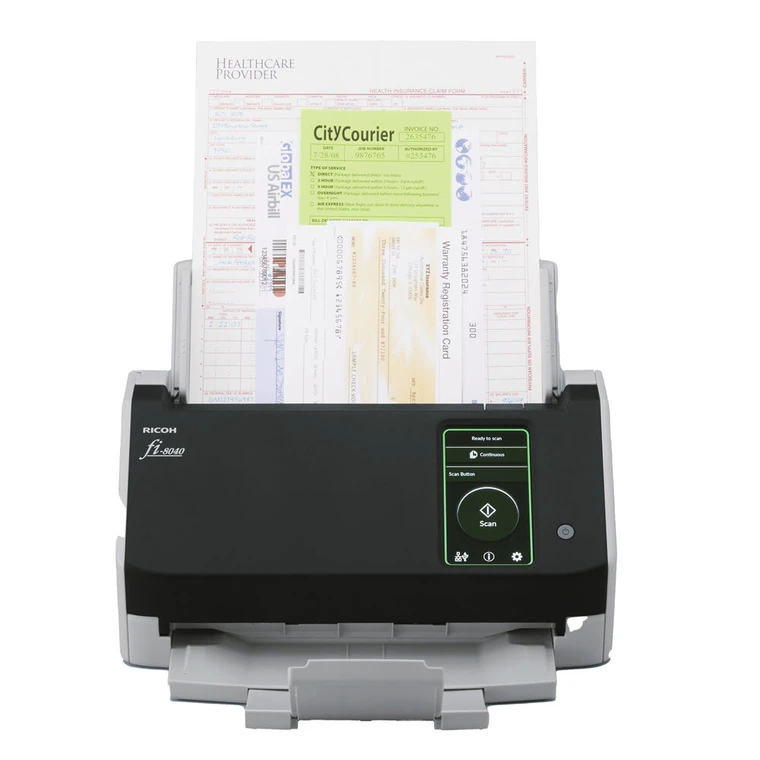
The fi-8040 has a 4.3-inch touchscreen and a documented DirectScan path to preset network destinations over wired LAN. Confirm destination ownership, access policy, naming, network and NTP configuration before use.
Explore this need in the finder →How should a buyer treat the Premium service term?
The exact Premium offer CG01000-310059 conflicts: the title/overview and service section say five years, but a feature bullet says four. Confirm the written term with the seller rather than treating it as settled.
Explore this need in the finder →The fi-8040 combines a modest desktop ADF with a touchscreen and a computer-free network destination feature. The exact US base scanner offer is PA03836-B005. Its most important distinction is DirectScan: PFU describes it as sending to preset network destinations without a PC, server software or cloud service. That is a different route from a cloud subscription and a different expectation from scanning to a connected computer. This assessment uses manufacturer material only; no hands-on testing is claimed.
DirectScan is networked, not cloud-based
PFU describes the DirectScan workflow as scanning at the device and delivering to network destinations without a connected PC or server-side application. The Operator’s Guide narrows the setup: the fi-8040 uses a wired LAN and requires network configuration, including NTP time setup. The touchscreen helps users select the configured destination, but it does not eliminate network administration or destination approval. Organizations should verify the exact network path, permissions, naming, retention and access policy before sending records from a shared device.
This feature is easy to overstate. The reviewed product materials say DirectScan does not require cloud services; it is not a cloud route merely because it avoids a PC. Wi-Fi is not established in the base offer, and no phone-scanning route is documented. A separate USB-connected computer plan remains available for the documented TWAIN/ISIS/SANE drivers and capture software. Keep those workflows distinct when assessing a buyer’s essential requirement.
A 50-sheet feeder for a smaller wired station
The fi-8040 has a 50-sheet ADF and is specified for duplex scanning at up to 40 pages per minute or 80 images per minute under the manufacturer’s stated conditions. Those figures describe capture speed, not an end-to-end business process. A real job can also include profile choice, network transfer, OCR, file review and corrective work. The feeder capacity supports recurring office batches, but it is smaller than 100-sheet fi-series alternatives.
PFU’s launch announcement describes a Manual Feed Mode for folded and other originals without a carrier sheet. Treat that as a separate route rather than proof that unusual documents should be mixed into the ordinary ADF stack. Consult the current manual for supported media and the exact operating instructions. The separate flatbed models are more appropriate when a bound page must lie on glass; the fi-8040’s touchscreen does not turn it into a flatbed scanner.
Touchscreen and drivers serve different operators
The 4.3-inch touchscreen provides a direct way to select jobs and destinations on the device. It may suit a small team that wants a predictable walk-up network scan station rather than asking every operator to open a PC session. USB and wired Ethernet are listed for the base offer, and PFU lists TWAIN, ISIS and SANE driver support for computer-connected capture. Choose the plan that the actual records application can support; a DirectScan profile is not interchangeable with an application’s TWAIN input path.
Before deploying a touchscreen workflow, decide who will create and maintain destinations, whether each person can send to every target, how confidential records are separated, and what happens when delivery fails. Those are organizational setup questions, not automatic hardware features. A small device can simplify a route only when the destination rules are clear and network administrators can provision the required wired connectivity.
Base part versus Premium package
The base US scanner is PA03836-B005. PFU also lists Premium bundle CG01000-310059 for the fi-8040. The bundle is the same scanner hardware with an advertised service package, not a different ADF or a new DirectScan mechanism. However, the bundle page contradicts itself: its title and overview and the service section say five years, while one feature bullet says four years; the service text also mistypes the model as “fi-80400.” Do not treat the five-year duration as settled until the seller confirms the exact written coverage for part CG01000-310059. The base page describes three years.
The fi-8040 can be compared with the fi-7300NX, which has Wi-Fi and an EdgeXperience service-bundle option but a distinct hosted workflow and one-year included subscription. It also differs from the fi-8150, which has a larger 100-sheet ADF without the same PC-less panel destination path established in its base offer. These are not simple better/worse comparisons; they address different network, support and paper-handling needs.
Fit checks before buying
The fi-8040 is worth shortlisting when the goal is a wired, walk-up document station for prepared network destinations, with a touchscreen and a moderate feeder. It is a poor assumption for a requirement that explicitly says “cloud without a computer,” since the reviewed documentation defines DirectScan as a network-delivery route without cloud services. It is also not the choice to start with when Wi-Fi, mobile capture, a flatbed or a 100-sheet stack is essential.
Check current operating-system and application compatibility, network/NTP requirements, destination ownership, service-package duration and exact part number. Published speed is not an independent result, and no price, availability, user satisfaction, image quality or reliability result is claimed. For secure records, have the organization’s network and data owners approve the actual route before enabling shared destinations.
Key specifications
Key details at a glance
| Scanner class | Professional desktop sheet-fed scanner |
|---|---|
| Manufacturer-listed simplex rate | 40 ppm |
| Manufacturer-listed duplex image rate | 80 ipm |
| Automatic document feeder capacity | 50 sheets |
| Optical resolution | 600 dpi |
| Connection options | USB / Ethernet |
| Automatic duplex capture | Yes |
| Separate manual-feed route | Yes |
| Touchscreen | Yes |
| TWAIN driver documented | Yes |
Use the exact model’s instructions for operating limits, supplied equipment and version differences.
Sources for this review
Sources for this assessment
Compare the workflow before you choose
Use the finder to test your connection, paper and software requirements against the documented scanner arrangements.