
Your needs, this model
Does it fit your priorities?
Can a large prepared batch use duplex capture without frequent feeder refills?
PFU specifies a 100-sheet ADF and duplex scanning up to 50 ppm/100 ipm at stated settings. These are manufacturer ratings; batch preparation and the full software workflow still affect job time.
Explore this need in the finder →Can it connect to a computer and use document-capture drivers?
The exact base offer lists USB and Ethernet, and PFU lists TWAIN and ISIS interfaces. Confirm the desired host OS, driver version, application and destination; no Wi-Fi or mobile route is established.
Explore this need in the finder →What is different about its manual-feed mode?
PFU documents a separate Manual Feed Mode for originals less than 7 mm thick, including IDs and pamphlets. It is a special-original path, not a license to place unusual thick originals in a mixed ADF stack.
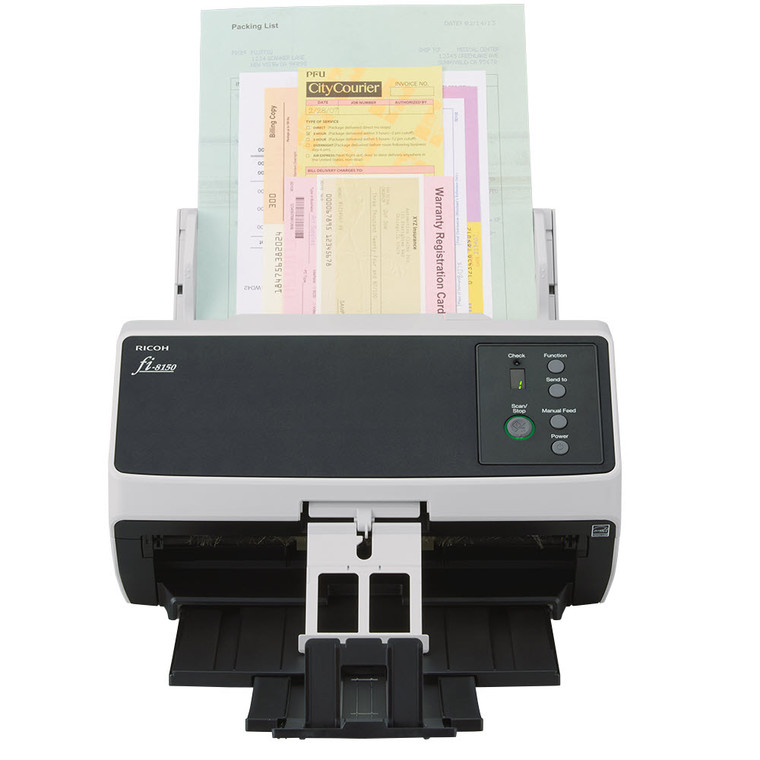
Explore this need in the finder →The fi-8150 is a wired duplex workgroup scanner for offices that need a fairly large feeder and a conventional computer-and-driver workflow. This assessment covers the US base part PA03810-B105. PFU also sells a Premium bundle, CG01000-310323, that packages the same scanner hardware with an extended service offer; it should not be confused with the base SKU. The discussion below is based on official product, Store and operating-guide material, not a hands-on test.
A 100-sheet feeder, with rated—not promised—speed
PFU lists a 100-sheet ADF, duplex scanning and a maximum of 50 pages per minute or 100 images per minute at stated 200/300 dpi settings. These ratings place it below some faster fi-series models on paper while keeping a substantial feeder for office batches. The figure is not an expected whole-job time: document preparation, mixed media, software profiles, image cleanup, OCR and the destination all affect how long work takes.
The 100-sheet capacity can reduce reload frequency for a prepared stack, but does not remove the need to inspect originals or understand the feeder’s paper limits. PFU describes a distinct Manual Feed Mode for individual originals under 7 mm thick, including items such as IDs or pamphlets. That special path is not permission to mix thick originals into a standard batch. Follow the exact manual for media, loading order, thickness and maintenance.
Plan around USB or wired Ethernet
The base offer lists USB and Ethernet, and PFU documents TWAIN and ISIS interfaces. For a desktop station, USB is the straightforward route to a computer. Ethernet can serve a wired workgroup or a supported managed-capture setup, but the reviewed sources do not establish Wi-Fi, a phone route or a direct computer-free cloud destination. A wired Ethernet port is not the same as a cloud workflow; verify what server, host, driver and application your deployment actually requires.
The fi-8150’s LCD and buttons are a functional operator panel, not a touchscreen profile station. If operators must select jobs at the scanner, check how the intended software presents those tasks and whether the planned management product fits. The hardware specification alone does not answer questions about authentication, network permissions, destination retention or exception handling.
Software compatibility deserves an early check
The published driver interfaces are useful for organizations with established document-capture software, but the application’s exact version, operating system and host architecture still matter. PFU’s current notice adds a particularly specific check: fi-8150 units manufactured on or after April 1, 2026 use updated device identification that PaperStream IP 3.36.0 and earlier will not recognize; PFU recommends 3.40.1 or later. Ask the seller for the unit’s manufacture date when a fleet image is fixed to an older driver, and confirm the exact driver release against the host before rollout.
PFU gives an expected daily volume of 8,000 sheets in its specification material. That is manufacturer-calculated operating guidance, not an independently verified durability rating, a guarantee of uninterrupted daily throughput, or evidence that every workload is appropriate. Plan realistic duty cycles, consumables and service with the manufacturer’s current documentation.
Base scanner or Premium service offer?
The exact base product is PA03810-B105. The separate Premium part CG01000-310323 identifies the same fi-8150 hardware and repeatedly describes a five-year Advance Exchange service package. The base offer and current model page describe a three-year package. This is a support-duration difference, not a higher-capacity feeder or different scan engine. A team that values predictable replacement coverage may find the extended package relevant, but should confirm eligibility, coverage scope, start date, shipping, parts and labor with the seller and current contract. The bundle does not erase the need to check software fit.
For alternatives, the fi-8170 is a faster 70/140 ppm/ipm model with a separate manual-feed path and a 100-sheet ADF; its base offer is a different part. The fi-7300NX adds Wi-Fi and a distinct service-bundle option, while the fi-8040 uses a smaller 50-sheet feeder and a touchscreen with DirectScan to network destinations. These comparisons describe documented differences rather than test rankings. Choose around the actual network, original mix, interface, and operating plan.
Who should shortlist it?
The fi-8150 looks most appropriate on paper for a wired office that wants duplex batching, a substantial feeder, recognized document-driver interfaces and a separately available special-original feed mode. It is a less obvious fit when wireless placement, phone scanning or a direct cloud workflow is essential. It is also not automatically the right machine merely because the feeder says 100 sheets: a small personal desk, a flatbed-dependent workflow or a frequent need to scan bound pages may point elsewhere.
Before purchase, match the exact US part and condition, confirm current software/host support, ask which service term applies to the selected offer, and check the current media limits and duty guidance. No price, stock status, independent scan result or customer experience is asserted here. The manufacturer specifications are helpful planning inputs, not a substitute for a site-specific compatibility check.
Key specifications
Key details at a glance
| Scanner class | Professional desktop sheet-fed scanner |
|---|---|
| Manufacturer-listed simplex rate | 50 ppm |
| Manufacturer-listed duplex image rate | 100 ipm |
| Automatic document feeder capacity | 100 sheets |
| Optical resolution | 600 dpi |
| Connection options | USB / Ethernet |
| Automatic duplex capture | Yes |
| Separate manual-feed route | Yes |
| Touchscreen | No |
| TWAIN driver documented | Yes |
Use the exact model’s instructions for operating limits, supplied equipment and version differences.
Sources for this review
Sources for this assessment
Compare the workflow before you choose
Use the finder to test your connection, paper and software requirements against the documented scanner arrangements.