
Your needs, this model
Does it fit your priorities?
Can the fi-8170 process two-sided office batches without constant reloading?
Ricoh specifies duplex scanning at up to 70 ppm/140 ipm under stated 200/300 dpi A4 conditions and a 100-sheet ADF at its specified Letter/A4 paper weights. Those are manufacturer figures, not a measured job result; input preparation and destination software still shape throughput.
Explore this need in the finder →Will it fit a wired computer-and-capture-software setup?
The exact US base offer lists USB 3.2 and Ethernet, and PFU documents TWAIN/TWAIN64/ISIS plus other driver routes. Ethernet is wired network access, not evidence of Wi-Fi, phone-first use, or direct cloud delivery. Check the OS, driver version, application interface and destination before adding it to a fleet.
Explore this need in the finder →Can an occasional thick pamphlet use a separate feed path?
PFU documents a Manual Feed Mode for originals under 7 mm thick, including pamphlets and IDs. That distinct route should not be confused with feeding any thick original through the regular ADF stack.
Explore this need in the finder →Review basis: This is a source-led assessment of the US fi-8170, not a hands-on test. The speed and capacity figures below are manufacturer specifications, not results from our own workload.
The fi-8170 in context
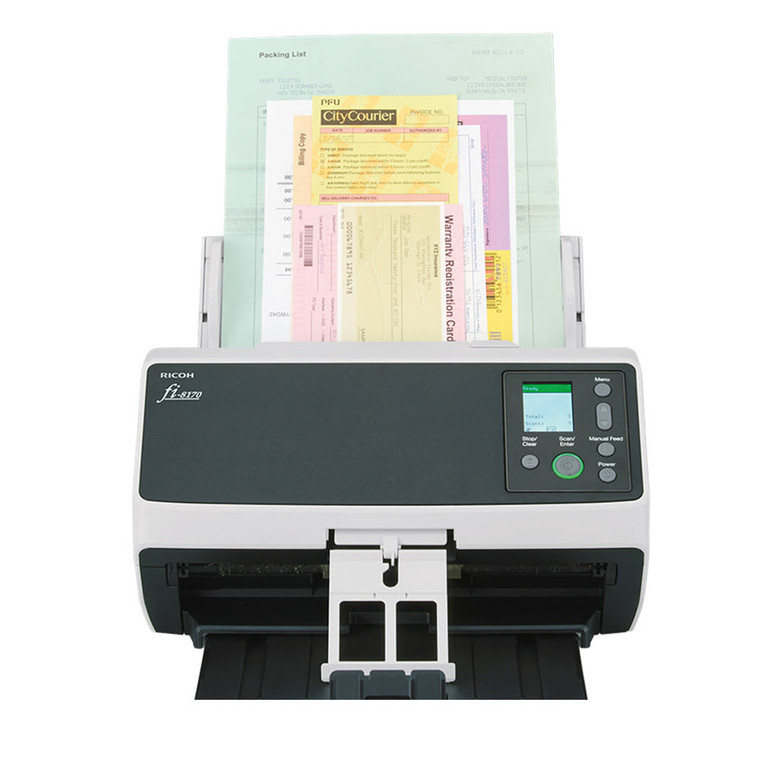
The Ricoh fi-8170 is a wired, duplex desktop document scanner for organizations that regularly turn mixed stacks into digital files. Its US product page lists USB and Ethernet, a 100-sheet automatic document feeder, a color LCD-and-button operator panel, and software built around PaperStream. The most useful differentiator is its rated pace: up to 70 pages per minute and 140 images per minute at 200 or 300 dpi in A4 portrait orientation. Those conditions matter. The published figure is not a promise about total job time, high-resolution scans, file processing, destination speed, or a particular paper mix.
Ricoh’s own comparison places the fi-8170 between the fi-8150, rated at 50 ppm/100 ipm, and fi-8190, at 90 ppm/180 ipm. All three are listed with a 100-sheet feeder, USB and Ethernet, duplex capture, and TWAIN support. That makes the fi-8170 a middle-speed choice rather than an automatic upgrade for every office. If the slower model already keeps up with a real queue, the higher tier may not change the workflow; if the scanner is a bottleneck, the fi-8190 is the faster step. Compare the exact service package too: the same chart lists different included Advance Exchange periods across the family.
Feeding capacity is more than a number
A 100-sheet feeder can reduce how often an operator reloads a batch, while duplex capture records both sides in one pass. Ricoh also lists ultrasonic overlap and length detection, Automatic Separation Control, and Intelligent Sonic Paper Protection with image monitoring. These features are intended to identify feeding trouble and protect originals; they should not be read as a guarantee against jams, missed pages, or damage. Paper preparation, staple removal, curled receipts, mixed thicknesses, maintenance, and the condition of the rollers still affect a job.
The documented limits help define the scanner’s practical range. Its normal maximum document size is 8.5 by 14 inches, with a separate long-page limit up to 240 inches. The specified ADF capacity is 100 Letter sheets at 20 lb or A4 at 80 g/m². Ricoh lists paper from 20 to 465 g/m², plastic cards up to 1.4 mm, and booklets under 7 mm. A separate Manual Feed Mode is the right route for supported thick or delicate items such as pamphlets; it is not permission to put every bulky original into an ordinary mixed ADF stack. The body is about 11.8 by 6.7 by 6.4 inches and weighs 8.8 lb, so it is compact for a workgroup machine but still a powered desktop unit rather than a travel scanner.
Wired sharing and software need a deliberate setup
USB suits a computer beside the scanner. Gigabit Ethernet can put the unit on a wired office network, but network connectivity alone does not establish a direct cloud, phone, or computer-free workflow. The operator’s guide describes using a wired LAN with a computer or PaperStream NX Manager. Ricoh lists TWAIN/TWAIN x64, ISIS, WIA, macOS ICA, and Linux SANE drivers, alongside PaperStream IP, Capture, and ClickScan tools. That is a more open capture stack than a scanner that relies on one consumer app, but a listed interface still needs to match the software and host version your organization actually runs.
There is a timely driver check for new units. Ricoh says fi-8170 scanners manufactured on or after April 1, 2026 receive updated identification information that PaperStream IP 3.36.0 and earlier will not recognize; its notice recommends version 3.40.1 or later. The announcement also lists fi-8170 among models with Windows 11 ARM support as of June 2026, limited to the 32-bit TWAIN driver and PaperStream Capture. Before connecting a newly supplied scanner to an older workstation image, check the manufacturing date and the exact driver branch rather than assuming that prior fleet software will discover it.
Three packages share a scanner name, not identical terms
The exact base Store offer is part PA03810-B055. PFU also lists a Deluxe bundle, CG01000-310299, whose offer page names a two-year PaperStream Capture Pro subscription. That page says the bundle includes a one-year Advance Exchange warranty, while the current base fi-8170 page says the scanner now includes three years. A separate Premium bundle, CG01000-303101, is titled and summarized as a five-year Advance Exchange package, but one body heading says four years before the service section returns to five. These pages identify fi-8170 hardware in both cases; they do not give us a clean basis to promise the disputed service term. Confirm the written warranty and software entitlement attached to the exact part number before treating either bundle as equivalent to the base offer.
These distinctions also matter when comparing seller listings. Do not assume that a search result for “fi-8170” includes Capture Pro, the same warranty length, or the same service arrangement as another part number. The base scanner’s speed, feeder, wired interfaces, and feeding safeguards are the shared assessment here; the software and service package is a separate decision.
Who should consider it?
The fi-8170 makes most sense on paper for a department, records team, or busy back office that needs a substantial duplex feeder, a wired USB/Ethernet choice, conventional document-capture drivers, and a rated pace above the fi-8150. It is less compelling for occasional household paperwork, people who expect Wi-Fi or phone-first scanning, or teams that want an entirely self-contained cloud workflow. Buyers should confirm the exact part number, workstation/driver compatibility, destination software, expected paper mix, and package-specific warranty before ordering. A high daily-volume claim and paper-protection features are useful planning inputs, not substitutes for a fit check against the actual job.
Use the exact model’s instructions for operating limits, supplied equipment and version differences.Key specifications
Key details at a glance
Scanner class Professional desktop sheet-fed scanner Manufacturer-listed simplex rate 70 ppm Manufacturer-listed duplex image rate 140 ipm Automatic document feeder capacity 100 sheets Optical resolution 600 dpi Connection options USB / Ethernet Automatic duplex capture Yes Separate manual-feed route Yes Touchscreen No TWAIN driver documented Yes Sources for this review
Sources for this assessment
Compare the workflow before you choose
Use the finder to test your connection, paper and software requirements against the documented scanner arrangements.