
Your needs, this model
Does it fit your priorities?
Can the fi-8190 handle booklets or passports without a flatbed?
PFU documents a manual-feed mode for booklets such as passports and thicker items below 7 mm, within the operator guide's limits. That is a special feed route, not a flatbed and not permission to run every thick original through a normal ADF stack.
Explore this need in the finder →Does it have a 100-sheet automatic feeder and scan both sides?
Yes. The PFU datasheet lists a 100-sheet Letter/A4 feeder and duplex scanning. The capacity can vary by paper weight, so follow the model guide and do not compare the number as a guarantee that every mixed-media job fits at once.
Explore this need in the finder →Is the front display a touchscreen?
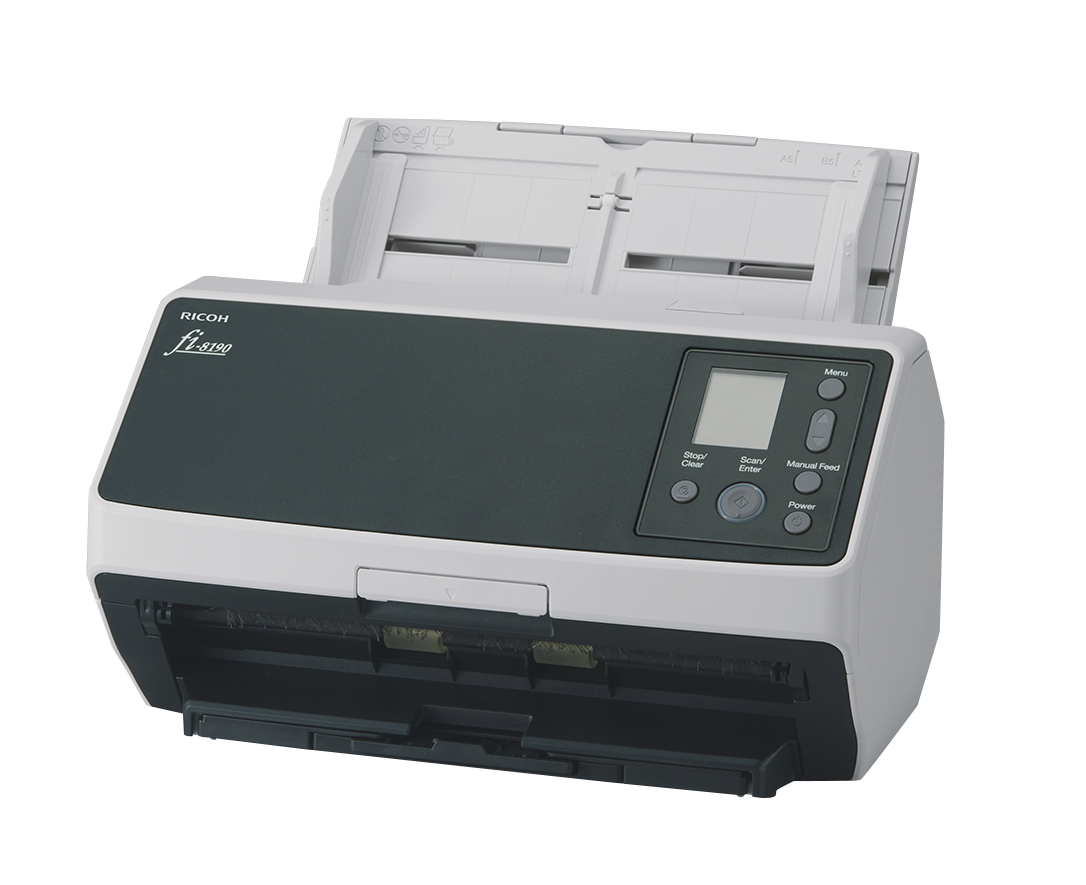
The fi-8190 has a color LCD and physical Menu, Scan/Enter, Stop/Clear, Manual Feed and Power controls. PFU's product page does not list a touchscreen feature, unlike the larger fi-8900 models; a touch-operated control panel is not established for this model.
Explore this need in the finder →The Ricoh fi-8190 is a compact departmental ADF scanner for wired office capture, not a 750-sheet production machine. PFU lists a 100-sheet feeder, duplex capture at up to 90 ppm/180 ipm, USB and Ethernet, a color LCD with physical buttons, and a separate manual-feed mode for selected originals. The manufacturer's US page identifies the fi-8190 model, but I did not find a standard US base retail part number in the reviewed sources. This is a source-led assessment of the named model; no ownership, hands-on testing or measured job results are claimed.
A compact step below production-scale feeders
The 100-sheet ADF places the fi-8190 in a different loading rhythm from the fi-8820, fi-8930 and fi-8950, which hold 500 or 750 standard sheets. That smaller hopper can suit a front desk, department or office station where someone prepares and collects batches rather than feeding a centralized continuous operation. PFU rates the fi-8190 at up to 90 pages per minute/180 images per minute in A4 portrait at 200/300 dpi. The number is a manufacturer specification, not a guarantee of the pace a team will achieve once setup, OCR, review and routing are included.
The actual feeder limit also depends on paper weight and loading instructions. If a routine includes large backlogs, a 100-sheet maximum means more reloads than the production models even if the rated speed appears sufficient. Conversely, the larger machines weigh about 50.7 lb, while the fi-8190 weighs about 8.8 lb; footprint and installation needs differ substantially. Match the size of the paper queue to the device rather than selecting from ppm alone.
Use manual feed for the right originals
PFU documents a Manual Feed mode for booklets such as passports and thicker materials below 7 mm. It is a deliberate route for individual items, not a blanket allowance for thick media in the ordinary ADF. The instructions set additional limits for paper weight, booklet thickness, cards and document dimensions. Check those details before placing an original with a raised surface, binding or delicate edge into the scanner.
Automatic Separation Control, ultrasonic multi-feed detection and image/sound-based paper protection are among the manufacturer-described handling features. They can help detect trouble, but they do not remove the need to prepare mixed batches or review exceptions. A department handling originals with legal, financial or identity value should retain a process to verify that each page was captured and that the right output was saved.
LCD controls and wired capture
The front panel is a color LCD with physical Menu, Stop/Clear, Scan/Enter, Manual Feed and Power controls; the US model page does not list a touchscreen feature. TWAIN, TWAIN x64 and ISIS drivers are documented, and PFU lists USB 3.2 plus Gigabit Ethernet. That supports a conventional computer or wired managed-capture setup when the host, driver and software are compatible. The reviewed sources do not establish a Wi-Fi/mobile route or direct cloud transfer without a computer.
PFU's software materials include PaperStream IP and PaperStream Capture; the 100-sheet ADF can be incorporated into a broader records process with profiles and indexing. Confirm the exact operating-system and driver version for the computer or server, along with any barcode, OCR, file naming or document-management requirements. A scanner's ability to make a file is not by itself proof that it will connect to a specific document-management product.
Mind the driver identification change
PFU's March 2026 notice says that fi-8190 units manufactured on or after April 1, 2026 use updated identification that PaperStream IP 3.36.0 and earlier will not recognize; PFU recommends version 3.40.1 or later. The date matters: older units are not covered by this particular identification change, but other software and operating-system requirements still apply. If an organization uses a frozen software image, ask for the unit's manufacture date and verify the supported driver before committing to deployment.
PFU lists an expected daily volume of 13,000 sheets and says its calculated volume estimate is not a guarantee of daily output or scanner durability. The same caution applies to rated scan speed and paper-protection marketing. Build a plan for cleaning, consumables and exception handling, especially if the scanner is central to an office's intake process.
Who should consider it?
The fi-8190 is a plausible fit for a wired departmental station that scans regular duplex batches and occasionally handles supported booklets or thick originals in manual mode. Its 100-sheet feeder and smaller body distinguish it from the high-volume fi-8900 models; it is not an alternative to them when reload frequency or a much larger paper queue dominates. It also lacks a touchscreen in the sources reviewed, a flatbed for bound pages and an established wireless phone workflow.
Before ordering, ask the seller to identify the exact fi-8190 and package, verify the current US driver and service terms, and check whether the required interface is TWAIN or ISIS. Confirm media limits for any special originals and leave room for the output tray. If measurable throughput, feed reliability or OCR accuracy is essential, request a demonstration with representative documents; this assessment has not independently tested those claims.
Key specifications
Key details at a glance
| Scanner class | Professional departmental sheet-fed scanner |
|---|---|
| Manufacturer-listed simplex rate | 90 ppm |
| Manufacturer-listed duplex image rate | 180 ipm |
| Automatic document feeder capacity | 100 sheets |
| Optical resolution | 600 dpi |
| Connection options | USB / Ethernet |
| Automatic duplex capture | Yes |
| Separate manual-feed route | Yes |
| Touchscreen | No |
| TWAIN driver documented | Yes |
Use the exact model’s instructions for operating limits, supplied equipment and version differences.
Sources for this review
Sources for this assessment
Compare the workflow before you choose
Use the finder to test your connection, paper and software requirements against the documented scanner arrangements.