
Your needs, this model
Does it fit your priorities?
Does the fi-8250 handle duplex stacks and occasional originals that should not pass through the ADF?
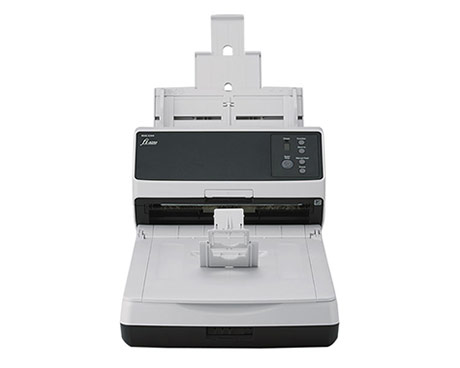
PFU lists a 100-sheet duplex ADF plus a separate letter-size flatbed. The platen is a one-page-at-a-time route for bound or delicate originals; verify the exact original against the manual before feeding it or placing it on glass.
Explore this need in the finder →Is it a faster version of the fi-8150 or fi-8270?
The fi-8250 shares a 50 ppm/100 ipm ADF rating with fi-8150 but adds a flatbed; the fi-8270 also has a flatbed but PFU rates its ADF at 70 ppm/140 ipm. Choose by originals-handling needs and supported workload, not speed alone.
Explore this need in the finder →Can it use special originals and older TWAIN installations without a compatibility check?
No. PFU's Manual Feed Mode and carrier-sheet/size restrictions are separate from ordinary ADF loading, and its driver notice says units made from April 1, 2026 need PaperStream IP 3.40.1 or later for the updated identification. Verify the model's manufacturing date, current manual, host OS and application.
Explore this need in the finder →The Ricoh fi-8250 is a wired duplex scanner with two distinct paper paths: a 100-sheet automatic document feeder (ADF) for prepared stacks and a letter-size flatbed for originals that should stay still. This assessment concerns the U.S. base configuration, part PA03810-B605. It is based on PFU/Ricoh’s model page, U.S. store listing, technical sheet and operator documentation—not hands-on use or an independent speed test.
Why the extra flatbed matters
PFU positions the fi-8250 as a front-office machine for light workloads. Its ADF is rated at up to 50 pages per minute and 100 images per minute at A4 portrait, 200/300 dpi conditions. The 100-sheet figure is a load capacity, not a promise that every paper weight or mixed batch will feed at the same rate. The flatbed is separate: it accommodates one page at a time and makes the scanner more useful for a bound page, fragile sheet or original that should not travel through rollers.
That hybrid design is the main reason to consider this model instead of its close relatives. PFU rates the flatbed-free fi-8150 at the same 50 ppm/100 ipm ADF speed; the fi-8250 adds a platen. The fi-8270 keeps the flatbed but is rated at 70 ppm/140 ipm for its ADF. Those distinctions are more practical than treating the three model numbers as interchangeable: choose whether a flatbed is useful, then decide if the faster ADF rating of the 8270 matters enough for your batches. All of these published rates describe manufacturer conditions, not a full job including preparation, OCR, file review and delivery.
Do not confuse the three ways to handle an original
The ADF is for supported loose-sheet stacks; the flatbed is a stationary, page-by-page route; and PFU separately documents a Manual Feed Mode for certain special originals. The U.S. page mentions items up to 7 mm thick, but that is not permission to feed every thick object. PFU’s specification says booklet scanning requires a carrier sheet and lists separate limits for cards and other media. Follow the current model-specific guide for the exact size, weight, thickness and loading instructions. A flatbed does not expand the ADF’s capacity, while a manual-feed setting does not turn it into a universal card or book scanner.
PFU lists an expected daily volume of 8,000 sheets. Its specification explicitly says this calculated reference is not a guarantee of daily output or durability. A department planning a sustained queue should verify workload, media mix, service coverage and exception handling with the manufacturer or reseller rather than extrapolating a duty cycle from the advertised speed.
Wired capture, with a server option
The exact model supports USB and wired Ethernet and lists TWAIN, ISIS, WIA and Linux SANE driver options in its current specification. The typical USB arrangement puts the scanner beside a computer; Ethernet can serve a wired workgroup. PFU also documents PaperStream NX Manager as a server-based LAN workflow that can operate without a local PC at the scanner. That is different from an integrated cloud destination: it depends on a configured server and should be checked against the organization’s software and licensing setup.
The sources reviewed establish USB and Ethernet, but not Wi-Fi, a phone-or-tablet scanning routine or a direct cloud route. Do not infer those capabilities from the word “network.” If you need a mobile app or a computer-free cloud service, confirm that exact route in the manufacturer’s current instructions before making the scanner a requirement. For TWAIN-dependent capture, also test the precise driver, OS and application combination; a bundled utility that exports PDFs is not a substitute for a TWAIN interface.
Pay attention to manufacture date and driver version
PFU’s March 2026 notice identifies a compatibility change for fi-8250 units manufactured on or after April 1, 2026: PaperStream IP TWAIN 3.36.0 and earlier will not recognize the updated identification, and PFU recommends version 3.40.1 or later. The notice does not say older units are affected by that change. An organization with a locked software image should ask for the unit’s manufacture date and validate the driver before deployment rather than assume that a scanner from the same family will behave identically across production dates.
Who should shortlist it?
The fi-8250 is a reasonable assessment candidate for a wired office that processes duplex stacks but also encounters occasional bound, fragile or other supported originals that are easier to place on glass. A team that only feeds ordinary documents may prefer the fi-8150’s simpler sheet-fed form; a workflow that values a faster published ADF rate and still needs a platen can compare the fi-8270. Someone who expects phone-first, Wi-Fi or built-in cloud capture should start with another configuration whose sources explicitly support those paths.
Before choosing the U.S. base offer, match part PA03810-B605, check that the ADF and flatbed limits fit the actual originals, confirm the driver version for the unit’s manufacture date, and verify current service and software terms. The U.S. sheet lists a one-year Advance Exchange service term, but buyers should confirm the current terms for the exact seller and package. PFU/Ricoh’s U.S. product page, model specification and fi-8000-series operator guide are the primary references to revisit. No current price, stock status, customer experience or independent performance result is claimed here.
Key specifications
Key details at a glance
| Scanner class | Professional desktop adf flatbed |
|---|---|
| Manufacturer-listed simplex rate | 50 ppm |
| Manufacturer-listed duplex image rate | 100 ipm |
| Automatic document feeder capacity | 100 sheets |
| Optical resolution | 600 dpi |
| Connection options | USB / Ethernet |
| Automatic duplex capture | Yes |
| Separate manual-feed route | Yes |
| TWAIN driver documented | Yes |
Use the exact model’s instructions for operating limits, supplied equipment and version differences.
Sources for this review
Sources for this assessment
- PFU Ricoh Store: current unfiltered fi-series catalog page 1
- PFU Ricoh Store: exact fi-8250 base offer PA03810-B605
- PFU America: fi-8250 US product page
- PFU/Ricoh global fi-8250 specification (as of June 30, 2026)
- PFU America: fi-8250 datasheet dated 2025-04-14
- PFU America: fi-8000-series Operator's Guide including fi-8250
- PFU America: PaperStream IP updated identification notice
Compare the workflow before you choose
Use the finder to test your connection, paper and software requirements against the documented scanner arrangements.