
Your needs, this model
Does it fit your priorities?
Does the standalone fi-8290 fit a 100-sheet USB duplex workflow that also needs TWAIN and occasional special-feed handling?
It is a documented match on paper: PFU lists USB, TWAIN/ISIS, automatic duplex and a 100-sheet ADF, and the shared guide documents a separate Manual Feed mode. The 100-sheet load is qualified to Letter 20 lb/A4 80 g/m² and a stack no thicker than 10 mm. Manual Feed is slower and disables overlap detection for intentionally folded or multilayered originals. Confirm your actual stock and software, and do not treat the rating as daily throughput.
Explore this need in the finder →Is Manual Feed a second feeder or a promise that the fi-8290 can safely take any unusual original?
No. PFU describes a distinct ADF Manual Feed mode for supported folded or multilayered originals; it slows scanning and overlap detection is disabled for such intentionally multilayered documents. It is not a bulk tray. The integrated flatbed is a separate letter-size surface, and neither route removes the need to follow paper, thickness and carrier-sheet instructions.
Explore this need in the finder →Can the base fi-8290 use Wi-Fi, a phone app or a scanner-only cloud path?
Those paths are not established in the inspected U.S. base sources. PFU lists USB and wired Ethernet and documents TWAIN/ISIS host capture; Ethernet is not Wi-Fi. Do not treat a computer/network connection as proof of mobile or computer-free cloud delivery. Check the exact capture software and host plan before buying.
Explore this need in the finder →Does the base fi-8290 include the FADGI service package?
No package inclusion is established for the standalone base model. PFU lists a separate fi-8290 FADGI bundle under part CG01000-310280; its service, target, training and software terms do not transfer to the base scanner. The base U.S. page does not give a standard part or exact seller carton, so identify the offer in writing.
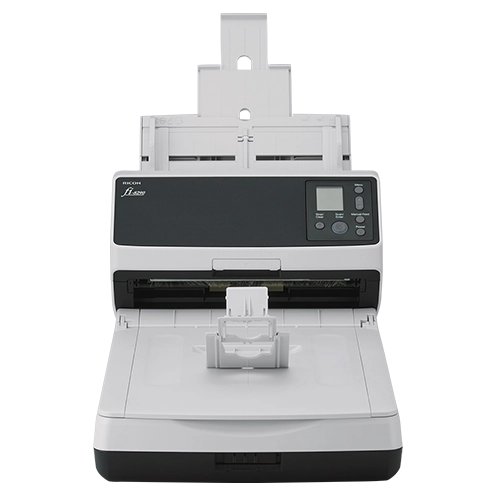
Explore this need in the finder →The fi-8290 is a departmental document scanner whose most useful distinction is the combination of an automatic document feeder and a letter-size flatbed. PFU's U.S. model page documents USB and wired Ethernet, automatic duplex capture, TWAIN/ISIS support, and a separate Manual Feed mode. That is a credible fit for a computer-managed records workflow that needs more than a simple ADF, but its 100-sheet feeder and wired-only connections are important constraints. This is a source-based assessment, not a hands-on test.
Keep the base scanner separate from the FADGI bundle
The U.S. directory observation for this model was the standalone fi-8290 scanner card. PFU also lists a different fi-8290 FADGI configuration: a package-specific datasheet identifies that bundle as part CG01000-310280. That part belongs to the bundle, not to this base-model assessment. PFU's current FADGI collection describes a service layer, while the standalone model page shows an empty cart and a demo request rather than a standard base part number or a bundle-style checkout. No current seller, price, stock, carton contents, warranty, or base part number is established here.
That boundary matters if an organization is comparing the machine for archival work. The base scanner's chassis specifications do not include the separately described calibration, verification support, operator training, target, software, or onsite service. The bundle's marketing language is also conditional: a scanner capability does not validate an institution's originals, image files, metadata, sampling, records schedule, or acceptance process. Ask for the exact offered part and written scope if those services are the reason for the purchase.
Three capture paths, each with a different job
For ordinary stacks, the fi-8290's duplex ADF is the natural route. PFU lists a 100-sheet capacity, and its U.S. datasheet and shared operator guide qualify that load to paper around 80 g/m² (20 lb), with the guide specifying a stack no thicker than 10 mm. The sheet rating is a per-loading reference, not a promise that every stock or mixed batch will hold 100 sheets. The manual's media limits, size rules, and loading instructions still govern.
The integrated flatbed handles appropriate single originals that should not go through the feeder, such as a bound item that fits the letter-size glass. It is not an A3 platen, a second sheet tray, or a guarantee that a fragile original is safe to scan. Inspect the actual original and use a conservation-approved handling plan when condition matters.
Manual Feed is a third, separate ADF mode for supported folded or multilayer originals. PFU's guide warns that speed slows in this mode and that intentionally folded or multilayered documents are not treated as overlapping sheets by the overlap-detection function. In practice, this is a deliberate, one-at-a-time path with its own paper and timeout instructions—not a way to mix envelopes or booklets into an ordinary stack and assume the machine will detect every problem.
Rated speed is not whole-job throughput
PFU rates the fi-8290 at up to 90 pages per minute simplex and 180 images per minute duplex under stated A4 portrait, 200/300-dpi conditions. The manufacturer's expected daily-volume figure is 13,000 sheets. Neither number is an independent measurement, a guaranteed output for a particular batch, or a durability test. File conversion, image processing, duplex settings, document condition, host performance, transfer, and operator checks all affect how quickly a real job is completed. A 100-sheet feeder can also require more frequent loading than a larger production-class model even when the scanner's headline speed looks high.
Wired host workflow, not Wi-Fi convenience
The documented connection choices are USB and wired Ethernet. USB is the straightforward one-computer setup; Ethernet can support a wired computer or managed-capture arrangement when the organization's network and software are configured for it. Neither is Wi-Fi. A network port alone does not establish phone scanning, a mobile app, or a scanner-to-cloud route that works without a computer. If mobile participation or a named destination service is essential, require a current model-specific workflow document rather than assuming the software can provide it.
PFU lists TWAIN and ISIS support, which makes this model relevant when a capture application requires one of those driver interfaces. It does not guarantee compatibility with every application or host architecture. PFU's 2026 driver notice is especially practical: fi-8290 units manufactured on or after April 1, 2026 use a changed scanner identity that PaperStream IP 3.36.0 and earlier will not recognize; PFU recommends 3.40.1 or later. The manufacture date of any offered unit is unknown, so check the actual serial/manufacture record, host OS, driver build, and capture software before committing.
Who should shortlist it—and what to verify
Consider the base fi-8290 when one department needs a duplex ADF for regular stacks, a letter-size flatbed for suitable bound or one-off originals, a separate supported special-feed path, and USB or Ethernet host capture. Its difference from a feeder-only machine is the glass; its difference from the separately listed FADGI package is that this base page does not establish package services. The 100-sheet threshold is a meaningful limit: the base model meets a 100-sheet minimum on the documented paper basis but not a 110-sheet minimum.
Look elsewhere if Wi-Fi, phone-led scanning, a touchscreen, computer-free cloud delivery, an ADF load above 100, or a larger flatbed is mandatory. Before purchase, get the standard base part and precise carton in writing; confirm whether any service or software is separately quoted; verify paper weight and stack thickness; confirm the host and driver version; and review condition, warranty, return terms, and delivery/installation access with the seller. Do not use FADGI part CG01000-310280 as a substitute for identifying the base offer.
Key specifications
Key details at a glance
| Scanner class | Professional departmental flatbed adf |
|---|---|
| Manufacturer-listed simplex rate | 90 ppm |
| Manufacturer-listed duplex image rate | 180 ipm |
| Automatic document feeder capacity | 100 sheets |
| Optical resolution | 600 dpi |
| Connection options | USB / Ethernet |
| Automatic duplex capture | Yes |
| Separate manual-feed route | Yes |
| Touchscreen | No |
| TWAIN driver documented | Yes |
Use the exact model’s instructions for operating limits, supplied equipment and version differences.
Sources for this review
Sources for this assessment
- PFU America all-scanners directory card observation (fi-8290)
- PFU America: exact U.S. fi-8290 base scanner page
- PFU America: fi-8290 U.S. scanner datasheet (2025-04-14)
- PFU America: fi-8000 Series U.S. Operator’s Guide, including fi-8290
- PFU America: PaperStream IP scanner identification update notice
- PFU America: current U.S. FADGI-capable fi Series bundle collection
- PFU America: fi-8290 FADGI bundle datasheet (2024-12-11)
- PFU EMEA: exact-model fi-8290 chassis image page
Compare the workflow before you choose
Use the finder to test your connection, paper and software requirements against the documented scanner arrangements.