
Your needs, this model
Does it fit your priorities?
How does the fi-8930 differ from the fi-8950 for large batches?
Both are listed with a 750-sheet ADF and touchscreen. PFU rates the fi-8930 at up to 130 ppm/260 ipm, below the fi-8950's 150 ppm/300 ipm landscape maximum. That distinction matters only if the faster rated ceiling is useful in your application and document mix; neither figure is measured end-to-end throughput.
Explore this need in the finder →Can it handle thick originals as well as ordinary stacks?
PFU documents both the U-turn ADF and a straight-through/manual path. The latter supports certain thicker originals up to 1.25 mm, but its limits are not interchangeable with the regular feeder's; verify the exact original in the operator guide.
Explore this need in the finder →Does the fi-8930 send scans directly to a cloud account?
The reviewed sources establish USB and Gigabit Ethernet with computer-oriented capture drivers, not a computer-free cloud feature. A wired network port alone does not tell you which host or destination software is required.
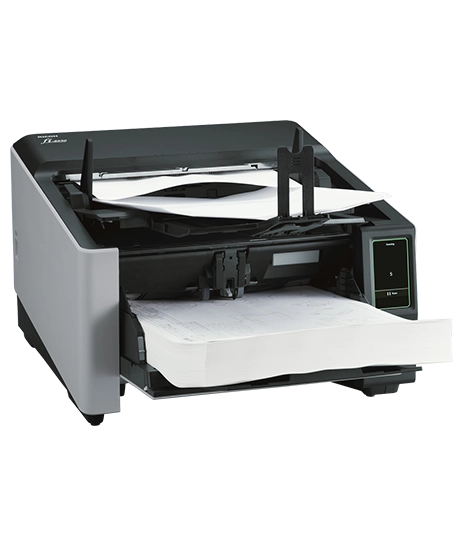
Explore this need in the finder →The Ricoh fi-8930 is a production-class duplex ADF scanner, not a home or portable model. PFU America's US page places it between the fi-8950 and fi-8820: it keeps the 750-sheet feeder and 4.3-inch touchscreen, but its listed landscape maximum is 130 ppm/260 ipm rather than the fi-8950's 150/300. The standard named model is covered here; I did not find a US base retail part number in the manufacturer sources reviewed. Optional post-imprinters and Capture Pro Premium software are separate configuration choices. No hands-on testing or measured throughput is claimed.
A large feeder without the top model's rated ceiling
PFU specifies a 750-sheet capacity for Letter or A4 80 g/m² paper. It rates the fi-8930 at up to 130 pages per minute and 260 images per minute in landscape orientation at 200/300 dpi; the datasheet lists a lower portrait rate. These are manufacturer conditions rather than a prediction of finished, indexed documents per hour. Image correction, OCR, document separation, file naming, review and exceptions can become the limiting stages long before the transport mechanism reaches its advertised ceiling.
The capacity and speed combination makes the fi-8930 distinct from the fi-8820, which is rated at 120 ppm and has a 500-sheet feeder. The fi-8950 shares the 750-sheet capacity but has the higher stated maximum. That comparison gives a useful starting point for procurement: estimate how often loading interrupts the shift, then decide whether the faster rated ceiling has operational value. Do not infer price or total cost from the model hierarchy; current quotes, warranty terms and service packages need separate verification.
U-turn and straight-through paper handling
The fi-8930 is a sheet-fed design without a flatbed. PFU documents both U-turn and straight-through feed routes, with the latter handling supported items up to 1.25 mm thick. Those modes are not interchangeable: paper weight, format and thickness limits depend on the chosen path. The operator guide should be the authority for envelopes, labels, attached notes, cards and unusually thick originals. A small item that can be fed manually does not automatically qualify for insertion into a regular batch.
PFU describes features such as staple detection, skew correction, multi-feed detection and automatic profile selection. These are relevant in a mixed-document intake room because they may reduce avoidable interruptions, but they do not eliminate document preparation or operator checks. Workflows still need a method to handle exceptions, confirm that pages were captured and retain the original in a controlled location if a scan fails.
Wired interfaces and the operator panel
The standard configuration is listed with USB and Gigabit Ethernet. PFU's datasheet names TWAIN, TWAIN x64, ISIS and WIA interfaces, while the fi-8900-series guide documents a 4.3-inch touchscreen. These features suit a managed desktop or networked capture station, but do not establish Wi-Fi, a mobile-device route or a direct-to-cloud feature. Ethernet means the scanner can participate in a wired network arrangement; the capture computer, application, permissions and destination still determine where the digital files go.
PaperStream Capture, ClickScan and other capture tools are part of PFU's software ecosystem. If the scanner must feed a document-management system, confirm the supported driver, operating-system version, batch rules, barcode fields and destination integration in advance. A generic statement that the scanner is TWAIN compliant cannot answer whether a particular legacy application, server build or security policy will work with the unit you receive.
Service and expected-volume caveats
The US datasheet lists an expected daily volume of 110,000 sheets and explicitly frames such numbers as calculated references rather than a guarantee of daily output or durability. PFU also lists a three-month Basic Onsite Service term in the comparison chart for this model. Treat those as planning and contract details to validate, not as a substitute for a duty-cycle assessment or a service quote. Ask what parts, labor, response time and preventative maintenance are included for the specific US offer.
Production consumables require routine attention as well. PFU lists roller replacement guidance of up to 700,000 sheets or one year for several components; actual intervals depend on use and document conditions. Include operator cleaning, replacement stock and service access in the total operating plan. A scanner that fits the peak paper volume but cannot be maintained between shifts may not be the best operational choice.
Who should consider the fi-8930?
It belongs on a shortlist when a wired workgroup or central intake team needs a large 750-sheet feeder, duplex capture, a touchscreen and professional-driver integration, but does not require the fi-8950's higher rated maximum. It is not the answer for bound books, phone-first capture or a small personal workspace. The official US page names a current product model, but the sources reviewed here did not establish a standard US base SKU, current availability or a specific seller package.
Before ordering, have the seller identify the scanner, included accessories, service term and any separately licensed software in writing. Verify the network topology and driver requirements with the system owner; check exact media limits for any unusual originals; and request a demonstration using representative paper if measured productivity or feed reliability is part of the decision. The published 130 ppm figure is a manufacturer rating, not an independent test result.
Key specifications
Key details at a glance
| Scanner class | Professional production sheet-fed scanner |
|---|---|
| Manufacturer-listed simplex rate | 130 ppm |
| Manufacturer-listed duplex image rate | 260 ipm |
| Automatic document feeder capacity | 750 sheets |
| Optical resolution | 600 dpi |
| Connection options | USB / Ethernet |
| Automatic duplex capture | Yes |
| Separate manual-feed route | Yes |
| Touchscreen | Yes |
| TWAIN driver documented | Yes |
Use the exact model’s instructions for operating limits, supplied equipment and version differences.
Sources for this review
Sources for this assessment
Compare the workflow before you choose
Use the finder to test your connection, paper and software requirements against the documented scanner arrangements.