
Your needs, this model
Does it fit your priorities?
Can this exact package send a scan to a cloud workflow without a computer at the scanner?
The exact US package CG01000-307601 includes a one-year EdgeXperience Capture Service subscription. PFU describes a PC-less SaaS route over Wi-Fi or Ethernet, but setup still requires the service tenant and firmware 0M00 or later. The source evidence does not settle renewal or post-year terms.
Explore this need in the finder →Does Wi-Fi mean I can scan directly from a phone?
No phone workflow should be inferred from the Wi-Fi specification. The reviewed documentation establishes the fi-7300NX's network connection and EdgeXperience service route, but does not establish a mobile-device scanning route. Its NFC reader is described for card authentication, not phone scanning.
Explore this need in the finder →Is the advertised batch speed an estimate of the time my office jobs will take?
PFU rates the scanner at up to 60 pages per minute or 120 images per minute at 200/300 dpi and lists an 80-sheet ADF. Those are manufacturer specifications, not an independent test or a complete job-time estimate; image processing, OCR, network transfer, profile setup, and review affect throughput.
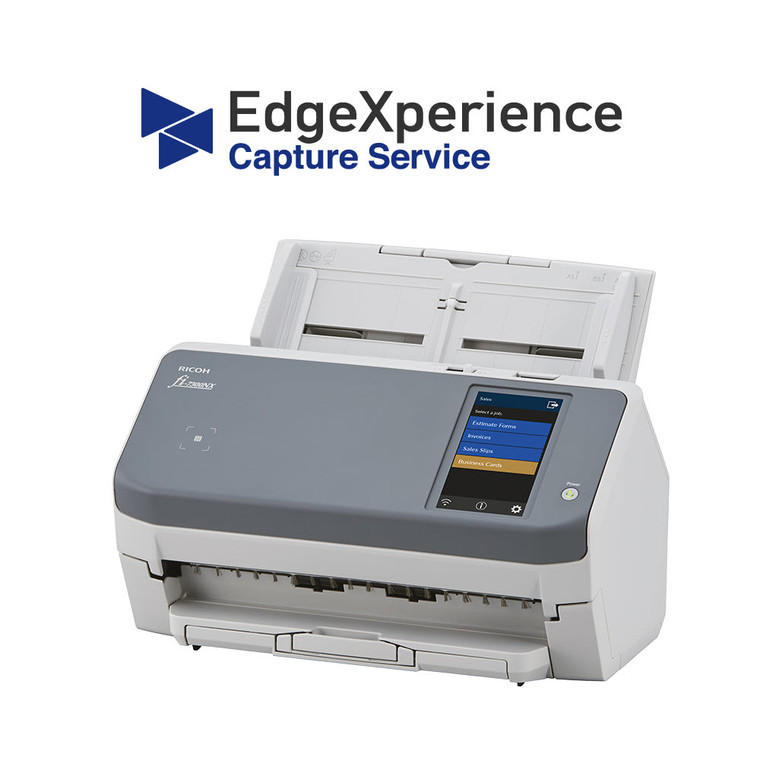
Explore this need in the finder →The fi-7300NX EdgeXperience bundle is not merely a scanner with wireless networking. Its distinguishing feature is an included, one-year EdgeXperience Capture Service subscription, which gives a shared scanner a documented PC-less route into a hosted cloud workflow over Wi-Fi or Ethernet. This is a research-based assessment of the exact U.S. bundle, part CG01000-307601, not a hands-on test of scanning speed, image quality, cloud service, or paper feeding.
The bundle adds a service-dependent workflow
The related base fi-7300NX offer is part PA03768-B005. PFU lists the same core machine features for the bundle: duplex capture, an 80-sheet automatic document feeder, Wi-Fi and Ethernet, USB 3.0, a color touchscreen, an NFC reader, and a manufacturer-rated maximum of 60 pages per minute or 120 images per minute at 200/300 dpi. The bundle's material difference is the one-year EdgeXperience subscription, not a different scanner engine.
With that subscription, staff can select a prepared job on the touchscreen and send scans from the device to a hosted service without a local computer attached to the scanner. PFU describes the service as centrally managed, with multiple destinations and an Azure-hosted back end. Its Store page describes encrypted image transfer using 128-bit AES. Those are vendor-described capabilities, not an independent security audit. A team routing financial, health, legal, or identity documents should have its own administrator review the service's destinations, account roles, retention, access controls, network path, and organizational approval before scanning real records.
Separate the three connection routines
The Wi-Fi and Ethernet plans are the documented routes for EdgeXperience cloud capture. A separate USB connection can link the scanner to a computer for a conventional software-led workflow. Do not treat those as one simultaneous route: the cloud-service plan and a USB desktop session are different ways to operate the machine. The built-in NFC reader is for badge-style authentication described in the service material; its presence is not evidence of mobile-phone scanning. Nor does Wi-Fi alone mean that a phone app can scan to the scanner. The reviewed sources do not establish a mobile-device route for this bundle.
The subscription also makes setup a real part of the buying decision. PFU's service-support page lists tenant-registration and connection instructions and says firmware 0M00 or later is required. Before ordering, an administrator should confirm who will register and manage the tenant, whether the organization's network can reach the chosen destinations, which job buttons need to be configured, and what happens when the included year ends. The sources inspected identify the one-year term but do not establish renewal pricing, future service availability, or the terms of a later subscription, so those should be confirmed in writing rather than assumed.
Feeder capacity and rated speed are not job-time promises
The 80-sheet ADF puts this model in a workgroup rather than pocket-scanner role. The published 60 ppm and 120 ipm figures describe a manufacturer rating at stated resolution settings; they do not tell you how long a real batch will take once profiles, image processing, network transfer, OCR, naming, and document review are included. PFU lists duplex operation and hard-card scanning up to 1.4 mm on the base scanner offer. That is useful context for an office mixing ordinary paper with some cards, but it is not a guarantee that every stack, damaged original, or card type will feed reliably. Prepare batches and follow the manual's loading guidance instead of interpreting the rated capacity as a universal one-load promise.
The touchscreen job buttons and thumbnail review are valuable in a shared area: a person can choose an administrator-prepared task and check a page count or preview without navigating a desktop profile. That convenience depends on thoughtful setup. If departments need separate destinations, permissions, naming conventions, or access policies, a technically compatible scanner will not design those rules for you. Plan the job configuration and service ownership before deploying it as an unattended drop point.
Where it fits—and where it does not
This package makes the most sense when several people need a common, networked scan station and the intended destinations are approved for the hosted service. It can also suit an office placing scanners at branches where a local PC is inconvenient, provided the subscription and network requirements fit the organization's policies. A USB-to-computer routine remains available, but buyers choosing that alone may not need to pay for a cloud-service bundle.
Compare the workflow rather than just the headline speed. The fi-8150 is a wired USB/Ethernet desktop unit with a larger 100-sheet feeder and no EdgeXperience subscription established in its base offer. The fi-8040 adds its own PC-less DirectScan workflow over a wired network, but PFU describes that route as sending to network destinations without a cloud service. They solve different sharing problems. The fi-7300NX bundle is the more specific choice when its one-year hosted service is wanted; it is not automatically the simpler choice for someone who only scans locally or whose organization does not approve cloud handling.
Check driver and service details before deployment
For a host-computer workflow using PaperStream IP, PFU's 2026 notice says fi-7300NX units manufactured on or after April 1, 2026 use updated identification that PaperStream IP 3.36.0 and earlier will not recognize; PFU recommends 3.40.1 or later. The notice does not say that every older unit needs this change, so check the manufacture date and the exact driver plan rather than applying the warning indiscriminately. For the cloud route, verify the exact bundle part, subscription activation, firmware, tenant setup, destinations, security requirements, and post-year service terms. Those checks matter more than treating an advertised scan rate as a measured outcome.
Key specifications
Key details at a glance
| Scanner class | Professional desktop sheet-fed scanner |
|---|---|
| Manufacturer-listed simplex rate | 60 ppm |
| Manufacturer-listed duplex image rate | 120 ipm |
| Automatic document feeder capacity | 80 sheets |
| Optical resolution | 600 dpi |
| Connection options | Wi-Fi / Ethernet / USB |
| Automatic duplex capture | Yes |
| Touchscreen | Yes |
| TWAIN driver documented | Yes |
Use the exact model’s instructions for operating limits, supplied equipment and version differences.
Sources for this review
Sources for this assessment
- PFU America: fi-7300NX EdgeXperience Bundle model page
- PFU Ricoh Store: exact EdgeXperience bundle, part CG01000-307601
- PFU Ricoh Store: related base fi-7300NX scanner, part PA03768-B005
- PFU America: fi-7300NX technical datasheet
- PFU America: EdgeXperience Capture Service support and setup resources
- PFU America: PaperStream IP driver identification notice for scanners manufactured from April 2026
Compare the workflow before you choose
Use the finder to test your connection, paper and software requirements against the documented scanner arrangements.