
Your needs, this model
Does it fit your priorities?
Does the M4099D have a separate flatbed for books or bound originals?
No flatbed is documented for this exact model. PFU's M4099D page identifies an ADF and Manual Feed, and its operator guide describes the hopper, feeder and stacker without a platen route. Do not transfer the M4097D's separate flatbed to this different machine.
Explore this need in the finder →Can I assume that the M4099D's 1,000-sheet figure applies to A3 and every paper stock?
No. The archived M4099D profile gives a maximum 1,000-sheet capacity at 64 g/m² (17 lb) and separately lists supported media from 52 to 127 g/m², but the consulted summary does not provide a size-by-size hopper chart. Verify the exact sheet size, weight and loading instructions for the actual unit; do not convert the 1,000-sheet figure into an A3 or daily-volume guarantee.
Explore this need in the finder →Does historical TWAIN support mean the M4099D will connect to my current USB computer?
No. The exact model sources document SCSI-2 and RS-232C/video/third-party interface routes and historical TWAIN/ISIS-era software, not USB or a current operating system. Identify the actual board and cable, then demonstrate a complete scan on the intended computer and capture application before relying on this model.
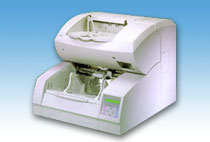
Explore this need in the finder →The Fujitsu M4099D is a narrow, earlier-era production scanner, not a general home-office upgrade. PFU America's U.S. roster places the exact model under Production / Discontinued for Service; that status is not a live sales offer, and it is not a current-service promise. Its archived model profile describes a monochrome A3 duplex automatic document feeder (ADF), a maximum 1,000-sheet hopper at a stated paper basis, and wired interfaces from the SCSI/video era. A manual-feed mode is available, but no flatbed is documented. The appeal is a very large batch feeder for an organization already prepared to operate old scanning hardware—not a claim that a used unit will work with a current computer.
Why its 1,000-sheet figure needs context
The headline is unusually large: PFU specifies up to 1,000 sheets at 64 g/m² (17 lb). The same exact-model profile lists a paper-weight range from 52 to 127 g/m² and an A3/11-by-17-inch maximum document size. Those statements describe different limits. The consulted model-page summary does not provide a size-by-size hopper chart, so I would not assume a full 1,000-sheet load is acceptable for every A3 stack, heavier stock or mixed paper. Check the exact operator instructions for the actual paper size, thickness and loading setup before planning a production run. The 1,000-sheet number is a per-load hopper rating, not a daily volume, guaranteed throughput or proof of condition in any second-hand machine.
PFU's archived profile rates monochrome/binary capture at 90 pages per minute simplex or 180 images per minute duplex at 200 dpi in A4 portrait. That is a manufacturer specification under a stated setting, not a hands-on test or an expected rate on a surviving machine. The host, capture software, originals, maintenance and configured interface all matter. Double-feed detection and a paper counter are listed features, but neither replaces inspection of the sensors, rollers and feed path on the unit being considered.
Manual Feed means a person loads each next original
The M4099D's manual-feed mode is an operator workflow, not an extra bypass tray. Its guide says the operator feeds each document manually onto the hopper table; a timeout controls how long the scanner waits after the host sends a scan command. The documented setting ranges from 1 to 255 seconds, with 30 seconds as the listed default. That can help when a job consists of separated pages that an operator can feed individually, but it does not make the ADF tolerant of every original. The guide cautions against items such as clipped or stapled sheets, wet ink, uneven-thickness paper (including envelopes), heavily curled or rumpled pages, and folded or torn stock; for other paper types it calls for feed tests in advance. It does not document a separate platen for books or bound material, so do not transfer the M4097D's flatbed capability to the M4099D.
Legacy interfaces and software are the main fit test
The archived product page identifies SCSI-2 and RS-232C/video interfaces, a half-pitch 50-pin connector, and a third-party option-board slot. Its period TWAIN and ISIS labels and old Windows symbols are historical compatibility references only. They do not establish a USB connection, Wi-Fi, network scanning, a current operating-system driver, or reliable operation in a named modern capture application. The operator guide describes selecting an interface and connecting the corresponding cable; a particular board, cable, controller and driver media are not established for any seller unit. Before purchasing, identify every installed board and connector from the actual machine, then ask for a complete scan demonstration on the intended host and software. An adapter found elsewhere is not proof that this scanner has a supported USB route.
It is a substantial machine, not a light desktop unit
The archived profile gives chassis dimensions of 588 × 689 × 540 mm and a weight of 65 kg (143 lb). Those figures make moving, placement and service access part of the buying decision. They are device measurements, not carton dimensions or shipping weight; plan handling with the seller rather than assuming it can be lifted or placed like a compact office scanner. The product page also names an endorser/inprinter as an option. No source reviewed establishes that this option is installed or included in a particular listing, so treat it as a separate configuration check, not a standard capability.
The M4099D may merit attention only when a buyer has a documented need for a very high-capacity monochrome duplex ADF, can verify the paper-loading rules and can support a legacy host connection. It is a poor evidence-based match for a requirement that must be satisfied by USB, Wi-Fi, mobile scanning, direct cloud delivery, a flatbed or a guaranteed current driver. Request a legible M4099D nameplate, photographs of the actual ports and option boards, a list of supplied cables/software, a live duplex scan and clear seller return terms. Confirm the condition and parts/service situation independently: the U.S. roster is a status reference, not a warranty or availability statement.
This assessment is based on the exact-model archived PFU/Ricoh profile, the model-qualified operator guide and the PFU America U.S. roster. No physical M4099D was examined or tested. Read PFU's archived M4099D specifications · Open the M4099D Operator's Guide · Check the PFU America discontinued-scanner roster.
Key specifications
Key details at a glance
| Scanner class | Professional production adf |
|---|---|
| Manufacturer-listed simplex rate | 90 ppm |
| Manufacturer-listed duplex image rate | 180 ipm |
| Automatic document feeder capacity | 1000 sheets |
| Connection options | SCSI-2 / RS-232C / Video / TP_IF (third-party interface) |
| Automatic duplex capture | Yes |
| Separate manual-feed route | Yes |
| Touchscreen | No |
| TWAIN driver documented | Yes |
Use the exact model’s instructions for operating limits, supplied equipment and version differences.
Sources for this review
Sources for this assessment

Compare the workflow before you choose
Use the finder to test your connection, paper and software requirements against the documented scanner arrangements.