
Your needs, this model
Does it fit your priorities?
Can ScanSnap N1800 send a scan to an office destination without a computer beside it?
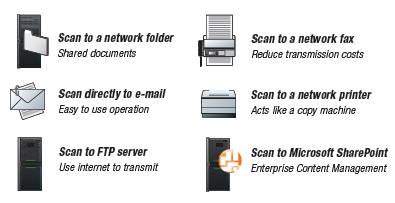
The model was designed for embedded panel-to-network tasks: the manufacturer documents configured email, network-folder and FTP sends, with print and fax routed through servers. An administrator must establish the destination and network first. That explains the stand-alone workflow, but does not establish that an old individual unit is accepted by a current mail server, share, directory or security policy.
Explore this need in the finder →Does the N1800's 50-sheet number mean a 50-sheet daily allowance?
No. Fujitsu rates the active feeder for 50 Letter/A4 sheets at 20 lb (80 g/m²) per load. Its separate 400-sheets/day expected-volume figure is also a manufacturer specification, not an independent endurance result. A 60-sheet minimum exceeds the stated load, and other stock sizes or weights need the manual's limits.
Explore this need in the finder →Is the ScanSnap N1800 a fit for USB capture, Wi-Fi, phone scanning or a direct cloud-drive must-have?
Those routes are not established for this configuration. The exact-model documents describe one 10/100 Ethernet port, embedded software and panel-driven office destinations; they do not establish host TWAIN, Wi-Fi, a mobile app or direct cloud-drive support. Email and a network share are not the same as a built-in cloud service. Do not rely on it until IT validates a specific present-day network and server path.
Explore this need in the finder →The Fujitsu ScanSnap N1800 is best understood as an older network endpoint with an ADF, screen, and embedded office workflows—not as a conventional desktop scanner that happens to have a network jack. Its appeal depends on whether a business still has a compatible way to connect those panel-started tasks to its mail, directory, file-share, print, or fax infrastructure.
Identity and operating idea
PFU America’s current discontinued-for-service roster places N1800 in the Network column. Fujitsu’s US data sheet identifies the historical model as ScanSnap N1800, part PA03609-B005. That is useful when checking an old offer, but it is not proof that a seller’s unit carries that label, includes the documented accessories, or still works. Ask for a clear nameplate photo, a description of the exact package, and an actual scan demonstration before assigning the part number to a specific item.
The N1800’s design is distinct from an ordinary USB scanner controlled by a nearby computer. The manufacturer describes embedded software, a single 10/100 Ethernet interface, an 8.4-inch resistive touch panel, and user-specific job menus. An administrator can configure destinations and profiles; a person at the panel can then start a saved task. That separation can be useful for a shared reception, records, or departmental device where people should choose a preconfigured job rather than manage scan software on a workstation.
What the ratings mean
The active feeder is rated for 50 Letter/A4 sheets at 20 lb (80 g/m²). Treat that as a qualified load, not a claim that every paper weight can be stacked to the same height. The US sheet separately lists an expected daily volume of 400 pages; that is another manufacturer specification, not an independent endurance test, a daily hard stop, or a promise about the condition of a used machine.
For A4 portrait, Fujitsu publishes 20 pages per minute simplex and 40 images per minute duplex at 200 or 300 dpi. Actual job time can depend on sending the data and on the receiving software or server. The more relevant comparison for a buyer may be the route and setup burden: the adjacent fi-6010N has a separately documented 25/50 ppm/ipm rating, but that difference does not make either model modern or compatible with a particular network. Each older network scanner needs its own source and system check.
The stated maximum ADF original is Legal size. A carrier sheet is required for the manufacturer’s A3/B4 scannability note, and carrier-sheet resolution is limited to 300 dpi. Long Page Mode reaches 120 inches but is limited to resolutions through 200 dpi. Those are specialized routes, not evidence of an A3 glass platen or unrestricted long-document capture. The manual’s paper size, thickness, and loading instructions still govern.
Destinations are only as useful as the network around them
Model documents describe sending to email, a network folder or FTP, and routing print or fax tasks through their named servers; they also list SharePoint with limited version support. Searchable PDF is listed for English. These descriptions help identify what the N1800 was built to do, but they do not prove that a current SMTP server, SMB share, directory, certificate policy, SharePoint tenant, or security configuration will accept an old embedded client. The archived operator guide’s server references are from an earlier software era. Have the IT administrator validate the exact firmware and service path, rather than assuming that a working Ethernet link means a working workflow.
The base model is not a demonstrated phone-scanning or Wi-Fi machine, and an Ethernet socket is not a USB host capture interface. The reviewed sources do not establish a current TWAIN driver or a direct cloud-drive route. Historical references to optional add-ins and SDK work are not evidence that an app, license, support package, or current cloud connection accompanies a second-hand unit. If a requirement is a contemporary computer-attached TWAIN workflow, mobile capture, wireless placement, or a named cloud service, this model should not be treated as a match without new model- and system-specific evidence.
Space, supplies, and condition checks
The body is listed at about 11.8 × 8.9 × 6.8 inches and 13.23 pounds, excluding the ADF chute and stacker. That small chassis measurement is not the operating clearance: PFU’s Getting Started guide gives an installation example of 700 mm deep, 400 mm wide, and 500 mm high. Check the actual desk layout, paper path, stacker, and access to the rear LAN and power connections before planning to deploy it.
The original US list names an ADF chute, AC cable and adapter, straight-through LAN cable, carrier sheet, and Getting Started material. A seller may have a different package. Inspect for the correct power supply, chute and stacker, and confirm whether the carrier sheet is present if it matters to your workflow. Also ask about roller and pad service history: the manufacturer lists these as consumables with replacement intervals, but no history for an offered unit is known here. Do not infer current warranty or transferable service coverage from the historical data sheet.
Who should consider it—and who should pass
The N1800 may warrant investigation when an organization specifically wants an older stand-alone Ethernet panel scanner, has an IT owner who can test its server-side paths, and values a saved job menu more than a current mobile or desktop driver ecosystem. Its 50-sheet duplex ADF and on-device workflow describe a real use case, but the product’s age makes compatibility and condition the central buying questions.
It is a poor default for a home-office buyer seeking plug-and-play USB, Wi-Fi, phone support, current cloud destinations, or a ready-to-use used package. PFU America currently places it in the category no longer eligible for extended service coverage. Its archived profile is valuable historical evidence, not a current support commitment. This assessment is research-based; it does not report hands-on testing, ownership, or a verified offer.
Sources checked: PFU America’s discontinued-for-service roster, the Fujitsu US N1800 data sheet, the archived exact-model profile, and its Getting Started and Operator’s Guide. Archived documentation does not confirm present network compatibility or the contents or condition of a seller’s item.
Key specifications
Key details at a glance
| Scanner class | Standalone ethernet network scanner |
|---|---|
| Manufacturer-listed simplex rate | 20 ppm |
| Manufacturer-listed duplex image rate | 40 ipm |
| Automatic document feeder capacity | 50 sheets |
| Optical resolution | 600 dpi |
| Connection options | Ethernet |
| Automatic duplex capture | Yes |
| Separate manual-feed route | No |
| Touchscreen | Yes |
Use the exact model’s instructions for operating limits, supplied equipment and version differences.
Sources for this review
Sources for this assessment
- PFU America US Discontinued for Service roster: N1800
- Fujitsu Computer Products of America ScanSnap N1800 US data sheet
- PFU/Ricoh Global archived ScanSnap N1800 model profile and specifications
- PFU ScanSnap N1800 Getting Started, P3PC-3192-04EN
- PFU ScanSnap N1800 Network Scanner Operator's Guide, P3PC-3182-01ENZ0
- PFU ScanSnap N1800 official two-page brochure
Compare the workflow before you choose
Use the finder to test your connection, paper and software requirements against the documented scanner arrangements.