
Your needs, this model
Does it fit your priorities?
Can the N7100 send scans to a business destination without a PC at the scanner?
Yes, its documented plan is a PC-less wired network station: Fujitsu lists e-mail, folder, printer, fax and SharePoint destinations, and the exact Global page also lists FTP. A local administrator still has to connect Ethernet, configure the network and prepare destinations, credentials and permissions; this does not establish Wi-Fi or phone scanning.
Explore this need in the finder →Does the N7100's USB connector make it a USB-to-laptop scanner?
That route is not established. PFU describes the N7100 USB connector for peripherals such as a keyboard or mouse, while the Getting Started guide distinguishes it from the LAN connector used to join a network. Its documented scan plan is standalone Ethernet; the model materials reviewed do not establish ordinary TWAIN host capture.
Explore this need in the finder →How should I interpret the N7100's 50-sheet ADF and 25/50 rate?
The U.S. datasheet specifies 50 sheets for Letter 20 lb or A4 80 g/m² paper, and 25 ppm/50 ipm at the stated A4 portrait 200/300 dpi conditions. PFU warns that paper weight can change maximum ADF capacity and data transfer/software processing affects speed. Its separate 4,000-sheet expected-volume figure is a calculation, not a guaranteed daily workload or durability promise.
Explore this need in the finder →The Fujitsu N7100 is a discontinued network scanner built for a shared station, not a conventional USB desktop setup. The exact U.S. datasheet identifies it as part PA03706-B205. PFU's current U.S. discontinued roster says the N7100 is no longer available for sale but remains eligible for extended service coverage; that statement does not confirm a current seller offer, package, condition or transferable service. This review uses manufacturer documents only. No hands-on test, measured job time or ownership claim is made.
Its value depends on a prepared network workflow
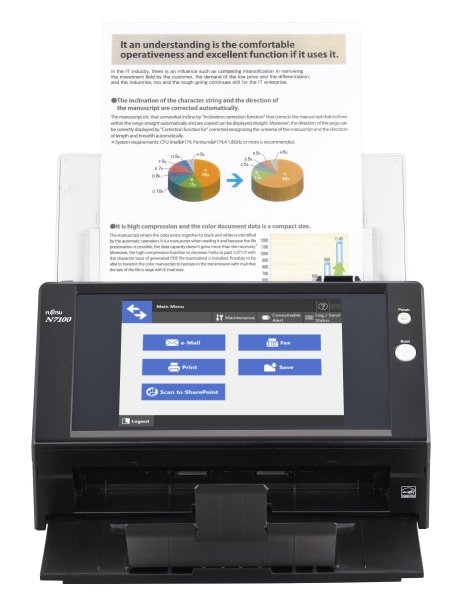
The N7100's defining job is to let a person load paper, select an on-screen task and send the result to a configured network destination without sitting at a computer next to the scanner. Fujitsu's U.S. sheet describes a standalone Ethernet workflow and names e-mail, folders, printers, fax and SharePoint; PFU's exact Global specification also lists FTP. An organization that collects forms at a reception desk, mailroom or shared intake point may find this arrangement more relevant than a personal scanner tied to one employee's laptop.
“PC-free” describes the act of using a prepared scan job at the device, not an installation that needs no computers or administrators. The model-specific Getting Started guide has the N7100 connect its LAN cable to a network hub, then walk an administrator through a scanner name, workgroup or domain, network address, DNS and centralized-management settings. The destination also needs valid permissions, credentials, service access and retention rules. A button that used to write to a server does not guarantee that the same server, account or SharePoint environment is configured now.
The rear USB connector is not a documented host-computer scan port. PFU describes it for attached peripheral equipment such as a keyboard or mouse; other USB devices require a model-specific application extension. The N7100's reviewed operating arrangement is wired Ethernet. The sources I checked do not establish Wi-Fi, phone scanning or a usual USB-to-laptop capture route, so do not infer those from the presence of a USB connector.
Fifty sheets is the useful feeder boundary
The manufacturer rates the duplex ADF at 50 sheets for Letter paper at 20 lb or A4 paper at 80 g/m². PFU warns that maximum load varies with paper weight. That makes the N7100 a moderate batch station, not a 100-sheet or production feeder. Mixed weights, curled originals, cards and other special stock should not be treated as though they all occupy the same paper stack or use the same loading instruction.
The published rate is 25 pages per minute simplex or 50 images per minute duplex in the stated A4 portrait, 200/300 dpi conditions. PFU notes that data transmission and software processing affect actual speed. File conversion, login, network load, OCR, human review and failed destinations can extend a job beyond the scanner's rated capture rate. A separate 4,000-sheet expected daily-volume figure is calculated from speed and typical use hours; PFU says it is not a guaranteed daily output or durability rating. Neither specification is an independent test result.
Cards and delicate pages need their own instructions
The U.S. datasheet lists paper from 40 to 209 g/m² and cards up to 0.76 mm. PFU's exact Global specifications say embossed cards can be scanned one at a time. Longer pages are also conditional: PFU describes pages over 863 mm at 200 dpi or below, up to the stated 3,048 mm maximum, with some size restrictions at higher resolutions. That is not a promise that every long sheet, card and ordinary stack can be intermixed in one job.
A carrier sheet is an optional accessory rather than an assumed part of every seller package. The product page says carrier-sheet scanning is limited to 300 dpi and can accommodate folded larger documents under its stated limit. The product evidence establishes an ADF network scanner, not a glass platen. The separate manual-feed route commonly found on some sheet-fed models is not established for the N7100, so consult its exact Operator's Guide before trying an unusual original. For a bound book or a page that should not travel through rollers, do not confuse an optional carrier sheet with a flatbed.
The screen is a shared interface, not a security guarantee
PFU documents an 8.4-inch color display with a resistive touch panel, a software keyboard and customizable job menus. This can make a repeat task visible to multiple users at a station. A shared menu still needs careful ownership: decide who may select each route, which destination receives each document, how mis-sends are corrected and which records may be retained on the network.
The Global page describes user authentication, encryption of temporary data during processing, secure transfer protocols and deletion after specified transfers. Those capabilities are configuration-dependent, not proof that a particular N7100 has been hardened to a current policy. Before using it for sensitive records, have the administrator confirm the exact firmware and protocols, server and directory support, account permissions, destination path, deletion behavior and any organization-specific controls. Scanner Central Admin can help administrators manage a fleet, but the manufacturer notes that licensing and software arrangements apply; verify the current tools and terms instead of assuming a legacy package is still supported.
N7100 and N7100E are separate model records
Check the label carefully: the U.S. N7100 part is PA03706-B205, while the separate N7100E is PA03706-B505. Their manufacturer pages describe related standalone Ethernet workflows and similar headline 50-sheet/25-ppm characteristics, but the suffix matters. A support fact from one model must not be silently copied to the other.
One concrete difference appears in PFU's model-specific application support FAQs, both updated in May 2025. The N7100 table lists Windows 11, Windows 10 and Windows Server 2016, 2019 and 2022, while Windows 11 LTSC 2024 and Server 2025 are marked not applicable. The N7100E FAQ lists support for those later environments. This comparison does not establish that an N7100 will work in every Windows setup on the broader list, that its tools remain downloadable or that the N7100E is a drop-in hardware replacement. Ask the IT owner to verify the exact scanner, the specific N7100 applications and versions, and the full server, network and destination path before making it part of a live workflow.
Plan for setup space and a legacy purchase
PFU lists a body measuring 300 × 232 × 172 mm (11.8 × 9.1 × 6.8 inches) and weight of 6 kg; its note excludes the ADF chute and stacker. The Getting Started guide separately gives 400 × 700 × 500 mm (16 × 28 × 20 inches) as the space needed for setup. Those are different measurements: the smaller number is not a work-area clearance allowance. The U.S. datasheet lists an AC cable, AC adapter, LAN cable and Getting Started guide among original components, while carrier sheets, keyboard/stand, ScanAid and other options are separate. The contents of a used or refurbished item still depend on that exact seller.
If you are assessing an old unit, match its rear label and part number, ask whether it is new-old-stock, used or refurbished, check the touch panel and feeder, and confirm the AC adapter and LAN cable. Obtain return, warranty and service terms from the seller in writing. PFU's roster language is about eligibility for extended service coverage in its stated category; it does not promise that coverage transfers with a used scanner. Do not rely on a historical brochure's price or package list as a current offer.
Who should keep it on a shortlist?
The N7100 is worth investigating only when a specific wired, shared, touchscreen-led PC-less destination workflow solves the job and the organization can validate its older software environment. Its 50-sheet duplex feeder is a clear limit; its network setup is part of the work, not a shortcut around administration. It is a poor fit for a buyer who requires Wi-Fi, a phone route, a standard USB-to-computer connection, documented TWAIN capture, a glass platen or a currently verified new scanner offer. The exact N7100 and N7100E identities, parts and software matrices must stay separate. Treat this as an evidence-based assessment of a legacy model, not a claim that a particular unit is available, complete or compatible with your current network.
Key specifications
Key details at a glance
| Scanner class | Standalone ethernet network scanner |
|---|---|
| Manufacturer-listed simplex rate | 25 ppm |
| Manufacturer-listed duplex image rate | 50 ipm |
| Automatic document feeder capacity | 50 sheets |
| Optical resolution | 600 dpi |
| Connection options | Ethernet |
| Automatic duplex capture | Yes |
| Touchscreen | Yes |
Use the exact model’s instructions for operating limits, supplied equipment and version differences.
Sources for this review
Sources for this assessment
- PFU America: U.S. discontinued scanner roster, Network section
- Fujitsu U.S.: N7100 datasheet, exact North American part
- PFU/Ricoh Global: exact N7100 model page and specifications
- PFU/Ricoh Global: N7100 manual downloads index
- PFU/Ricoh Global: N7100 Getting Started guide
- PFU/Ricoh fi Series FAQ: N7100 operating-system support matrix
- PFU/Ricoh fi Series FAQ: separate N7100E operating-system support matrix
- PFU/Ricoh Global: exact-model N7100 product photograph linked from its model page

Compare the workflow before you choose
Use the finder to test your connection, paper and software requirements against the documented scanner arrangements.