
Your needs, this model
Does it fit your priorities?
Can this scanner send a batch to a network destination without someone operating a computer at the device?
PFU describes the N7100E as a stand-alone PC-less network scanner and lists e-mail, network folder, SharePoint and FTP output. That is a wired Ethernet workflow, not a Wi-Fi or phone route; an administrator still has to configure network access, destinations and any required accounts.
Explore this need in the finder →What does the published 50-sheet ADF capacity mean for a real batch?
PFU's rating is 50 sheets on Letter 20 lb or A4 80 g/m² paper. The manufacturer says maximum capacity depends on paper weight and may vary, so this is a per-load reference, not a promise that every mixed or heavier stack fits. Duplex is documented; special stocks and card feeding still need the manual's exact limits.
Explore this need in the finder →Does the N7100E's USB port or wireless support make it a laptop or phone scanner?
Not on the evidence reviewed. PFU describes its USB port for peripheral equipment such as a keyboard or mouse and identifies wired Ethernet for network use. The sources do not establish Wi-Fi, a phone/tablet scan route, a USB-to-computer workflow or a TWAIN interface, so do not infer those from the port or from the successor model.
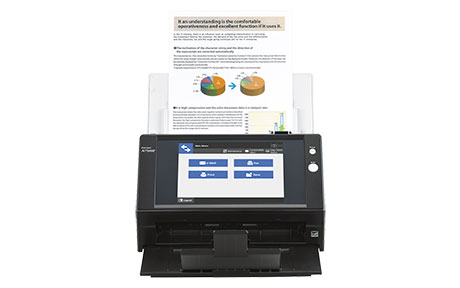
Explore this need in the finder →The N7100E is a discontinued network scanner designed around a shared station rather than a USB desktop setup. PFU's U.S. page describes PC-less scanning to e-mail, folders and SharePoint, a built-in 8.4-inch color touchscreen, Ethernet networking and a 50-sheet duplex feeder. This assessment covers the U.S. scanner part PA03706-B505, not the optional keyboard/stand or carrier sheets. It is based on manufacturer documents and is not a hands-on test: no feed reliability, OCR quality, measured throughput or current selling condition is claimed.
A network destination is the central buying question
The N7100E's defining difference is its self-contained destination workflow. PFU describes scanning without a person operating a computer at the scanner, with sends to e-mail, a network folder or SharePoint. Its global specifications also name FTP, print-server and fax-server destinations. In a mailroom or reception area, that arrangement can make sense when different users bring paper to one shared device and choose a prepared job at the panel.
That does not mean setup is computer-free. An administrator still has to connect the machine to a wired network, define destinations, permissions and authentication, and test exactly where the resulting file goes. A SharePoint route also depends on the organization's current account and service configuration. Before considering an old unit, have the IT owner verify the required protocols and security policy; a destination shown in the product literature is not proof that a present tenant, server or network will accept it.
PFU marks the N7100E discontinued and points to the fi-7300NX as the replacement. The two should not be collapsed into one assessment. The N7100E is a self-contained network endpoint with a 50-sheet feeder; the fi-7300NX is a separate fi-series configuration with different hardware, software and purchase-package distinctions. If the N7100E's workflow is the reason for shopping, confirm that exact configuration rather than substituting the successor's specifications.
The touchscreen is useful only after the jobs are designed
The 8.4-inch display and color-coded job buttons are meant to let a user pick a prepared task and review information at the scanner. PFU describes login controls and centralized administration tools; the product material also lists Active Directory or OpenLDAP authentication routes. Those features may help a team manage repeatable work, but they do not automatically create a good records process. Someone still has to decide who can choose each job, which folder or account it uses, how errors are handled and what happens to the file afterward.
There is a detail worth checking in a used unit: PFU lists the keyboard and stand as optional, while the specification sheet lists a software keyboard and supplied AC and LAN items. Do not assume an optional external keyboard or stand appears in a seller's package. Nor should the N7100E's USB port be read as a normal PC connection. The product documentation describes it for peripherals such as a keyboard or mouse; support for an IC-card reader requires a separately developed SDK add-in. The materials reviewed here do not establish Wi-Fi, mobile scanning or a TWAIN connection to a workstation.
Capacity and speed need their conditions attached
The published ADF capacity is 50 sheets of Letter paper at 20 lb or A4 paper at 80 g/m², and the duplex rating is up to 25 pages per minute or 50 images per minute at the stated 200/300 dpi settings. PFU warns that maximum ADF capacity varies with paper weight, and that scan speed varies with the system environment. These are manufacturer specifications, not a prediction of total job time after authentication, output processing, OCR, file transfer and human review.
The 50-sheet figure makes the N7100E a small-to-moderate batch station, not an unlimited intake hopper. PFU's specification allows plastic cards up to 0.76 mm; the embossed-card footnote limits those to one at a time. Optional carrier sheets support delicate originals and folded larger pages, with carrier-sheet scanning limited to 300 dpi. Treat those as separate special-original instructions, not a general promise that every fragile, folded or mixed item can be fed in an ordinary stack. Check the N7100E Operator's Guide for the precise preparation and loading rules before feeding a valuable original.
Discontinued means verify the whole offer
The U.S. page explicitly says the model is discontinued. A manufacturer authorized-part-number list pairs PA03706-B505 with N7100E, which helps identify a U.S. scanner; it does not establish today's availability, price, included accessories, service coverage or condition. A reseller or used listing may exist, but check the actual unit: confirm its label, boot and intended network connection, inspect the feeder, touchscreen and accessories, and obtain the seller's return and warranty terms in writing.
Also plan for the lifecycle of the software and destination services. PFU's manual index lists an English N7100E Operator's Guide and Getting Started guide; obtain the exact guide and verify firmware, server and destination compatibility before making a used unit part of a shared workflow. PFU's support page, not the scanner's original brochure, is the place to confirm any service route; do not assume an optional keyboard, stand, carrier sheet, roller kit or warranty accompanies the scanner.
Who should keep it on a shortlist?
The N7100E merits consideration only when a wired, shared station with prepared on-device jobs and direct network delivery solves a specific office problem—and the buyer is comfortable evaluating a discontinued unit. It is a poor fit for someone who needs Wi-Fi, phone capture, a standard USB-to-laptop setup, an established TWAIN requirement, a large 100-sheet feed or a currently supported new-model offer. Its product-page successor is a research lead, not a like-for-like promise. For an existing N7100E, identify the exact part, confirm current network and security requirements, and retain the manual and service information with the device. No independent performance test or current purchase availability is established here.
Key specifications
Key details at a glance
| Scanner class | Standalone ethernet network scanner |
|---|---|
| Manufacturer-listed simplex rate | 25 ppm |
| Manufacturer-listed duplex image rate | 50 ipm |
| Automatic document feeder capacity | 50 sheets |
| Optical resolution | 600 dpi |
| Connection options | Ethernet |
| Automatic duplex capture | Yes |
| Touchscreen | Yes |
Use the exact model’s instructions for operating limits, supplied equipment and version differences.
Sources for this review
Sources for this assessment
Compare the workflow before you choose
Use the finder to test your connection, paper and software requirements against the documented scanner arrangements.