
Your needs, this model
Does it fit your priorities?
What does the SP-1425's 50-sheet ADF capacity mean in practice?
PFU's Operator's Guide allows 50 sheets at 80 g/m² when the stack is under 5 mm, and says paper weight affects the load. Sheets in an ADF batch must share a width. Treat 50 as a qualified one-load ceiling, not a promise for thicker stock, mixed media or daily output.
Explore this need in the finder →Does the flatbed make it a manual-feed scanner?
It adds a separate glass platen for placing a book or suitable individual original, but the SP-1425 guide does not describe a dedicated manual-feed mode or ADF bypass. That matters if a workflow needs a special-original feed path rather than a separate flatbed capture.
Explore this need in the finder →Will it connect directly to a phone or cloud service?
The reviewed U.S. configuration is a USB-connected, PC-only scanner. PFU's model sources do not establish Wi-Fi, mobile-device scanning or a computer-free cloud destination. Confirm the exact intended computer, application and driver before purchase; do not treat a push-button shortcut as a standalone service.
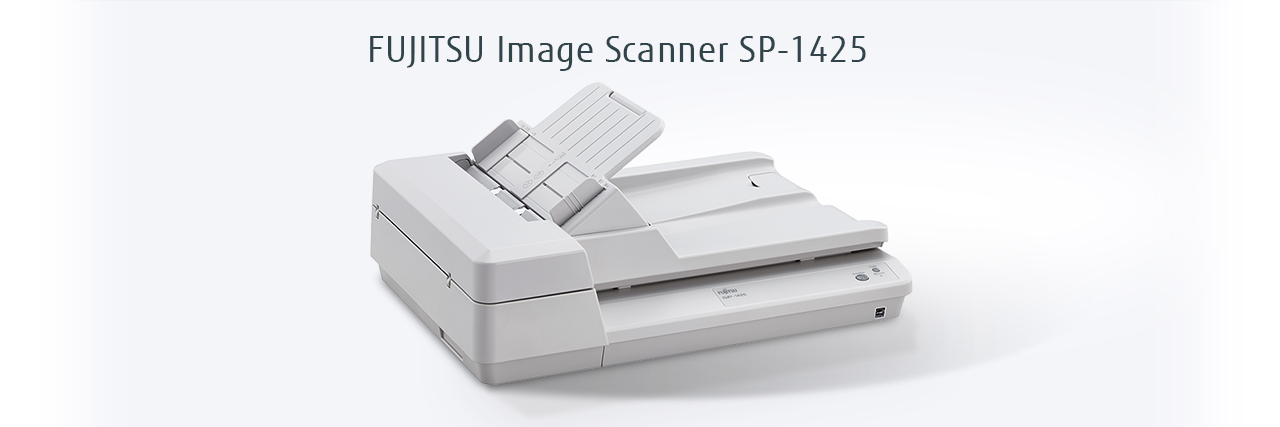
Explore this need in the finder →The SP-1425 is a small-office scanner with two capture routes: a duplex automatic document feeder (ADF) for prepared batches and a glass flatbed for originals placed one at a time. This assessment is of the U.S. base scanner, part PA03753-B005. Its clearest use is a USB-connected computer desk that wants automatic two-sided capture while retaining a platen for books or other suitable originals. It is a source-based assessment, not a hands-on test.
Duplex speed is useful, but it is not whole-job time
PFU lists a maximum 25 pages per minute simplex and 50 images per minute duplex for the ADF, with a separate four-seconds-per-sheet flatbed rating. The operator guide ties the headline ADF rate to A4 at 300 dpi using JPEG compression; the global specifications list their own resolution conditions and warn that system environment changes results. These are manufacturer ratings, not independent throughput measurements.
Automatic duplex is the practical advantage when routine pages are printed on both sides. The platen complements that workflow rather than replacing the feeder: books, thin paper or an individual page can be placed on glass, while batch capture still goes through the ADF. PFU gives the flatbed a maximum area of 8.5 by 11.69 inches; the ADF handles standard paper through Legal size and a separately qualified long-page mode. A large sheet on the platen and a long sheet through the feeder are different capabilities, so check which route your original actually needs.
Read the 50-sheet figure as a loading condition
The SP-1425 has a 50-sheet ADF, but the manual states the maximum at 80 g/m² (20 lb) with the stack less than 5 mm thick. It explicitly says capacity varies with paper weight, and the loading diagram shows different counts by stock weight. ADF batches also need documents of the same width; the guide tells users to fan and align the stack, remove clips and staples, and reduce the load if multifeeds or pickup errors occur. Fifty is a useful per-load ceiling for suitable paper, not a promise that every 50-page mixture will feed reliably.
The stated ADF paper range is 52–127 g/m², yet a weight range is not blanket approval for every media type. The guide rules out several originals from its ADF instructions, including plastic cards, nonuniform items such as envelopes, and very thin, coated, folded or damaged sheets. It says to use the flatbed for documents outside its ADF conditions, but that is not permission to scan every material: some listed items must not be scanned or could be damaged. Inspect the manual's exact restrictions for the original before loading it.
Long-paper support is another specialized benefit rather than a higher routine capacity: PFU lists up to 120 inches, limited to 200 dpi or lower, and the manual says to load long pages one at a time. For a recurring stream of mixed, fragile, plastic or irregular originals, the SP-1425 needs a separate handling decision for each type. Its flatbed is genuinely useful for a book or individual page, but it is not a dedicated manual-feed bypass through the transport.
Plan on a host computer and verify its driver
The reviewed U.S. part is specified with USB 2.0/1.1 and PC-only compatibility. The manufacturer lists TWAIN, TWAIN x64 and ISIS driver connectivity, plus WIA and a Linux SANE driver in its global profile. That makes it a plausible integration point for a computer-based capture application, but a driver acronym alone does not establish compatibility with a particular operating-system release, security image or application. The model profile lists Windows 10/11, selected Windows Server versions and Ubuntu; it does not list macOS, and it expressly excludes Windows on Arm. Confirm the current download and your host setup before placing a managed fleet order.
PFU also issued a 2026 driver-identity notice: SP-1425 units manufactured on or after April 1, 2026 are among those using a revised RICOH USB-ID that PaperStream IP 3.36.0 and earlier will not recognize. The notice recommends PaperStream IP TWAIN 3.40.1 or later. If the scanner will join an older installation, check both the unit's manufacture date and the installed driver rather than assuming the USB connection is plug-and-play across revisions.
The exact PFU Store listing describes a one-button scan operation and lists PaperStream IP, PaperStream Capture Lite, Presto! PageManager, ABBYY FineReader Sprint and other utilities. The global specification lists a pad unit, AC cable, adapter, USB cable and setup DVD among included items. These are manufacturer-listed package contents; inspect the exact seller's listing and carton, especially for a used or third-party offer. The cited specification gives replacement guidance of 30,000 sheets for the pad unit and 200,000 for the pick roller, with intervals varying by documents, cleaning and environment.
Who should consider it?
Consider the SP-1425 if a desk needs a host-connected duplex ADF for ordinary office batches and a separate letter-size platen for books or suitable one-off originals. It sits between a simple feeder-only setup and a larger production scanner: PFU's stated 4,000-sheet expected daily volume is calculated from rated speed and typical use, not a durability guarantee, while the 50-sheet ADF remains the meaningful per-load boundary. If you need a 100-sheet minimum, Wi-Fi, Ethernet, direct phone scanning, computer-free cloud delivery, touchscreen profiles or a true separate manual-feed mode, the reviewed configuration does not establish those requirements.
Within PFU's own range, the SP-1130N is a useful contrast: it has a 50-sheet duplex ADF and a documented Ethernet connection, while the SP-1425's distinguishing feature is its flatbed. Choose by route and original type rather than assuming the similar SP-series label means equivalent connections. Verify U.S. part PA03753-B005 and the exact host software before buying.
Sources checked 2026-11-02: PFU America's SP-1425 product page; the exact-part PFU Store listing; PFU/Ricoh's model specifications and manual index with the linked Operator's Guide; and PFU America's PaperStream IP USB-ID notice.
Key specifications
Key details at a glance
| Scanner class | Professional desktop hybrid |
|---|---|
| Manufacturer-listed simplex rate | 25 ppm |
| Manufacturer-listed duplex image rate | 50 ipm |
| Automatic document feeder capacity | 50 sheets |
| Optical resolution | 600 dpi |
| Connection options | USB |
| Automatic duplex capture | Yes |
| Separate manual-feed route | No |
| Touchscreen | No |
| TWAIN driver documented | Yes |
Use the exact model’s instructions for operating limits, supplied equipment and version differences.
Sources for this review
Sources for this assessment
- PFU America: SP-1425 U.S. product and exact part listing
- PFU Ricoh Store: exact SP-1425 U.S. part PA03753-B005
- PFU/Ricoh: SP-1425 global specifications and product profile
- PFU/Ricoh SP-1425 Operator's Guide, P3PC-6062-08ENZ0
- PFU/Ricoh: SP-1425 manual download index
- PFU America: PaperStream IP USB-ID driver update notice
- PFU/Ricoh global SP-1425 product image

Compare the workflow before you choose
Use the finder to test your connection, paper and software requirements against the documented scanner arrangements.