
Your needs, this model
Does it fit your priorities?
When does the SP-2240 make sense for a duplex paper stack?
PFU lists automatic duplex and an 80-sheet ADF, plus TWAIN/ISIS host connectivity. The manual ties the 80-sheet load to 80 g/m² paper and a stack under 8 mm, so this is a useful starting point for one-sided or double-sided office batches rather than a promise about mixed, fragile or unusually thick originals.
Explore this need in the finder →Can I count on the SP-2240 to scan without a computer?
Not from the evidence resolved here. PFU's U.S. model comparison lists USB-only connectivity and its Operator's Guide describes a USB-to-computer route, while the exact-part Store page separately claims DirectScan/PC-less scanning. Treat standalone delivery as unverified until PFU reconciles that documentation; do not confuse the SP-2240 with the networked SP-2240N.
Explore this need in the finder →Does a card or folded original have a separate manual-feed path?
A separate manual-feed path is not established for this exact configuration. The guide places supported originals in the ADF and says to feed one plastic card at a time; unusual or vulnerable pages need the exact manual's handling guidance rather than an assumed bypass route.
Explore this need in the finder →The Ricoh SP-2240 is an 80-sheet duplex document scanner assessed here as the U.S. base model PA03880-B405. It is not the similarly named SP-2240N, part PA03880-B005: PFU's model comparison gives the N model Ethernet as well as USB, while it lists USB for this SP-2240. This is a source-led assessment of PFU material, not a hands-on test. One important point remains unresolved: the exact-part Store page currently describes DirectScan and PC-less scanning, but the model comparison and operator guide do not establish that workflow for this USB-only configuration. Treat it as unverified until PFU reconciles the documentation.
An 80-sheet feeder is useful only within its loading conditions
PFU lists a maximum of 40 pages per minute simplex and 80 images per minute duplex, alongside an 80-sheet automatic document feeder. These are manufacturer specifications, not measured end-to-end job times. Sorting, preparing pages, resolving misfeeds, OCR, naming and reviewing files all add work that a rated feed speed cannot describe. The model's value is therefore clearest for recurring batches where automatic two-sided capture and fewer reloads matter, rather than for an occasional single page.
The SP-2240 operator guide narrows what “80 sheets” means: the stated load is for paper at 80 g/m² with a document stack under 8 mm. It directs users to fan and align pages, load them face-down, and reduce the number if feeding or overlap problems occur. Paper type, width, condition and thickness still matter. In particular, PFU's broad mixed-media marketing should not be read as a promise that every unusual original belongs in a routine batch.
USB host scanning—not the SP-2240N's network profile
For the base SP-2240, PFU's U.S. comparison chart lists USB connectivity and TWAIN; the exact-family guide explains connecting the scanner to a computer with a USB cable. PFU also names TWAIN and ISIS connectivity and PaperStream ClickScan, so this is a conventional computer-managed capture path. Three programmable buttons are listed for routine actions, but a button does not by itself prove a particular destination or a computer-free service.
The documentation conflict deserves attention before purchase. The PFU Store page for PA03880-B405 says DirectScan enables PC-less scanning. The U.S. model comparison, however, lists USB for this SP-2240 and Ethernet plus USB for the SP-2240N; the SP-2240/SP-2230 operator guide describes USB-to-computer operation and does not supply a DirectScan setup path. I cannot reconcile those statements from the current sources. This review therefore does not treat the SP-2240 as having a verified standalone network or cloud route. If a computer-free workflow is essential, ask PFU to confirm the exact part number and destination procedure in writing, or compare a model whose instructions clearly document that route.
Media limits are more useful than a generic “handles mixed documents” claim
The operator guide lists standard originals through Legal size, with long-page scanning up to 240 inches subject to lower resolution as length increases. The side-guide adjustment can accept widths up to 240 mm. The stated paper range is 27–413 g/m², but that range has exceptions: A8 originals have a narrower 128–209 g/m² limit. The guide also notes that envelopes and other non-uniform-thickness documents may not scan successfully, and calls for a test when a material falls outside the listed types. Those details are reasons to check the exact instructions, not reasons to assume that envelopes, folds, cards and ordinary office paper can all be combined without preparation.
Plastic cards are a supported example, but they have their own conditions. The manual specifies ISO ID-1 dimensions and a maximum thickness of 1.4 mm, including embossed cards, and directs users to feed one card at a time. It warns that a thick card can trigger overlap detection. Fragile, glossy or irregular originals may need a carrier sheet or a separate handling plan. The document's paper-weight range is not a substitute for checking each page type and how it must be loaded.
Software, controls and service need a host check
TWAIN and ISIS make the SP-2240 a plausible candidate when an existing desktop capture application expects one of those interfaces. That still does not guarantee compatibility with a particular operating-system release, driver architecture, document workflow or security policy. The current OS matrix was not resolved in the materials reviewed here; confirm the exact download and host requirements with PFU before placing it in a managed fleet. Do not assume that ClickScan delivers a named cloud destination without a configured host, account and tested procedure.
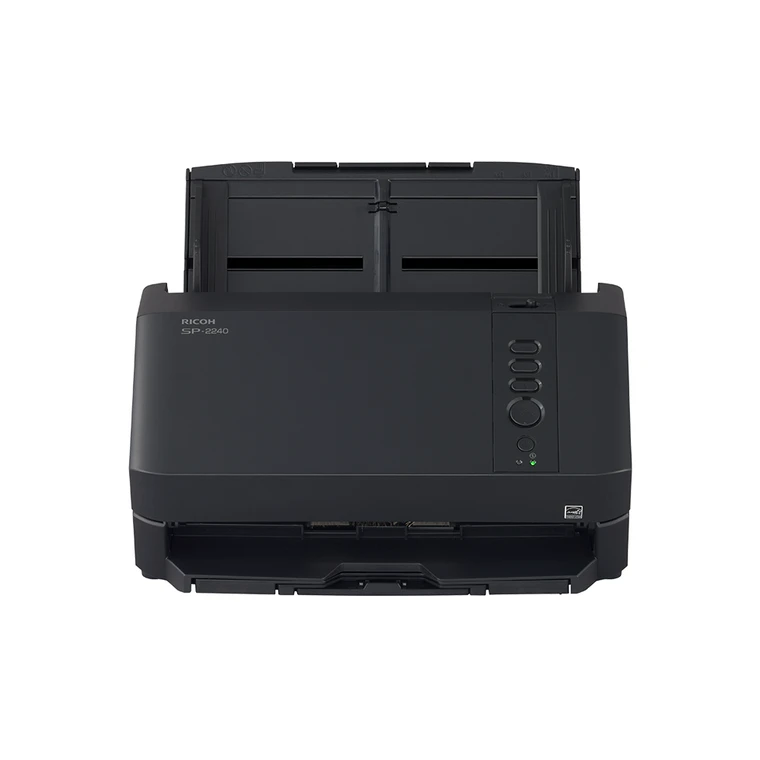
PFU's comparison lists a one-year Depot Protection Plan. Check the seller's exact part, included cable and written service terms rather than treating a model name as proof of what a particular carton or contract contains. The official product image shows the SP-2240 body and physical controls; it does not document package contents.
Who should consider it?
The SP-2240 is most defensible for a USB-connected desk that needs duplex ADF batches, an 80-sheet load under the stated paper conditions, and TWAIN/ISIS access. Its three buttons and ClickScan are useful workflow cues, but neither replaces a deliberate file and OCR process. It is a poor match when Wi-Fi, a mobile-device path, a known standalone destination, or a separately documented manual-feed route is a must-have. The SP-2240N is a distinct network model, not a suffix to overlook: confirm PA03880-B405 versus PA03880-B005 and resolve the DirectScan discrepancy before buying on a PC-less requirement.
Sources: PFU America's U.S. SP-2240 product page, the exact-part PFU Store listing (whose PC-less statement conflicts with other model-specific material), and Ricoh's SP-2240/SP-2230 manual downloads and linked Operator's Guide.
Key specifications
Key details at a glance
| Scanner class | Professional desktop sheet-fed scanner |
|---|---|
| Manufacturer-listed simplex rate | 40 ppm |
| Manufacturer-listed duplex image rate | 80 ipm |
| Automatic document feeder capacity | 80 sheets |
| Optical resolution | 600 dpi |
| Connection options | USB |
| Automatic duplex capture | Yes |
| Touchscreen | No |
| TWAIN driver documented | Yes |
Use the exact model’s instructions for operating limits, supplied equipment and version differences.
Sources for this review
Sources for this assessment
Compare the workflow before you choose
Use the finder to test your connection, paper and software requirements against the documented scanner arrangements.