
Your needs, this model
Does it fit your priorities?
What changes when a batch needs both sides scanned?
PFU specifies automatic duplex at up to 40 ppm/80 ipm at 200/300 dpi and an 80-sheet ADF for Letter 20 lb or A4 80 g/m² paper. Capacity varies with stock and the headline speed excludes job setup and downstream processing.
Explore this need in the finder →Can the SP-2240N scan without a computer at the device?
PFU documents DirectScan over Ethernet to common network destinations without a PC, using programmable destination buttons. The sources reviewed here do not name a particular cloud service, so check the exact destination and network setup rather than treating this as phone or computer-free cloud compatibility.
Explore this need in the finder →Does it offer a route for originals that need manual feeding?
The exact 2026 datasheet lists ADF/Manual Feed/Duplex. That supports a manual-feed mode, but the specific original types and loading steps still need to be checked in the current guide; it is not permission to mix every special original into the ADF stack.
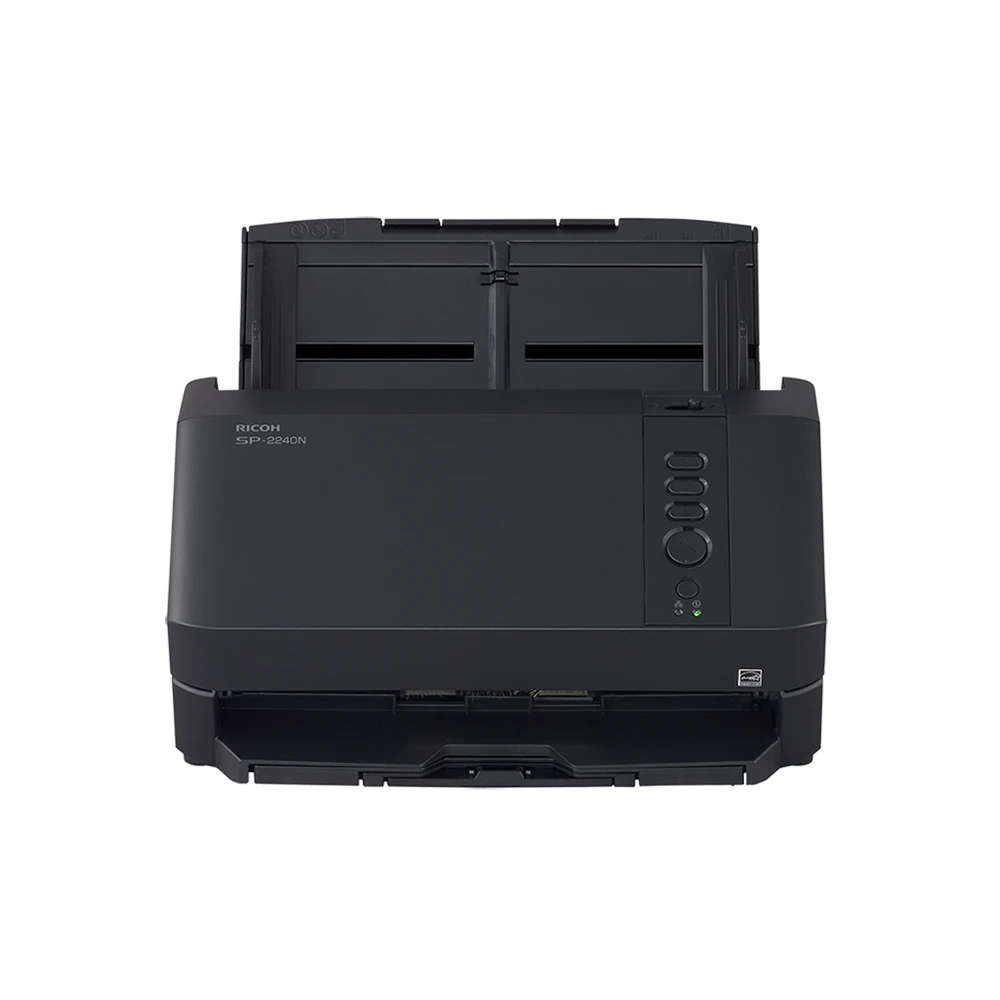
Explore this need in the finder →The SP-2240N is a wired office scanner with a less common mix of host-computer capture and a documented PC-less network workflow. This assessment covers the US base part PA03880-B005, not an expanded service or software bundle. It is a source-led review of PFU’s product page, Store listing and 2026 datasheet—not a hands-on test. The main distinction from the smaller SP-1130Ne is practical: the SP-2240N has a larger ADF, higher rated speed and a DirectScan route to network destinations without a PC.
A batch feeder for everyday office paper
PFU rates the scanner at up to 40 pages per minute simplex and 80 images per minute duplex at 200/300 dpi. The datasheet lists lower figures at 400/600 dpi, an important reminder that resolution and settings matter. The 80-sheet ADF is specified for Letter 20 lb or A4 80 g/m² paper; PFU notes that capacity varies with paper weight and permits additional documents to be loaded during a scan. A full tray can help reduce reloads, but neither capacity nor speed describes a complete job with preparation, exceptions, image processing, OCR, naming and delivery.
PFU’s published 6,000-sheet expected daily volume is manufacturer-calculated guidance based on speed and typical usage, not a guarantee of uninterrupted throughput or a durability rating. For a shared office, the useful question is whether the expected batches fit the actual feeding, verification and routing routine—not whether a rated maximum sounds large. See the PFU America model page and its technical datasheet for the specified conditions.
Two-sided capture and a separate manual-feed mode
Automatic duplex captures both sides of an inserted sheet in one pass. The 2026 datasheet also identifies the scanner type as ADF/Manual Feed/Duplex, so manual feeding is a real listed mode rather than an assumption drawn from the duplex ADF. It does not follow that every fragile, folded or thick original is safe to feed in the same way. Consult the current instructions for which materials use which path, and check whether any carrier sheet or special handling is required.
For normal batches, PFU lists legal-size originals up to 8.5 by 14 inches and long-page scanning up to 240 inches, limited to 200 dpi. The paper range is broad on paper—27 to 413 g/m²—but over 209 g/m² PFU directs users to feed one sheet at a time. Plastic cards up to 1.4 mm are listed, with ISO ID-1 orientation requirements; the datasheet also calls out ultrasonic overlap and length detection and image monitoring. Treat each of those as a boundary to check against the actual original, not a promise that any mixed stack will behave identically.
Computer capture or PC-less DirectScan
For a desk connected to one host, the unit offers USB Type-C at the scanner and includes a USB-A-to-C cable. PFU lists TWAIN, TWAIN x64, ISIS, WIA and SANE for Linux, alongside PaperStream ClickScan and other capture tools. A wired Ethernet setup is another host-computer route. If a capture application or operating system is fixed, confirm its exact driver version and architecture before choosing between those connections.
The SP-2240N’s standout workflow option is DirectScan over Ethernet: PFU says it can send scans to common network destinations without a PC and provides three programmable destination buttons. That may suit a shared station where users should start a known, preconfigured job at the scanner. However, “network destination” is not the same as a confirmed named cloud service, phone route or unrestricted email integration. The reviewed material does not establish a mobile-device route or a particular computer-free cloud provider; verify the exact destination, network permissions and authentication with the intended administrator.
Check host and installation details
PFU lists Windows 10 and 11, Windows Server 2016, 2019, 2022 and 2025, and Ubuntu Linux. The datasheet limits Ubuntu support to USB and says Windows 10/11 ARM-based PCs are not compatible. This makes a host check especially important in an organization standardizing on ARM laptops or Linux workstations. The small desktop footprint and 7.3-pound specified weight make it a plausible shared desk device, but those measurements do not include the chute and stacker; leave space for the paper path.
The listed standard warranty is one-year Advance Unit Replacement, while separate service plans can be purchased. PFU identifies roller replacement intervals in its datasheet, with the normal caveat that paper type, use, cleaning and environment affect consumable life. Budget for maintenance and routine image review. An ultrasonic sensor, paper-protection feature or advertised OCR capability is not a substitute for checking exceptions and confirming that the final records reached the intended destination.
Who should compare it?
The SP-2240N is worth comparing when an office wants an 80-sheet duplex feeder, a TWAIN-capable wired host setup, and the option of PC-less Ethernet delivery to prepared network destinations. It is less suitable if Wi-Fi, phone-led scanning, a touchscreen, or a specifically named computer-free cloud destination is essential. The SP-1130Ne is a smaller, slower 50-sheet alternative with USB/Ethernet and TWAIN, but its reviewed documentation does not establish the same PC-less DirectScan workflow. Conversely, buyers who only need short USB batches may not benefit from the SP-2240N’s network controls.
Before selecting the exact PA03880-B005 offer, confirm cable and software requirements, the destination setup, supported media and feed instructions, driver/OS architecture, service terms, seller condition, current package contents and return policy. Manufacturer speed and capacity figures are useful specifications, not independently measured performance. No ownership, testing, scan-quality result, price or seller rating is claimed.
Key specifications
Key details at a glance
| Scanner class | Professional desktop sheet-fed scanner |
|---|---|
| Manufacturer-listed simplex rate | 40 ppm |
| Manufacturer-listed duplex image rate | 80 ipm |
| Automatic document feeder capacity | 80 sheets |
| Optical resolution | 600 dpi |
| Connection options | USB / Ethernet |
| Automatic duplex capture | Yes |
| Separate manual-feed route | Yes |
| Touchscreen | No |
| TWAIN driver documented | Yes |
Use the exact model’s instructions for operating limits, supplied equipment and version differences.
Sources for this review
Sources for this assessment
Compare the workflow before you choose
Use the finder to test your connection, paper and software requirements against the documented scanner arrangements.