
Your needs, this model
Does it fit your priorities?
Can I scan a single receipt or page wirelessly to a supported phone?
PFU documents Wi-Fi and ScanSnap Home for iOS and Android. Check the current app and exact OS; the paper path still feeds one original at a time.
Explore this need in the finder →Can it send a scan to cloud storage without a computer or phone?
PFU documents direct ScanSnap Cloud operation without a computer or mobile device. Verify the internet-connected Wi-Fi setup, account and supported destination service.
Explore this need in the finder →Will it handle both sides of a routine document stack automatically?
No. PFU identifies simplex single feeding. CDF lets you insert successive originals without another button press, but it is not an automatic duplex stack feeder.
Explore this need in the finder →A portable feed, not a tiny desk ADF
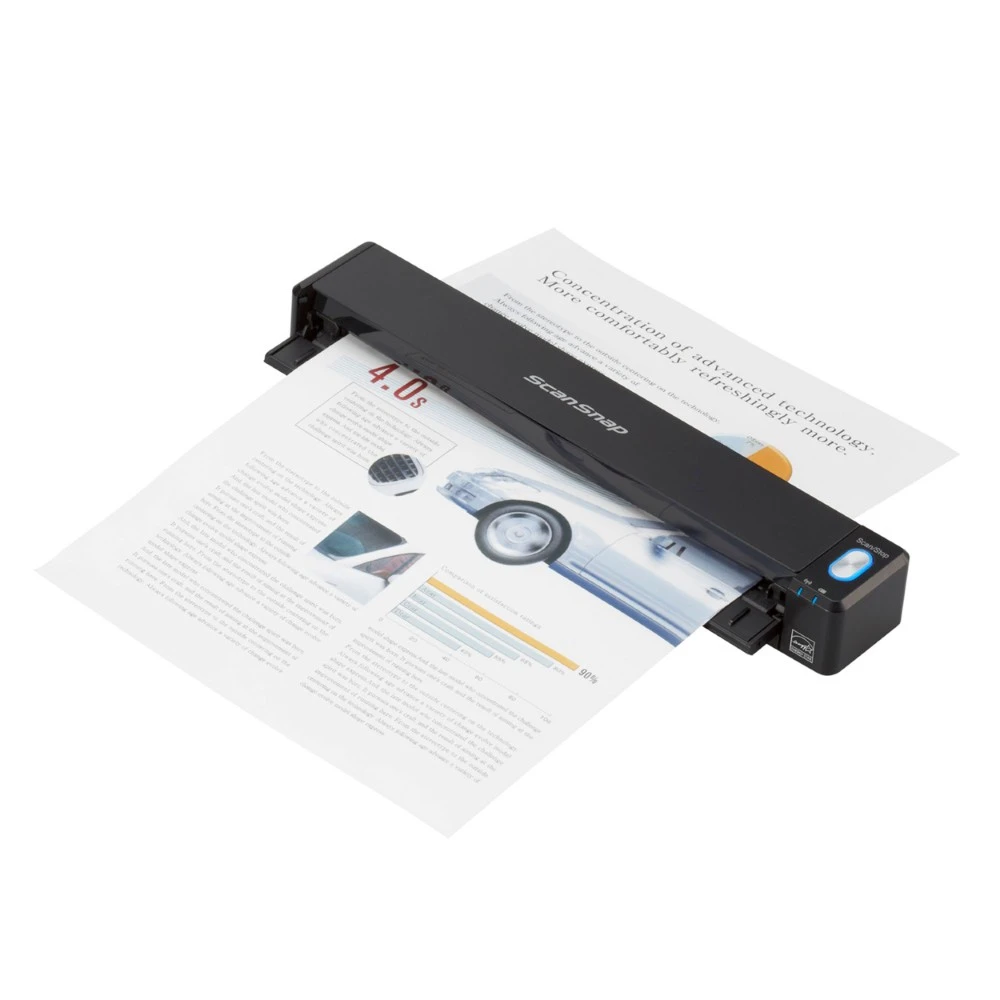
The iX100 solves a different problem from a compact desktop feeder. PFU identifies it as a single-fed, simplex scanner with straight and U-turn paper paths and continuous document feeding. A page enters, passes through, and exits; the user can insert the next page without pressing the scan button again. That is useful when the job is a handful of receipts, travel papers, or forms away from a desk. It is not a way to load a stack and walk away, and it does not capture both sides in one pass.
This distinction matters more than the word “mobile.” The scanner is roughly 10.75 by 1.87 by 1.42 inches and weighs about 0.88 pound according to the current PFU specification. A built-in rechargeable battery and wireless connection give it a genuine portable workflow. But the original still needs to be fed individually. A two-sided pile or regular office batch is better matched to an automatic duplex feeder such as the 20-sheet iX1300; see the iX1300 assessment for that very different arrangement.
What the paper path can and cannot do
PFU lists 600 dpi optical resolution for color and grayscale, and 1,200 dpi for monochrome. Its published automatic-mode speed is 5.2 seconds per page for the specified A4 portrait setup; the slower “Excellent” 600-dpi color/grayscale mode is listed at 20.4 seconds per page. Those are manufacturer test figures, not an independent capture test or a promise about total job time. The single-sided path also means those numbers cannot be compared directly with duplex pages-per-minute ratings on larger scanners.
There is more flexibility here than the thin body suggests. The normal straight path accepts a broader paper-weight range than the U-turn route, and the specification covers long sheets up to 34 inches. With the optional carrier sheet, PFU lists an 11-by-17-inch maximum document size. Its Dual Scan feature is for two small originals placed together, such as a card and receipt; it is not two-sided scanning. For folded A3, B4, or double-letter material, the supported stitch workflow scans one side at a time and reconstructs a spread when text or diagrams cross the fold. These are specific jobs with setup conditions, not a substitute for feeding mixed stacks through an ADF.
Connectivity choices require a little planning
The current specification lists USB and 2.4 GHz 802.11b/g/n Wi-Fi, including both access-point and Direct Connect modes. USB is the straightforward choice at a computer. Wi-Fi can connect through a home or office access point, while Direct Connect lets the scanner act as an access point where no router is available. PFU also documents wireless scanning to iOS and Android devices through ScanSnap software. Check the current mobile app and the exact operating-system support before depending on a particular phone or tablet.
A separate ScanSnap Cloud route can send a scan to a supported cloud service without a computer or mobile device. That is a different setup from a direct phone connection: it relies on a compatible internet-connected Wi-Fi arrangement, an account, and an available destination service. A cloud service name in a feature list does not guarantee that every account, region, network, or third-party service will work. The iX100 uses PFU’s ScanSnap-specific software and driver, not a generic capture interface: PFU says Windows does not support TWAIN or ISIS and macOS does not support TWAIN. A workflow that requires TWAIN should treat this as a poor fit unless its software owner confirms another supported route.
Who is likely to value it
The strongest case is someone who values low weight, a built-in battery, one-button operation, and the ability to scan away from the usual computer setup. A person organizing receipts or small documents in short bursts may prefer its small footprint and wireless choices to carrying originals back to a desk. The one-sheet path can also be a practical compromise for paper that is too occasional to justify a larger machine. It is a weak match for recurring two-sided paperwork, unattended batches, or software environments built around TWAIN.
It is worth comparing the iX100 with both a handheld page scanner and a small duplex desktop model, because those categories solve different constraints. The iX100 is neither a stack-processing desk device nor a scanner that reads both sides of a page as it passes. It is a mobile, single-sheet workflow with a useful mix of USB, Wi-Fi, and optional cloud destinations. If speed through a pile matters more than carrying the device, the iX1300’s documented duplex ADF is the more relevant comparison; if the originals are bound or fragile, an overhead design such as the SV600 uses a completely different capture path.
Checks before choosing this exact offer
The US PFU Store identifies the iX100 offer as part PA03688-B005. Check that code rather than assuming a carrying case, optional carrier sheets, or another ScanSnap accessory is part of a scanner listing. Confirm the supported ScanSnap Home version for the exact computer, and verify mobile app support for the intended device. If computer-free cloud delivery is essential, confirm the destination service and current account/setup requirements before ordering. Finally, be realistic about the job: this is a simplex scanner that takes originals one at a time. Manufacturer speeds and feature descriptions are useful for screening, but no independent speed, OCR, feed-reliability, battery-runtime, or image-quality test is represented here.
Key specifications
Key details at a glance
| Scanner class | Portable one-sheet sheet-fed scanner |
|---|---|
| Optical resolution | 600 dpi |
| Connection options | USB / Wi-Fi |
| Automatic duplex capture | No |
| Separate manual-feed route | No |
| Touchscreen | No |
| TWAIN driver documented | No |
Use the exact model’s instructions for operating limits, supplied equipment and version differences.
Sources for this review
Sources for this assessment
- PFU Ricoh Store: ScanSnap iX100, US part PA03688-B005
- PFU Ricoh Store: ScanSnap iX100 listing
- Ricoh ScanSnap iX100 global specifications (as of May 12, 2026)
- Ricoh ScanSnap iX100 manual and support index
- PFU Ricoh Store ScanSnap family listing, page 1/page 2 observations
- PFU Ricoh Store refurbished ScanSnap listing (partial observation)
Compare the workflow before you choose
Use the finder to test your connection, paper and software requirements against the documented scanner arrangements.