
Your needs, this model
Does it fit your priorities?
Must I connect it to a computer by USB?
Yes. PFU describes a one-button USB-connected computer workflow; the current family comparison lists USB only for this model.
Explore this need in the finder →Will it automatically scan both sides and feed up to 50 sheets?
PFU lists duplex scanning and a 50-sheet ADF. Actual capacity depends on paper weight and loading instructions; speed and capacity are manufacturer claims.
Explore this need in the finder →Can I use its advertised Manual Feed mode for envelopes or folded A3?
PFU's US Store page says so, but the 2026 family comparison identifies the iX1400 as automatic-feed-only; the global product specification describes A3 carrier-sheet use. Do not count a separate manual route without confirmation from PFU.
Explore this need in the finder →Can it scan wirelessly to a phone or cloud service without the computer?
No Wi-Fi/mobile or computer-free cloud plan is listed for the iX1400. Choose a model with a documented wireless operating arrangement if that is essential.
Explore this need in the finder →The short version: a one-button USB-only scanner
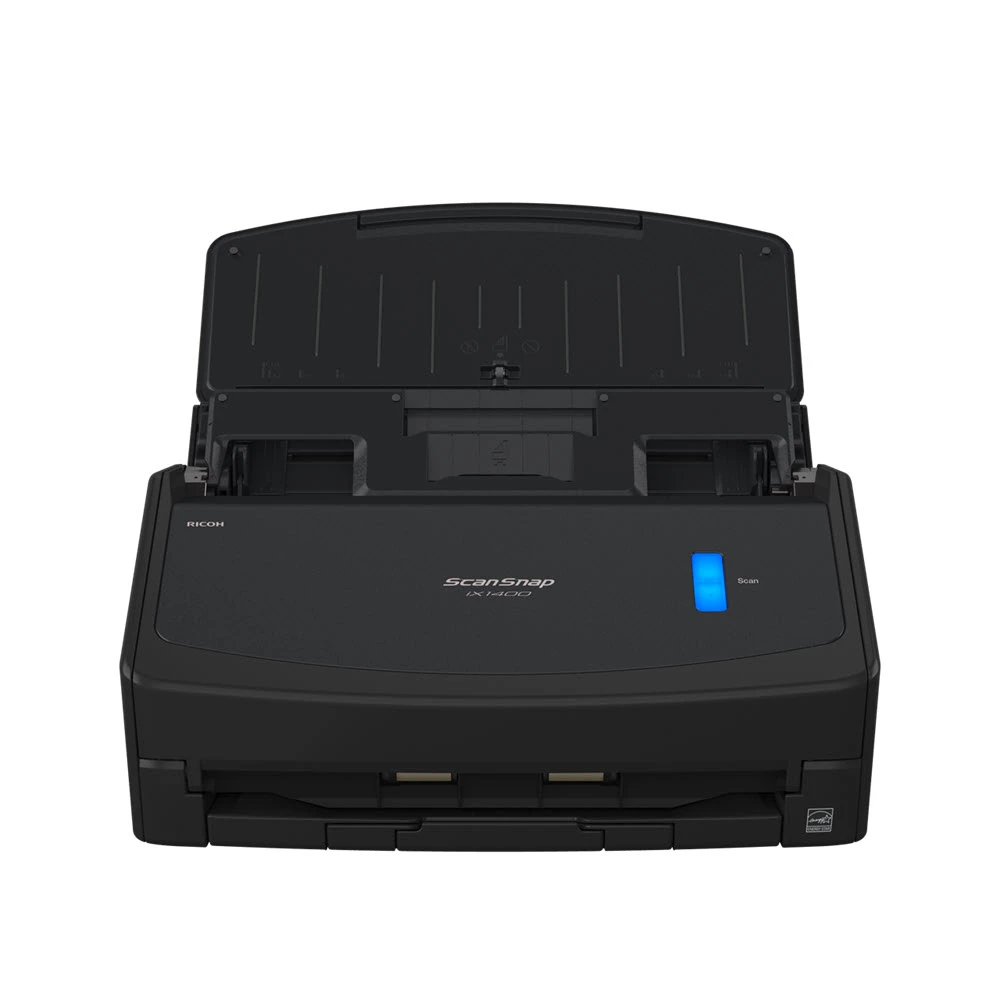
The ScanSnap iX1400 is a desktop duplex scanner built around a simple computer-connected routine. PFU's US Store listing identifies the Standard black model as PA03820-B235 and promotes one-button operation over USB. The same listing says PFU replaced it with the iX2400, so this is an earlier-model reference rather than a current-generation recommendation. PFU publishes a 50-sheet automatic feeder, up to 40 pages per minute / 80 images per minute and 600 dpi optical resolution. These are manufacturer specifications, not results from independent speed, feed or OCR tests; no hands-on evaluation was conducted.
Its appeal is a deliberately narrow workflow
With a single start button and USB connection to a computer, the iX1400 avoids asking users to choose a network, touchscreen profile or destination on the scanner. That simplicity can be useful when a PC or Mac stays beside the device and one predictable ScanSnap Home workflow is enough. The desktop software handles capture and file organization; the one-button design does not mean the scanner is a standalone, computer-free appliance. It requires a supported host, the correct software and a working USB setup. Check cable reach, supported operating system and application route before purchase.
Its 50-sheet ADF can reduce repeated loading for ordinary personal or small-office batches, with duplex capture for two-sided originals. The headline 40 ppm / 80 ipm figure refers to a manufacturer's stated mode; actual job time also depends on the selected resolution, host system, document condition, OCR, review and file destinations. PFU's official global specifications list a 600 dpi optical resolution and a driver specific to ScanSnap, not a TWAIN or ISIS driver. If a line-of-business application names TWAIN as a requirement, confirm with the software owner before considering this model: producing PDFs or searchable PDFs does not supply that interface.
Do not mistake the ADF for a manual-feed path
PFU's US Store page has a conflicting feature bullet: it advertises “Manual Feed mode” for envelopes, plastic cards, folded A3 and pages with sticky notes. The more specific current comparison lists the iX1400 as automatic-feed-only, and PFU's official product release describes the iX1400 as a one-button USB model while identifying iX1600 as the model with manual single feed. The global iX1400 specification says A3 scans are possible with an A3 carrier sheet, which is an accessory procedure rather than evidence of a separate manual-feed mode. Accordingly, this review and matching record do not count a manual-feed route for the iX1400. If that feature is essential, ask PFU to confirm the exact original and configuration before purchase instead of relying on the inconsistent marketing bullet.
For ordinary mixed paper, keep to the manufacturer's loading rules and supported media. The global specification lists a Receipt Guide among included items, while US Store offers may vary in what is in the box; verify package contents on the exact offer. A receipt guide can help with narrow or varied receipts, but it does not convert the machine into a Wi-Fi scanner or prove that every nonstandard paper can go through unattended. Carrier sheets, roller sets and cleaning materials are separate details to check as paper condition and care needs arise.
What the simpler model gives up
There is no Wi-Fi, mobile-device scanning or touchscreen profile selection in PFU's four-model comparison for the iX1400. It is the plainest option among iX1600 and iX1400: connect it to one host by USB, start the capture at the device and finish the work on the computer. The iX1600 adds wireless and mobile/cloud routes, a 4.3-inch display with profiles and a separate manual-single feed option, although its standard ADF is also 50 sheets and its published scan rate is similar. Choose between them on control and routing needs, not on a claim that the USB model is inherently more reliable.
PFU's iX2400 is the closer successor in the simple USB niche. Its current specification raises the advertised rate to up to 45 ppm / 90 ipm and the ADF to 100 sheets, while retaining USB-only operation. Like the iX1400, it is listed as automatic-feed-only in PFU's newer comparison; it does not gain Wi-Fi, mobile routing or a touchscreen. If larger ordinary batches and the newer support horizon matter, compare the exact iX2400 package rather than relying on an older iX1400 offer.
Check the offer and software before choosing
The reviewed US Standard configuration is PA03820-B235. PFU also has certified-refurbished listings with a different suffix and condition terms. Confirm whether the seller is offering new or refurbished stock, which accessories and cables are in the box, whether the receipt guide is included, the warranty and returns, and which ScanSnap software version supports your computer. PFU's store page reported an out-of-stock state when consulted; that observation is not a claim about current availability or another seller. If a listing omits a manual or identifies an unfamiliar package, resolve it rather than assuming all product titles refer to the same condition.
Who should pass?
The iX1400 is a plausible paper-capture choice for someone who wants a straightforward USB-connected, one-button desktop scanner with duplex ADF handling and no need for wireless sharing. Pass if you expect phone scanning, direct cloud capture without a computer, touchscreen selection, a separate manual-feed route or TWAIN. It is also the wrong type for bound books, fragile pages needing flatbed handling or a documented high-volume workload. Its modest controls may make sense for a stable one-computer setup; the right decision depends on whether USB-only is the simplicity you want or a limitation your workflow will quickly outgrow.
Key specifications
Key details at a glance
| Scanner class | Personal desktop sheet-fed ADF |
|---|---|
| Manufacturer-listed simplex rate | 40 ppm |
| Manufacturer-listed duplex image rate | 80 ipm |
| Automatic document feeder capacity | 50 sheets |
| Optical resolution | 600 dpi |
| Connection options | USB |
| Automatic duplex capture | Yes |
| Separate manual-feed route | No |
| Touchscreen | No |
| TWAIN driver documented | No |
Use the exact model’s instructions for operating limits, supplied equipment and version differences.
Sources for this review
Sources for this assessment
Compare the workflow before you choose
Use the finder to test your connection, paper and software requirements against the documented scanner arrangements.