
Your needs, this model
Does it fit your priorities?
Is the S500M just a white S500 finish option?
No. The U.S. S500M data sheet describes a Mac-oriented ScanSnap, distinct from the Windows-oriented S500. Their part numbers and period software platforms differ even though both have USB duplex ADF hardware.
Explore this need in the finder →Does the S500M accept 50 sheets regardless of paper thickness?
No. Its English Operator's Guide limits an A4-or-smaller batch to a stack no thicker than 5 mm, about 50 sheets of 20 lb / 80 g/m² paper. Use the exact guide and the feeder's condition rather than assuming every 50-sheet stack will run.
Explore this need in the finder →Can a TWAIN-only Mac app address the S500M directly?
No direct TWAIN or ISIS device route is documented. The S500M uses its ScanSnap-specific Manager software. Confirm a named application's file-import workflow, and whether the old software can be obtained and run lawfully, before considering the model.
Explore this need in the finder →Does its old Intel-Mac claim establish support on a current Mac?
No. The U.S. data sheet covers Mac OS X 10.2.8 through 10.4-era systems, and PFU says it no longer provides S500M software. A USB connection alone does not establish a working modern Mac workflow.
Explore this need in the finder →Verdict: a genuinely Mac-oriented S500, with a dated software dependency
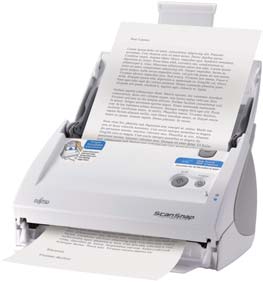
The Fujitsu ScanSnap S500M is a separate earlier scanner configuration, not simply the S500 in another color. The “M” matters: Fujitsu's U.S. data sheet describes a Mac-oriented USB duplex ADF with its own historical part number, PA03360-B605, and Mac OS X-era ScanSnap Manager. Its main hardware task—feeding a stack and capturing both sides in one pass—resembles the Windows-oriented S500, but the operating-system and software path are materially different. PFU America lists S500M as “Discontinued for Service,” and PFU's 2023 notice states that it no longer provides software for S500M. A working scanner, current driver, modern Mac compatibility, service coverage or seller package is not established by the old part number.
The feeder is rated for 50 sheets under stated conditions
The U.S. brochure gives the S500M a 50-sheet hopper and a general paper range of 52–127 g/m². It labels 50 sheets at 20 lb. The exact-model English Operator's Guide makes the limit operational: no more than 50 sheets at a time, with A4-or-smaller paper in a stack at or below 5 mm, about 50 sheets of 20 lb / 80 g/m² stock. A taller stack can prevent file creation. These details make “50-sheet ADF” a useful boundary for a suitable batch, not a guarantee for every stock, curled sheet or worn feeder. The broad per-sheet paper range and the stack limit answer different questions.
The S500M is not a flatbed. Its standard document path is the ADF, and no separate built-in manual-feed mode is established in the sources I reviewed. A carrier sheet may support selected special originals, but that accessory is not another feeder and its presence in an old or used package is unknown. Fujitsu's paper-size information includes letter and legal documents; the carrier-sheet route expands what can be handled under its own instructions. For photos or fragile originals, consult the exact manual rather than reading a headline size as unrestricted direct feeding.
Resolution settings change the published pace
Fujitsu's U.S. data sheet rates Normal mode at up to 18 pages per minute, or 36 images per minute in duplex, at 150 dpi color or 300 dpi monochrome. Its Better, Best and Excellent entries are 12/24, 6/12 and 0.6/1.2 at progressively higher resolutions. The sheet says system conditions can lower speed. These are manufacturer-defined settings, not results from a current Mac or an independent test. They do not tell us how quickly a particular used scanner, old Manager installation or destination application will work today.
Mac-only software is the main buying constraint
The U.S. S500M sheet covers Mac OS X v10.2.8, v10.3 and v10.4, including the period's PowerPC and Intel Mac configurations; it lists ScanSnap Manager V2.0. This is historical software evidence, not a statement that a current Mac is supported. PFU's end-of-support notice says software is no longer provided for S500M. The scanner also uses a ScanSnap-specific driver rather than exposing direct TWAIN or ISIS applications. A compatible file-import workflow may be possible in some setup, but the sources do not establish that a named modern application can use it.
That is why the S500M should not be selected by its USB connector alone. Before considering an individual unit, identify its exact model and power supply, determine whether an existing lawful installer and license are available, and verify the actual Mac version and application workflow. The Mac claim in a period brochure does not guarantee use with current macOS, Apple silicon, security updates or a current USB-C adapter path. No software is promised by a seller listing unless the specific license and installation media are confirmed.
Do not transfer the S500's Windows setup
The S500M and S500 have similar headline feeder specifications but different system profiles and historical part identifiers: PA03360-B605 for the M model and PA03360-B505 for the Windows-oriented S500. Their respective period applications and operating systems should be treated as separate. This assessment therefore keeps them as separate products and matching facts rather than merging their host support. The old S500M part number identifies a model family/configuration only; it does not show which accessories, software or warranty a present seller has.
Conditions to check before relying on one
For a used example, request a clear nameplate photo and ask what exact S500M driver media and license accompany it. Check that the AC adapter and USB cable are present, ask how the feeder, pickup roller and pad were maintained, and establish a return route if the chosen host cannot enumerate the scanner. Confirm the paper and 5 mm loading limit in the manual for that unit. The manufacturer's historical one-year warranty and included software are not evidence of a remaining warranty or an intact current package.
In summary, the S500M's differentiator is not wireless convenience or a special file destination. It is a compact, one-pass duplex feeder for a historical Mac workflow. The 50-sheet rating and Normal-mode speed are documented, but modern software compatibility is not. It may be relevant to someone validating an existing legacy setup; otherwise, a supported scanner with current software is the safer route.
Manufacturer references: Fujitsu’s U.S. S500M data sheet identifies the Mac configuration; the S500M Operator’s Guide gives its loading limits. PFU’s support notice says software is no longer provided, while the U.S. roster lists S500M as discontinued for service. None establishes a current offer or modern Mac compatibility.
Key specifications
Key details at a glance
| Scanner class | Desktop duplex adf |
|---|---|
| Manufacturer-listed simplex rate | 18 ppm |
| Manufacturer-listed duplex image rate | 36 ipm |
| Automatic document feeder capacity | 50 sheets |
| Optical resolution | 600 dpi |
| Connection options | USB |
| Automatic duplex capture | Yes |
| Touchscreen | No |
| TWAIN driver documented | No |
Use the exact model’s instructions for operating limits, supplied equipment and version differences.
Sources for this review
Sources for this assessment
Compare the workflow before you choose
Use the finder to test your connection, paper and software requirements against the documented scanner arrangements.